







Definition and Meaning
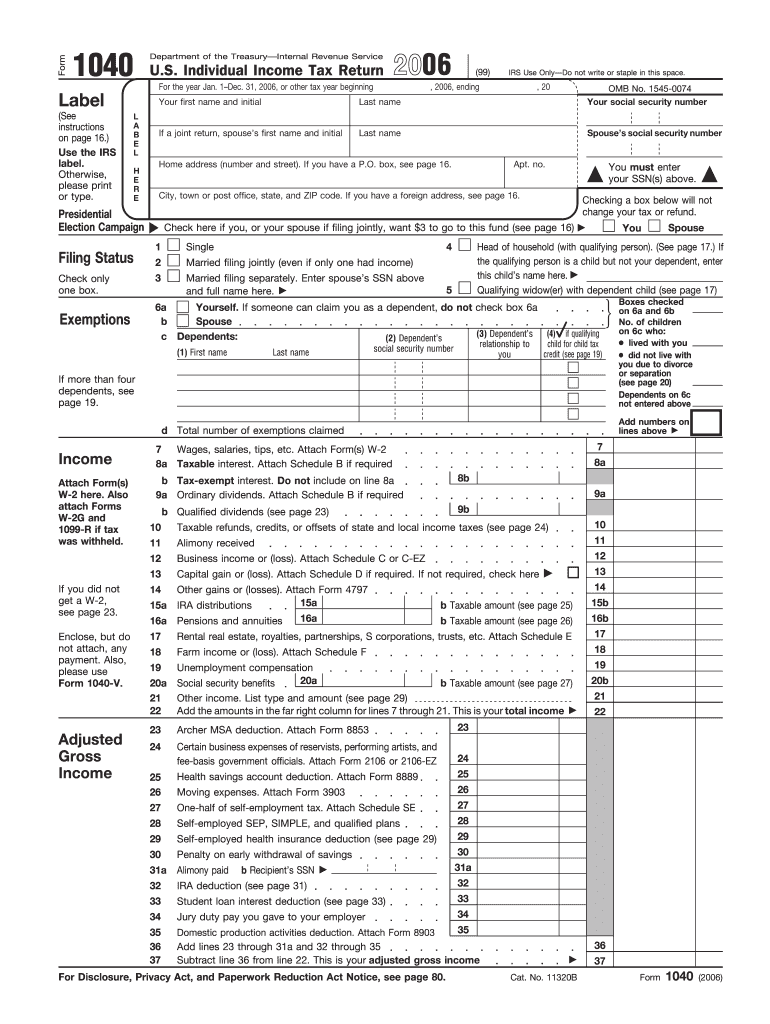
The 1040 form 2006, also known as the U.S. Individual Income Tax Return, is the primary document used by individuals to report their income, deductions, and credits to the Internal Revenue Service (IRS) for the tax year 2006. This form calculates the taxpayer's total taxable income and determines their tax liability or refund. Unlike some simplified forms such as the 1040EZ or 1040A, the 2006 Form 1040 accommodates a wide range of income types and deductions, making it suitable for more complex financial situations.
Key Components
- Personal Information: Include name, address, and Social Security Number.
- Filing Status: Options include single, married filing jointly, married filing separately, head of household, and qualifying widow(er).
- Exemptions: Detail personal and dependent exemptions that affect the taxable income.
- Income: Document income from various sources such as wages, salaries, tips, interest, dividends, and retirement distributions.
- Adjustments to Income: Include deductions that lower taxable income, such as contributions to retirement accounts and student loan interest.
Steps to Complete the 1040 Form 2006
Filing the 1040 form requires accuracy in documenting financial transactions and understanding tax rules for 2006. Here are the steps to complete it:
- Gather Necessary Documents: Collect W-2s, 1099s, and any other income documentation.
- Determine Filing Status: Select the appropriate status based on your personal situation.
- List Dependents: Provide information for any dependents you claim.
- Report Income: Accurately record all income sources. Ensure each item matches the related tax document.
- Claim Adjustments: Utilize deductions for which you qualify to reduce taxable income.
- Calculate Total Tax: Determine tax liability or refund using the form's worksheet and tables.
- Review and Sign: Double-check calculations and include a signature to validate the return.
Examples
- Single Taxpayer with Simple Income: May report income using only a W-2, making the form straightforward.
- Self-Employed Individual: Requires additional schedules to report business income and expenses.
How to Obtain the 1040 Form 2006
Acquiring the 2006 version of the Form 1040 can be done through various methods:
- IRS Website: Access previous years' tax forms directly from the IRS archives.
- Tax Software: Programs like TurboTax often include past tax forms for preparation similarly to current versions.
- Local IRS Office: Obtain paper forms by visiting an office in your region.
Important Terms Related to 1040 Form 2006
Understanding certain tax-related terms is essential for completing the form accurately:
- AGI (Adjusted Gross Income): Total income minus specific deductions.
- Standard Deduction: A fixed dollar amount that reduces taxable income, viable if not itemizing deductions.
- Itemized Deductions: Deductions for specific expenses, such as medical costs and state taxes, reported on Schedule A.
- Tax Credits: Reduction in the tax owed, more beneficial than deductions as they directly decrease tax liability.
Legal Use of the 1040 Form 2006
The legality of the 1040 form 2006 involves several considerations:
- Obligations: Taxpayers are required by law to file a return if their income surpasses certain thresholds.
- Accuracy: Misrepresenting income or deductions can lead to penalties or audits.
- Timeframe: Forms must be submitted by the IRS-designated deadline to avoid late fees.
Filing Deadlines and Important Dates
Timely filing is critical to avoid penalties:
- Standard Filing Deadline: April 15, 2007, was the initial deadline for filing the 2006 taxes.
- Extension Deadline: Taxpayers may apply for an extension to file by October 15.
Required Documents
Having all necessary documents ensures a smooth filing process:
- W-2s: For wages and salaries.
- 1099 Forms: For income from freelancing, investments, and other non-wage sources.
- Receipts for Deductions: To substantiate claims for deductions such as charitable contributions and educational expenses.
Taxpayer Scenarios
Different individuals and entities use the 1040 form according to specific situations:
- Self-Employed Individuals: Report income and expenses on Schedule C.
- Retirees: Include pension and social security benefits as income.
- Investors: Must detail dividend and interest income, along with applicable gains or losses.


Considerations for Each Scenario
- Self-Employed: Must maintain records of expenses to maximize deductions.
- Retirees: Need to understand the implications of required minimum distributions on tax obligations.
- Investors: Gain familiarity with nuances like capital gains tax rates applicable to long-term investments.
By providing extensive detail, taxpayers can leverage available benefits while ensuring compliance with 2006 tax regulations.




