
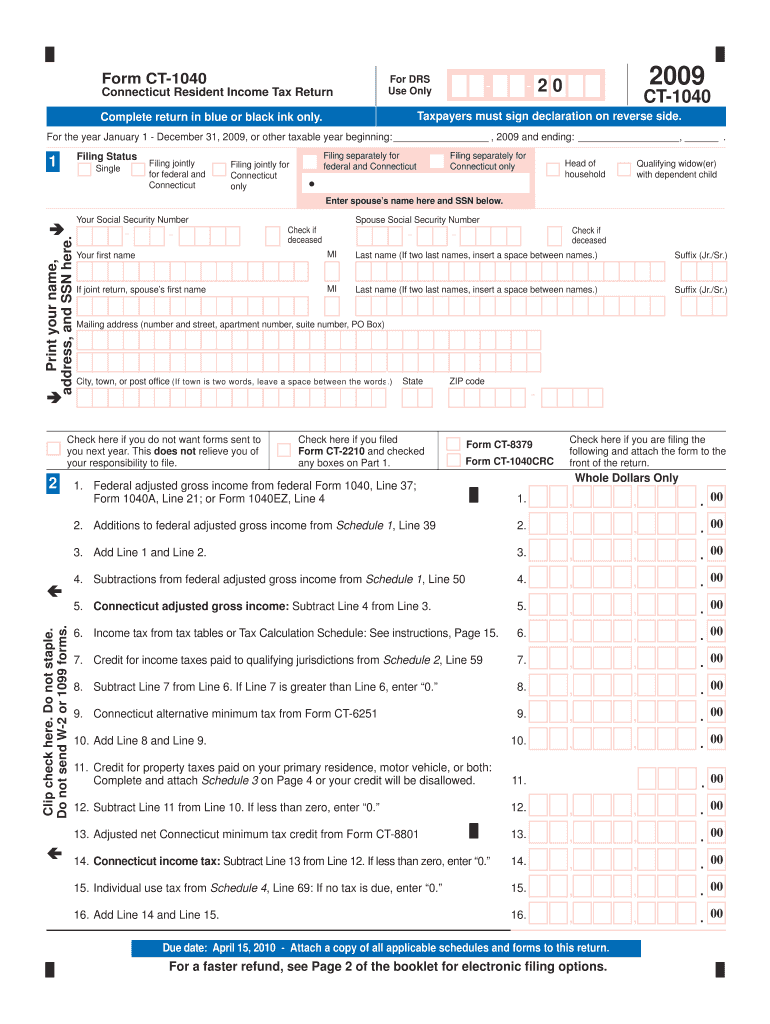







Definition and Meaning of the CT-1040 Fillable Form
The CT-1040 fillable form is an interactive version of the Connecticut Resident Income Tax Return Form used for reporting income, calculating tax liabilities, and determining refunds for state tax purposes. As an essential document for Connecticut residents, this form is designed to streamline the tax reporting process for individuals who reside in the state for the entirety of the taxable year. Unlike traditional paper forms, the fillable version allows taxpayers to input data directly into electronic fields, reducing errors associated with handwritten entries.
Key Features
- Digital Entry: Users can complete the form on their computers, ensuring legible and accurate data input.
- Auto-Calculations: Some fields are programmed to automatically compute totals, minimizing manual calculation errors.
- Printable: After filling out the form, users can print it for record-keeping or mailing purposes.
How to Use the CT-1040 Fillable Form
Using the CT-1040 fillable form involves several steps to ensure accurate and complete submission. This section guides taxpayers through the process.
Step-by-Step Instructions
- Download the Form: Access the form on the official Connecticut Department of Revenue Services website or through platforms supporting form downloads.
- Populate Personal Information: Fill in sections related to personal information, including name, address, and Social Security number.
- Report Income Details: Enter income data, such as wages, salaries, and other income sources, into the corresponding fields.
- Account for Deductions: Input any eligible deductions to adjust taxable income.
- Evaluate Tax Credits: Identify and enter applicable tax credits to potentially reduce tax liability.
- Calculate Taxes Owed or Refund Due: Utilize the auto-calculation features to determine the final amount owed or refunded.
Steps to Complete the CT-1040 Fillable Form
Completing the form accurately is crucial for a correct tax filing. Follow these comprehensive steps to ensure all necessary information is captured.
Detailed Breakdown
- Personal and Filing Status:
- Federal Adjusted Gross Income from federal tax forms.
- Filing status, such as single, married filing jointly, etc.
- Income Adjustments:
- Include adjustments such as IRA contributions or health savings accounts.
- Exemptions and Deductions:
- Deduct personal and dependent exemptions.
- Tax Computation:
- Subtotal income and deductions followed by applying tax rate.
- Use Current Year Tax Tables:
- Applicable for calculating exact tax liabilities.
Important Terms Related to the CT-1040 Fillable Form
Understanding key terms related to this form is vital for tax compliance.
Glossary of Terms
- Adjusted Gross Income (AGI): Total gross income minus specific deductions, serving as the basis for tax calculations.
- Credits vs. Deductions: Credits provide direct tax reductions, while deductions lower taxable income.
- Refund: Monies returned when tax payments exceed liabilities.
Examples of Using the CT-1040 Fillable Form
Real-world scenarios illustrate common issues Connecticut residents might encounter.
Practical Scenarios
- Scenario 1: Incorrect Income Reporting
- A taxpayer initially misreports income, resulting in recalculated tax liabilities.
- Scenario 2: Claiming Unqualified Deductions
- Understanding eligibility criteria for deductions to avoid penalties.
Filing Deadlines and Important Dates
Timeliness is critical in the tax filing process.
Key Dates
- April 15: Standard deadline for filing Connecticut state tax returns.
- Extension Requests: Available with proper forms and procedures prior to the deadline.
Required Documents for the CT-1040 Fillable Form
Gathering appropriate documentation is essential for completing the form accurately.
Necessary Documentation
- W-2 Forms: For wage and salary income.
- 1099 Forms: Reporting additional income types, such as freelance work.
- Receipts for Deductions: To verify claims for items like charitable contributions.
Form Submission Methods
Multiple submission options cater to different preferences.
Available Methods
- Online Submission: Secure filing directly through the Connecticut Department of Revenue Services website.
- Mail: Printable forms submitted via postal services.
- In-Person: Direct submission at designated state tax offices for personal assistance.




