Student athlete progress report template 2026

Get Form
athlete progress report template Preview on Page 1

Here's how it works

01. Edit your athlete progress report template online
Type text, add images, blackout confidential details, add comments, highlights and more.
02. Sign it in a few clicks
Draw your signature, type it, upload its image, or use your mobile device as a signature pad.
03. Share your form with others
Send athlete progress report via email, link, or fax. You can also download it, export it or print it out.

How to use or fill out student athlete progress report template with our platform

Form edit decoration
9.5
Ease of Setup
DocHub User Ratings on G2
9.0
Ease of Use
DocHub User Ratings on G2
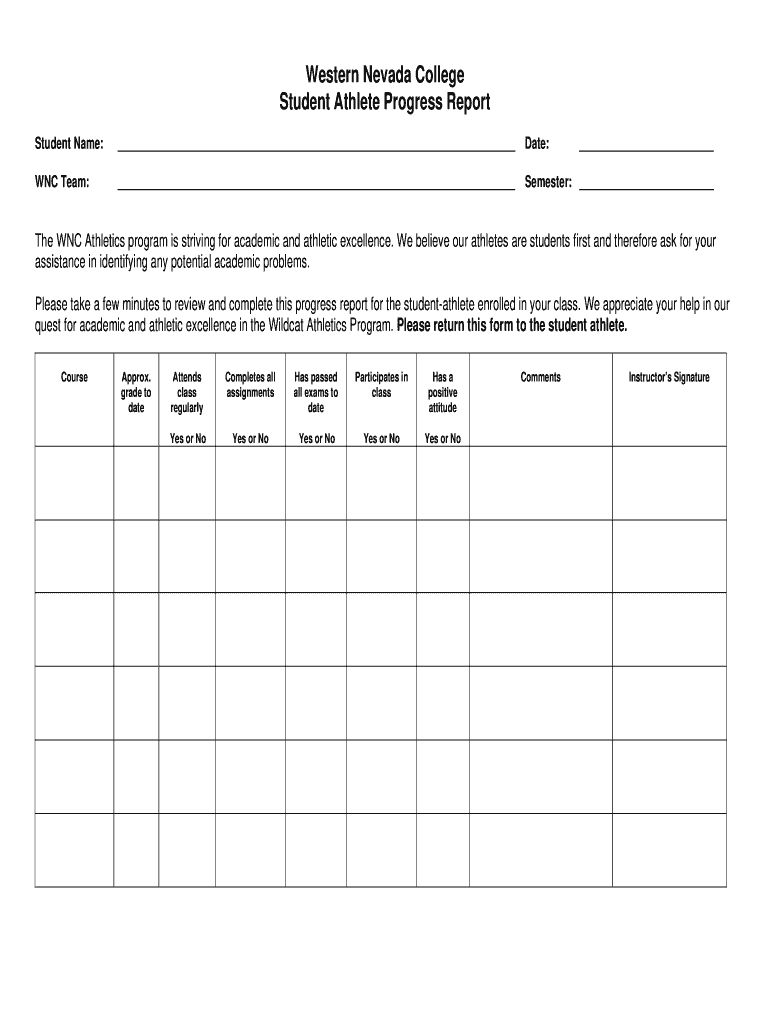
  1. Click ‘Get Form’ to open the student athlete progress report template in the editor.
  2. Begin by entering the student's name in the designated field at the top of the form. This personalizes the report and ensures clarity.
  3. Next, input the date and WNC team information. This helps track when and which team the report pertains to.
  4. Fill in the semester information to provide context for academic performance during that specific term.
  5. In the course section, list each course the student is enrolled in, followed by an approximate grade to date. This gives a snapshot of academic standing.
  6. For each criterion (attendance, assignment completion, exam performance, class participation, and attitude), select 'Yes' or 'No' based on your observations. This section is crucial for identifying areas needing support.
  7. Add any additional comments that may help provide context or insights into the student's performance.
  8. Finally, sign the form as an instructor to validate your feedback before returning it to the student-athlete.

Start using our platform today for free to streamline your document editing and enhance your workflow!

be ready to get more

Complete this form in 5 minutes or less

Get form

Got questions?

We have answers to the most popular questions from our customers. If you can't find an answer to your question, please contact us.
Contact us

eSignatures are an excellent replacement for traditional signing, as they save time, effort, and money people spend on printing, scanning, and paper delivery. You can eSign your athletic progress report template using a reliable and robust online document processing services like DocHub. It complies with main eSignature standards (ESIGN and UETA), so all forms approved there are legally binding and have the same validity as manually signed ones.

Document editing with DocHub is equally convenient on desktop and mobile devices. You only need an internet browser to edit your sports progress report template on Android. Open our website and sign in to access the instruments you require. Add your file and introduce your intended changes. After that, you can keep your form in your file storage or send it out instantly.

6 Tips for Motivating Young Athletes Acknowledge the Importance of Motivation. Discover each Athletes Unique Motivators. Explain the Why Encourage Teamwork. Commend Successes No Matter the Size. Set Achievable Goals.
As a general rule, under NCAA legislation, a prospective student-athlete (PSA) refers to a student who may attend a school and their college sports program.
The five components of athletic development are as follows: Strength, Speed, Flexibility, Coordination and Endurance.

Security and compliance

At DocHub, your data security is our priority. We follow HIPAA, SOC2, GDPR, and other standards, so you can work on your documents with confidence.

Learn more
ccpa2
pci-dss
gdpr-compliance
hipaa
soc-compliance
be ready to get more

Complete this form in 5 minutes or less

Get form

People also ask

Studies have shown recruited male athletes to have an average GPA of 2.84 which is 0.20 points lower than non-athletes.

weekly progress report template for students