



Here's how it works



How to use or fill out the SS-5 form with our platform

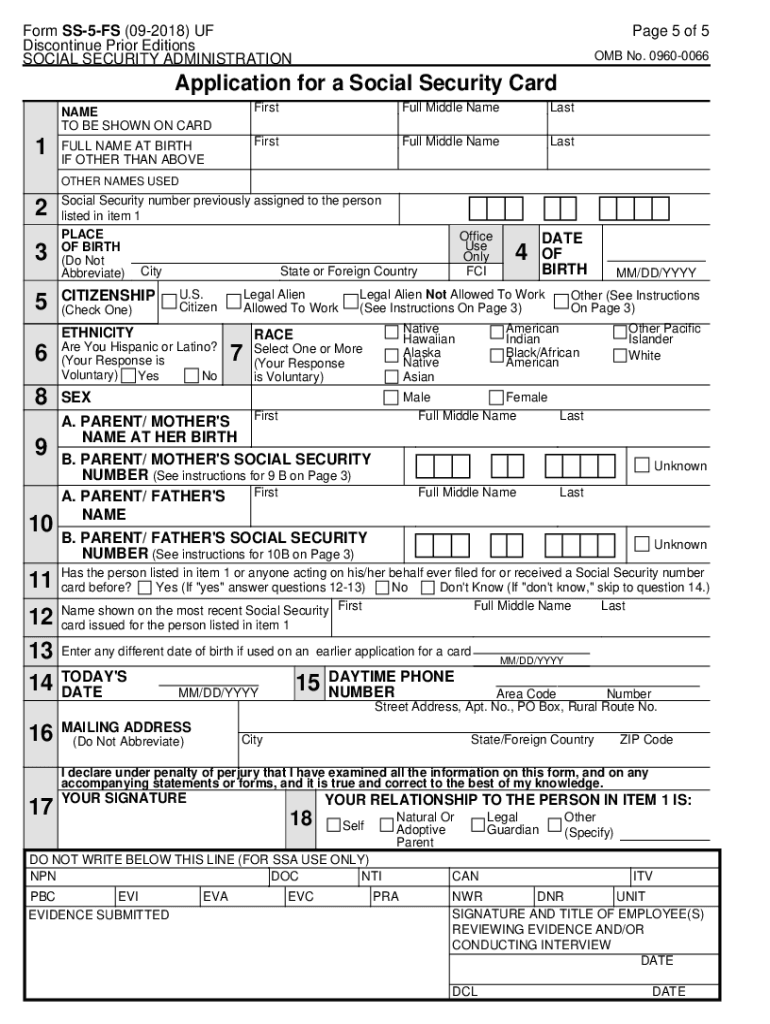
- Click ‘Get Form’ to open the SS-5 application in the editor.
- Begin by entering your name as it should appear on the Social Security card. Ensure you include your first, middle, and last names.
- Provide your date of birth in MM/DD/YYYY format. This is crucial for verifying your identity.
- Indicate your citizenship status by checking the appropriate box: U.S. Citizen, Legal Alien Allowed to Work, or Legal Alien Not Allowed to Work.
- Fill in your mailing address where you would like to receive your Social Security card. Be sure to include all relevant details without abbreviations.
- If applicable, provide information about your parents, including their names and Social Security numbers if known.
- Review all entered information for accuracy before signing the application at the designated area.
Start using our platform today for free to complete your SS-5 form effortlessly!
It's free
See more ss5 form versions
Got questions?
Can I type my electronic signature on my ss 5 form?
Yes, a typed name is recognized as a legitimate electronic signature when you add it to your document utilizing a compliant solution like DocHub. Simply upload your ss 5 form to our editor, click Sign in the top tool pane → Create your signature → Type your name in the appropriate tab, and choose how it will appear on your document.
How do you fill out ss5 form on iOS?
You need only an internet connection and a web browser to fill out your ss5 form on an iOS phone. Open the DocHub website and authenticate. Then, add your file or select it from the list in your dashboard. Then use our editing tools to fill out your form and save all your changes. You can also send it to a dedicated recipient straight away.
Can I fill out the SS-5 form online?
How do I find my SS5 form?
How long does it take to process SS-5 form?
Security and compliance
At DocHub, your data security is our priority. We follow HIPAA, SOC2, GDPR, and other standards, so you can work on your documents with confidence.
Learn more