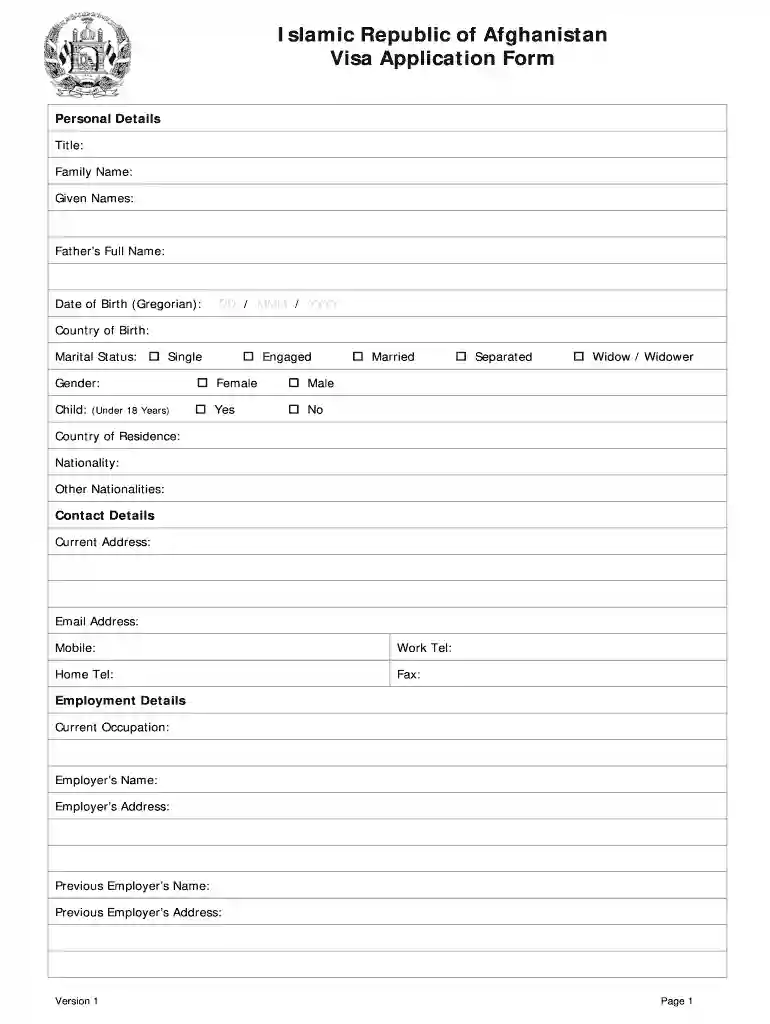
Islamic republic visa form 2026

Get Form
iran visa application form pdf Preview on Page 1

Here's how it works

01. Edit your iran visa application form pdf online
Type text, add images, blackout confidential details, add comments, highlights and more.

02. Sign it in a few clicks
Draw your signature, type it, upload its image, or use your mobile device as a signature pad.

03. Share your form with others
Send iran visa application form via email, link, or fax. You can also download it, export it or print it out.

How to use or fill out Islamic Republic Visa Form with DocHub

Form edit decoration
9.5
Ease of Setup
DocHub User Ratings on G2
9.0
Ease of Use
DocHub User Ratings on G2
  1. Click ‘Get Form’ to open the Islamic Republic Visa Application Form in our editor.
  2. Begin by filling out the 'Personal Details' section. Enter your title, family name, and given names. Provide your father's full name, date of birth, country of birth, marital status, gender, and whether you have children under 18.
  3. Next, complete the 'Contact Details' section. Input your current address, email address, mobile number, work telephone number, home telephone number, and fax number.
  4. In the 'Employment Details' section, specify your current occupation and employer's name and address. Include details about any previous employment as well.
  5. Proceed to the 'Visa Details' section. Select the visa type and purpose of your journey. Fill in your intended entry date, point of entry, duration of stay, and places you plan to visit in Afghanistan.
  6. Complete the 'Passport Details' section by entering passport type, number, place of issue, issue date, and expiry date. Ensure you sign within the designated box.
  7. Finally, attach a passport photograph as per guidelines provided on the form.

Start using our platform today for free to streamline your visa application process!

be ready to get more

Complete this form in 5 minutes or less

Get form

Got questions?

We have answers to the most popular questions from our customers. If you can't find an answer to your question, please contact us.
Contact us
Log on to , fill the application form online and take out a print-out.
Can I print a new one? Yes, you can reprint the confirmation page of an application that has already been submitted. In order to do so, go into the Consular Electronic Application Center website and select the Embassy or Consulate at which you are applying.
All applicants are advised to visit the official U.S. website where you can create your account, pay your visa application fee, and schedule your U.S. visa appointment online .
Detailed Step-by-Step DS 160 Form Filling Process Step 1: Initiate Your Application. Step 2: Document Your Application ID. Step 3: Complete Personal Information Sections. Step 4: Enter Your Travel Information. Step 5: Disclose Previous US Travels. Step 6: Input Contact Details. Step 7: Update Passport Information.
To apply for an entry visa for business or social visits, you will need the following documents: Duly completed Form 14A () signed by you. Valid passport with at least six months validity on the date of entry into Singapore.

People also ask

Access the online DS-160 by clicking: Consular Electronic Application Center website.

Related links