Form 609 2026

Get Form
form 609 Preview on Page 1

Here's how it works

01. Edit your form 609 online
Type text, add images, blackout confidential details, add comments, highlights and more.
02. Sign it in a few clicks
Draw your signature, type it, upload its image, or use your mobile device as a signature pad.
03. Share your form with others
Send 609 form via email, link, or fax. You can also download it, export it or print it out.

How to use or fill out form 609 with our platform

Form edit decoration
9.5
Ease of Setup
DocHub User Ratings on G2
9.0
Ease of Use
DocHub User Ratings on G2
  1. Click ‘Get Form’ to open it in the editor.
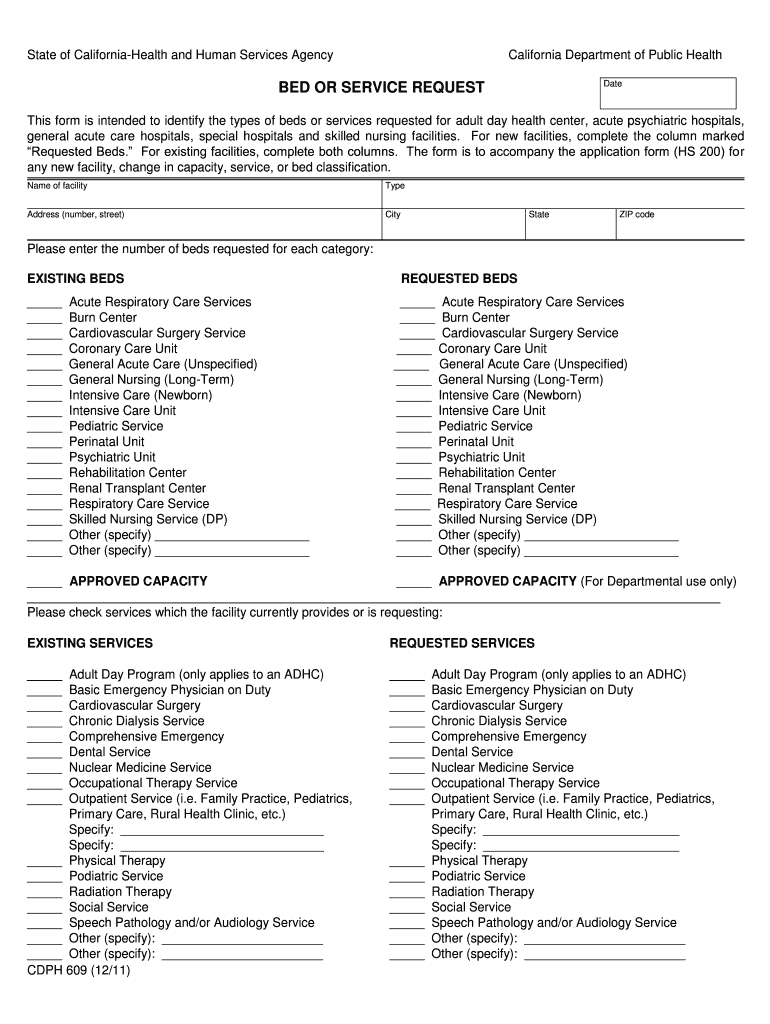
  2. Begin by entering the name of your facility, type, address, city, state, and ZIP code in the designated fields.
  3. In the 'EXISTING BEDS' section, input the number of beds currently available for each category listed. Ensure accuracy as this information is crucial for your application.
  4. Next, move to the 'REQUESTED BEDS' section. Fill in the number of beds you are requesting for each service type. This helps clarify your needs for new facilities or changes.
  5. Proceed to check off any existing services your facility currently provides in the 'EXISTING SERVICES' section. This will help assess your current capabilities.
  6. Finally, indicate any additional services you are requesting in the 'REQUESTED SERVICES' section. Be sure to specify any unique services that may not be listed.

Start using our platform today to streamline your form completion process for free!

See more form 609 versions

We've got more versions of the form 609 form. Select the right form 609 version from the list and start editing it straight away!
Versions Form popularity Fillable & printable
2011 4.9 Satisfied (45 Votes)
be ready to get more

Complete this form in 5 minutes or less

Get form

Got questions?

We have answers to the most popular questions from our customers. If you can't find an answer to your question, please contact us.
Contact us
Bottom line. 609 dispute letters are seen as a way to help improve your credit, but they dont really do this, not directly at least. You can instead dispute inaccurate information with the help of Credit Journey or by contacting the credit bureaus directly.
By law, credit bureaus must reply to a dispute within 30 days of receiving your request. Depending on the circumstances, they may receive a 15-day extension. If the creditor cannot verify the disputed account information by the deadline, the credit bureau will remove it from your credit report.
A 609 letter is a way to request verification of the accuracy of the accounts listed on your credit reports. While theyre sometimes called 609 dispute letters, a 609 letter isnt actually a dispute. Its a request for a copy of the information in your credit file.
Quick Answer. A 609 request is a formal request for credit report information. It can help uncover sources of reporting inaccuracies you wish to dispute, but a 609 request isnt actually a dispute letter.
While 609 letters cant remove verified or accurate debts, they can help uncover documentation issues that might support a formal dispute. The process requires persistence, as credit bureaus are obligated to respond to your request within 3045 days but may not always provide adequate information on the first try.