Type text, add images, blackout confidential details, add comments, highlights and more.
02. Sign it in a few clicks
Draw your signature, type it, upload its image, or use your mobile device as a signature pad.
03. Share your form with others
Send j294 form download via email, link, or fax. You can also download it, export it or print it out.
How to use or fill out j243 form with our platform
Ease of Setup
DocHub User Ratings on G2
Ease of Use
DocHub User Ratings on G2
Click ‘Get Form’ to open the j243 form in the editor.
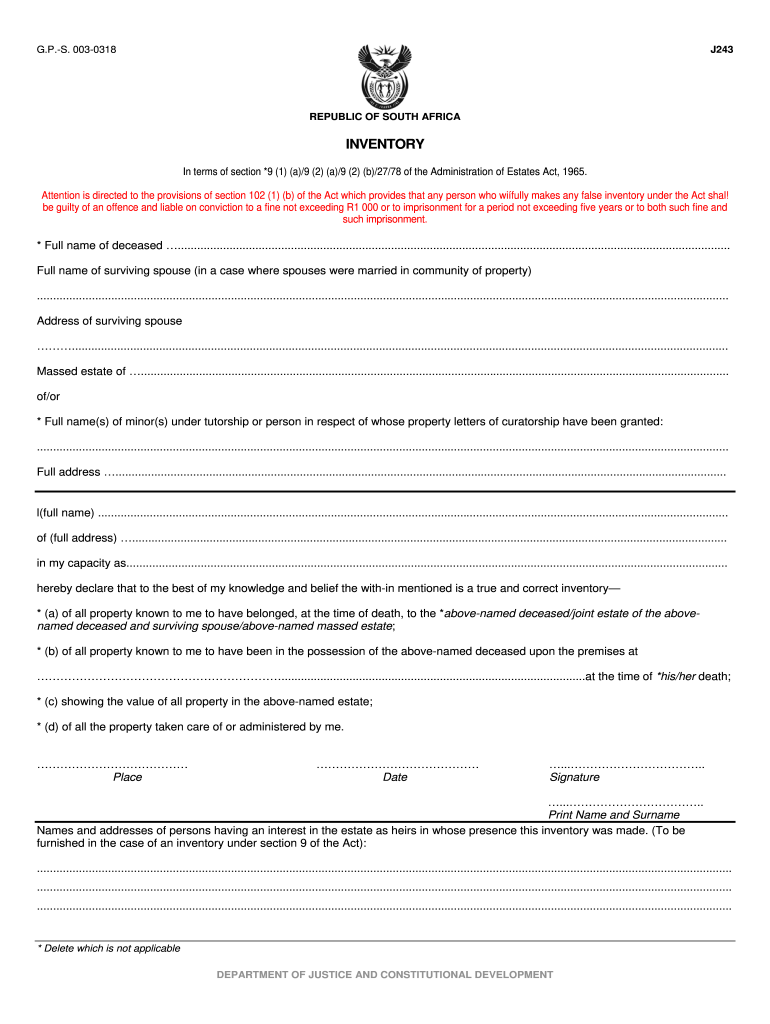
Begin by entering the full name of the deceased in the designated field. Ensure accuracy as this is crucial for legal purposes.
If applicable, provide the full name and address of the surviving spouse, especially if they were married in community of property.
Fill in the massed estate details and any minor(s) under tutorship or curatorship, including their full names and addresses.
In the declaration section, state your full name, address, and capacity. Confirm that the inventory is true and correct by checking all relevant boxes regarding property ownership.
Detail immovable and movable properties along with their values in the respective sections. Be thorough to avoid discrepancies.
Complete the summary section by totaling all values from previous sections to ensure clarity on estate worth.
Finally, sign and date the form at the bottom before submitting it through our platform for processing.
Start filling out your j243 form online for free today!
Well learn how writers conceive and pitch narrative story ideas; how to report for narrative; and, crucially, how to keep your narrative true to your reportingRead more
A. Background. This instruction sheet provides guidelines on assigning LCGFT to resources issued in successive parts. These types of resources may include,Read more
Cookie consent notice
This site uses cookies to enhance site navigation and personalize your experience.
By using this site you agree to our use of cookies as described in our Privacy Notice.
You can modify your selections by visiting our Cookie and Advertising Notice.