Montana nurse aide registry 2026

Get Form
montana cna registry Preview on Page 1

Here's how it works

01. Edit your montana cna registry online
Type text, add images, blackout confidential details, add comments, highlights and more.
02. Sign it in a few clicks
Draw your signature, type it, upload its image, or use your mobile device as a signature pad.
03. Share your form with others
Send montana cna license verification via email, link, or fax. You can also download it, export it or print it out.

How to use or fill out Montana Nurse Aide Registry with our platform

Form edit decoration
9.5
Ease of Setup
DocHub User Ratings on G2
9.0
Ease of Use
DocHub User Ratings on G2
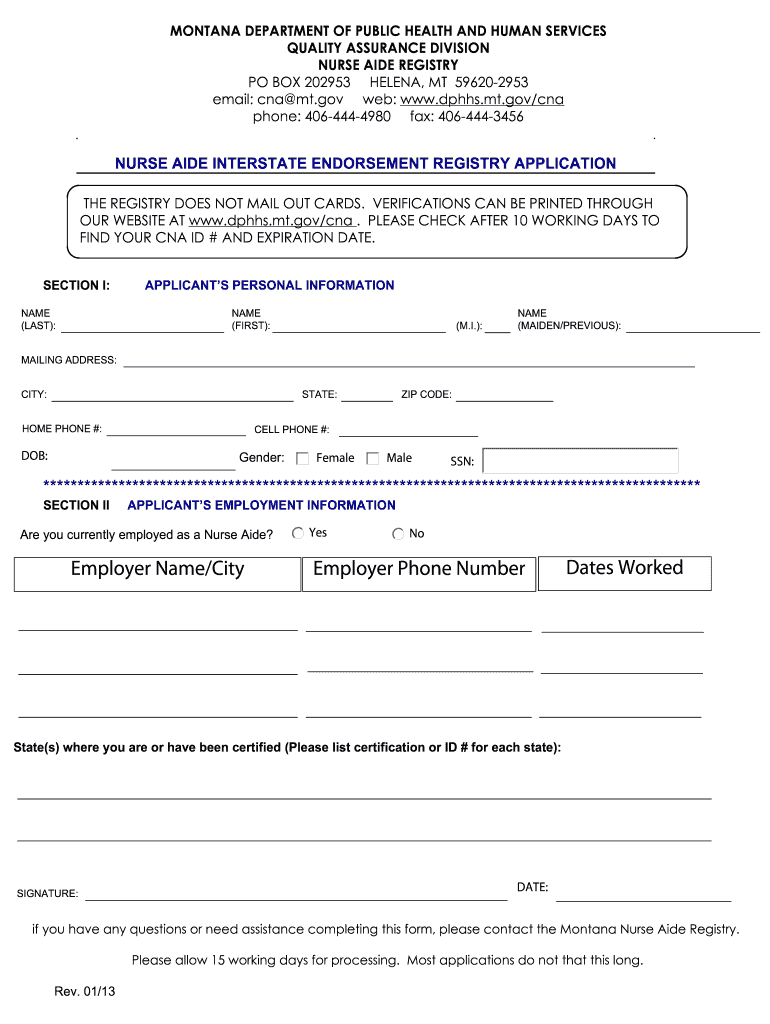
  1. Click ‘Get Form’ to open the Montana Nurse Aide Registry application in the editor.
  2. Begin by filling out Section I, which includes your personal information. Enter your last name, first name, middle initial, and maiden/previous name. Provide your mailing address, city, state, zip code, home phone number, cell phone number, date of birth (DOB), gender, and Social Security Number (SSN).
  3. Proceed to Section II for employment information. Indicate if you are currently employed as a Nurse Aide by selecting 'Yes' or 'No'. If employed, provide your employer's name and city, their phone number, and the dates you worked there.
  4. List all states where you are or have been certified along with the corresponding certification or ID numbers for each state.
  5. Finally, sign and date the application at the bottom of the form before submitting it back to the Montana Nurse Aide Registry.

Start using our platform today to easily complete your Montana Nurse Aide Registry application online for free!

See more montana nurse aide registry versions

We've got more versions of the montana nurse aide registry form. Select the right montana nurse aide registry version from the list and start editing it straight away!
Versions Form popularity Fillable & printable
2017 4.8 Satisfied (47 Votes)
2013 4.3 Satisfied (128 Votes)
be ready to get more

Complete this form in 5 minutes or less

Get form

Got questions?

We have answers to the most popular questions from our customers. If you can't find an answer to your question, please contact us.
Contact us

Electronic document approval demands a software solution that complies with data security and eSignature regulations. DocHub is an excellent tool for that, because it meets all the previously mentioned requirements. Whatever method you prefer to sign your montana cna license lookup in DocHub, your eSignature will be legally binding and court-admissible.

With DocHub, there are several convenient ways to edit your cna license lookup montana online. You can drag and drop the form and edit it straight at the DocHub site or use our browser extension to fill out your form right away. Additionally, you can edit your PDF on your phone, as DocHub is compatible with all the accessible mobile platforms.

Use the Montana Nurse Aide Registry to confirm certification status and employment eligibility. Step 1: Access the Verification Portal. Visit the Montana CNA License Verification page. Step 2: Enter Required Information. Step 3: Select Certificate Type. Step 4: Complete CAPTCHA Verification. Step 5: Submit Your Search.
Log into: Click on secure sign in. In the Main Menu, click on the link that says Review Scores. Click on the test date listed in the history box to view score report.
Nurse Aides who have passed a state exam are called Certified Nursing Assistants, or CNAs. Licensed Practical Nurses (LPNs) and Registered Nurses (RNs) are required to pass state board examinations and practice under a license. Working under the supervision of Registered Nurses, Nurse Aides provide bedside care.

Security and compliance

At DocHub, your data security is our priority. We follow HIPAA, SOC2, GDPR, and other standards, so you can work on your documents with confidence.

Learn more
ccpa2
pci-dss
gdpr-compliance
hipaa
soc-compliance