
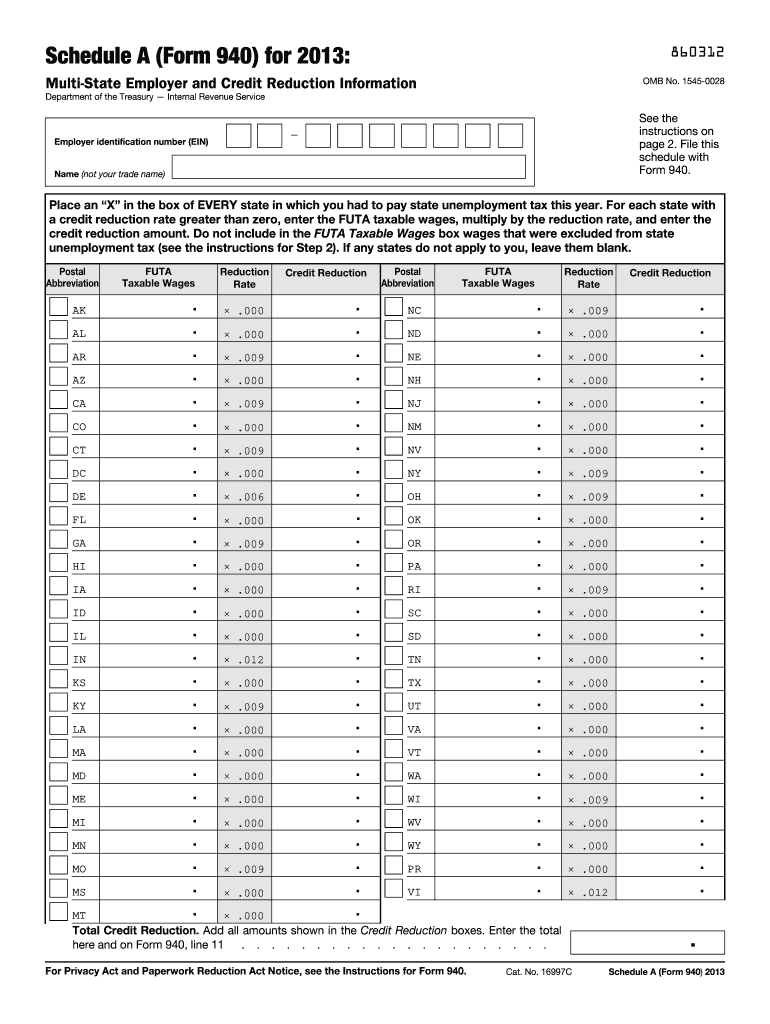







Definition and Meaning
The 2013 Schedule A (Form 940) is designed to assist employers in delivering multi-state unemployment tax information and calculating credit reductions. This form is critical for employers who operate in multiple states and need to report state unemployment taxes paid. By completing this form, businesses can determine the federal unemployment tax obligations and gain any potential credits against owed taxes.
Credit Reduction
The form highlights credit reductions based on state-specific unemployment fund statuses. Employers must indicate states where they paid unemployment taxes and calculate total credit reductions accordingly. Examples are included within the form to demonstrate how employers should perform these calculations.
How to Use the 2013 Schedule A (Form 940)
Preparing for Completion
To accurately use the 2013 Schedule A (Form 940), gather all necessary documents, including state unemployment tax records. It's essential to have detailed wage and tax reports ready to ensure precise calculations are made for federal and state obligations.
Filling Out the Form
When filling out the form:
- List all states where unemployment taxes were paid during 2013.
- Calculate the FUTA taxable wages based on those states.
- Determine the credit reductions for each state.
- Attach the completed Schedule A to Form 940 before submission.
How to Obtain the 2013 Schedule A (Form 940)
Download and Print Options
The 2013 Schedule A (Form 940) can be downloaded directly from the IRS website. For those preferring a physical copy, the form can be printed once downloaded. This ensures both digital and hard copies are accessible for record-keeping and filing purposes.
Alternative Methods
Tax software solutions, such as TurboTax or QuickBooks, often provide options to import and fill out the form electronically, offering additional convenience and accuracy checks as you complete the form.
Steps to Complete the 2013 Schedule A (Form 940)
Initial Setup
Before diving into form completion:
- Ensure all state unemployment contributions are up-to-date.
- Compile a list of states where operations impacted unemployment taxes.
Completing Entries
- Begin by noting the employer name and EIN.
- Fill in the state abbreviation for each state where taxes were paid.
- Calculate the total wages subject to FUTA tax for those states.
- Deduct any credit reductions, using the form's instructions for specific state guidelines.
Key Elements of the 2013 Schedule A (Form 940)
Employer Identification
The form requires the employer's identification number (EIN) to ensure accurate tracking and processing of unemployment tax obligations. This number is crucial for the IRS to match reported data with the correct business account.
Wage and Tax Details
Specific details about wages paid and unemployment taxes are integral to the form. This include:
- Total wages paid during the year.
- Total FUTA taxable wages after state adjustments.
- Any credit reductions applied based on state rates.
IRS Guidelines for the 2013 Schedule A (Form 940)
Official Instructions
IRS instructions should be reviewed when completing this form to avoid common errors. These guidelines clarify how each section of the form should be filled out and describe how to handle unique situations, such as operating in states with credit reduction changes.
Compliance
Ensure compliance by cross-verifying the reported data with your payroll records. Misstatements can lead to inquiries and potential penalties.
Filing Deadlines and Important Dates
Annual Filing Requirement
Employers are required to file both Form 940 and Schedule A by January 31 of the following year. For 2013, this meant the complete package was due by January 31, 2014. Missing this deadline may result in penalties or late fees.
Extensions
In certain situations, extensions may be available, although prerequisites often apply. Thorough documentation and timely requests are crucial in these scenarios.
Penalties for Non-Compliance
Financial Repercussions
Failure to properly file Schedule A (Form 940) or to meet deadlines can result in hefty fines and interest on unpaid taxes. Compliance with completion, submission accuracy, and deadlines is imperative to avoid financial penalties.
Legal Consequences
Engaging in willful non-compliance or providing false information can lead to more severe legal actions, including audits or investigations by the IRS.
Form Variants and Related Versions
Alternatives
While Schedule A (Form 940) specifically targets multi-state tax credit reductions, other forms such as Form 940EZ exist for straightforward single-state employers.
Historical Comparisons
Employers using older form versions should be aware of changes in tax laws and requirements. Comparing past forms with the 2013 form helps ensure adaptation to any reporting changes.




