




Here's how it works

01. Edit your appointment of agent form texas online
Type text, add images, blackout confidential details, add comments, highlights and more.

02. Sign it in a few clicks
Draw your signature, type it, upload its image, or use your mobile device as a signature pad.

03. Share your form with others
Send form 50 162 via email, link, or fax. You can also download it, export it or print it out.
How to use or fill out appointment of agent form texas with DocHub

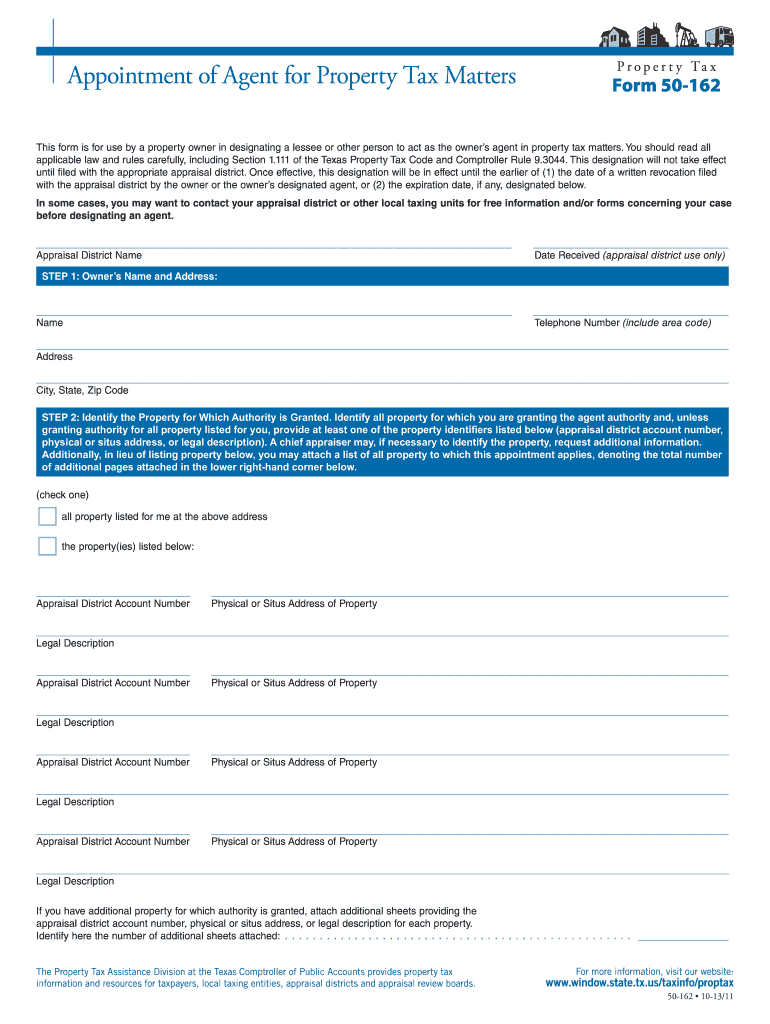
- Click ‘Get Form’ to open the appointment of agent form in our editor.
- Begin by entering the Owner’s Name and Address in the designated fields. Ensure that you include a valid telephone number and complete address details.
- Identify the property for which authority is granted. You can either check the box for all properties listed or provide specific property identifiers such as appraisal district account numbers or physical addresses.
- Next, identify your agent by filling in their name, contact number, and address. This section is crucial as it designates who will act on your behalf.
- Specify the authority granted to your agent by checking the appropriate box regarding property tax matters. You may also indicate if they are authorized to receive confidential information.
- Indicate when the agent's authority ends. This can be a specific date or left open-ended until revoked.
- Finally, sign and date the form, ensuring that it is completed by an authorized individual. Review all entries for accuracy before submission.
Start using our platform today to streamline your document editing and signing process for free!
Fill out appointment of agent form texas online
It's free
It's free
See more appointment of agent form texas versions
We've got more versions of the appointment of agent form texas form. Select the right appointment of agent form texas version from the list and start editing it straight away!
Security and compliance
At DocHub, your data security is our priority. We follow HIPAA, SOC2, GDPR, and other standards, so you can work on your documents with confidence.
Learn more




