
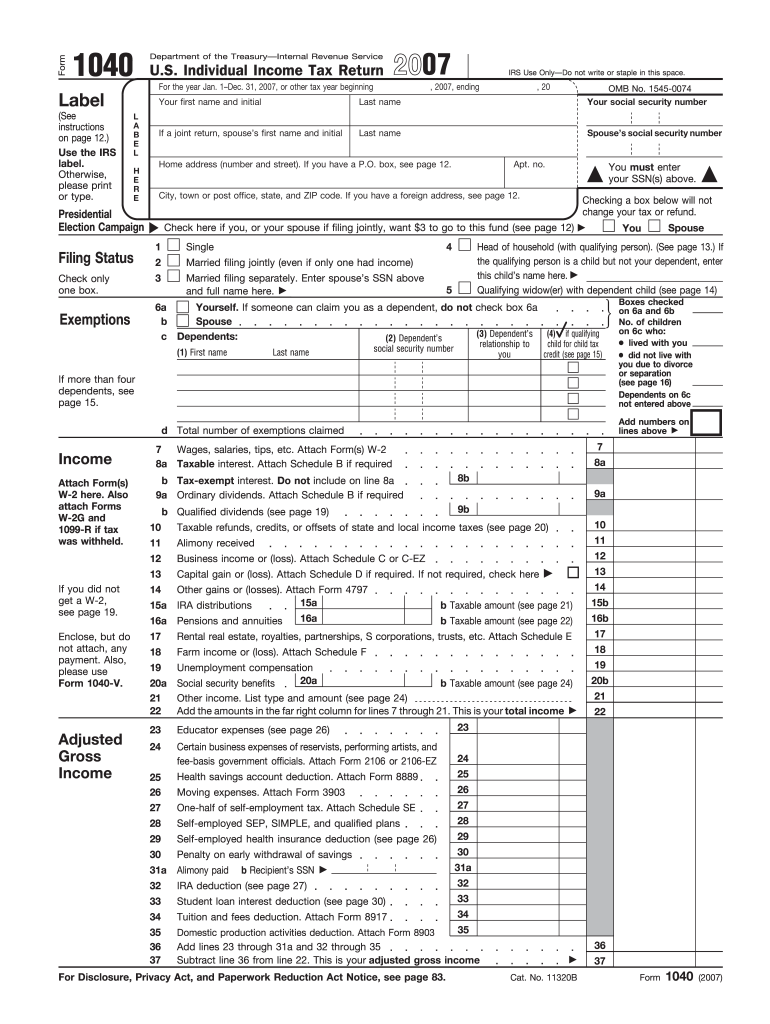







Definition and Purpose of the 2007 Form 1040
The 2007 Form 1040, formally known as the U.S. Individual Income Tax Return, is a document used by taxpayers in the United States to report their annual income and determine their tax liability. This form collects essential information to calculate the amount owed to the Internal Revenue Service (IRS) or the potential refund. It includes sections for personal details, income sources, adjustments, deductions, credits, and tax calculations.
Key Sections of the 2007 Form 1040
The form contains various crucial sections, including:
- Personal Information: Provides spaces for names, Social Security numbers, and addresses to identify the taxpayer and any dependents.
- Filing Status: Offers different categories such as Single, Married Filing Jointly, or Head of Household, influencing tax rates and deductions.
- Income Sources: Asks for data on wages, salaries, tips, interest, dividends, and business income to assess the total taxable income.
- Adjustments to Income: Allows for deductions that reduce taxable income, such as student loan interest or retirement contributions.
- Tax and Credits: Includes calculations for total tax owed and any eligible credits, which can reduce the total tax liability.
- Payments: Details previously made tax payments, including withholding and estimated payments, to calculate the owed balance or refund.
How to Use the 2007 Form 1040
The 2007 Form 1040 is primarily used for individuals to report annual income to the IRS. It facilitates the calculation of tax obligations and the eligibility for tax credits. Users must fill and file the form accurately to ensure compliance and avoid penalties.
Filing Process and Methods
Taxpayers can file the 2007 Form 1040 using different methods:
- Online: Utilize IRS-provided, authorized electronic platforms for entering and submitting information.
- Mail: Complete the paper form manually and mail it to the appropriate IRS address based on the taxpayer's location.
- Tax Software: Use programs like TurboTax or QuickBooks to guide through the completion and submission process.
Steps for Accurate Completion
Accurate completion of the 2007 Form 1040 requires the following steps:
- Review all income sources, ensuring that every field is filled with precise data.
- Calculate total income, adjustments, deductions, and credits properly.
- Double-check each entry to eliminate errors and inconsistencies.
- Submit the completed form by the IRS deadline to avoid late fees.
Required Supporting Documents
When completing the 2007 Form 1040, taxpayers need to attach several supporting documents to verify the reported details. These include:
- W-2 Forms: From employers, indicating wages and withheld taxes.
- 1099 Forms: Reflect additional income like dividends or freelance payments.
- Receipts for Eligible Deductions: Such as educational expenses or charitable contributions.
- Previous Tax Returns: Helpful for comparison and accuracy.
Common Scenarios for the 2007 Form 1040
The 2007 Form 1040 is applicable to a variety of taxpayers, each with unique circumstances:
Self-Employed Individuals
These individuals often report business income and are eligible for deductions like home office expenses. Accurate reporting is crucial to avoid audits.
Retirees
They might declare Social Security benefits or pension income. Understanding applicable credits and retirement-related deductions is important.
Students
For students, the form can reflect education credits and deductions, helping reduce taxable income and obligations.
IRS Guidelines and Compliance
The IRS provides extensive guidelines on filling out and submitting the 2007 Form 1040. Adhering to these instructions ensures compliance:
- Accuracy: All figures must be precise to reflect the exact tax liability.
- Integrity: Submissions should be free from fraudulent data and misrepresentations.
- Deadline: Taxpayers must meet deadlines to prevent interest and penalties on late filings.
Filing Deadlines and Important Dates
The 2007 Form 1040 must be filed by April 15, 2008, unless extensions are sought and granted in advance. Missing these deadlines can lead to penalties and interest charges on overdue taxes. If unable to meet the deadline, taxpayers can request an automatic six-month extension, providing additional time to manage their submissions.
Penalties for Non-Compliance
Failure to submit the 2007 Form 1040 or underreport taxes can result in:
- Monetary Penalties: Charged for overdue payments or errors.
- Interest: Accrued on unpaid taxes following the deadline.
- Legal Consequences: Potential investigations and audits by the IRS.
State-Specific Considerations
While the 2007 Form 1040 pertains to federal taxes, taxpayers should also be aware of possible state-level requirements. Each state can have unique forms or conditions that must be fulfilled alongside the federal submission. Compliance with both state and federal regulations ensures holistic tax compliance.
Conclusion
To leverage the utility of the 2007 Form 1040, users should ensure a meticulous approach in completing and submitting the form. Understanding the nuances of each section, maintaining precise records, and following IRS guidelines provide a seamless filing experience. By recognizing various taxpayer scenarios and adhering to deadlines, individuals can optimize their tax obligations, potentially securing refunds and minimizing liabilities.




