Contractors chage order log 2026

Get Form
change order construction Preview on Page 1

Here's how it works

01. Edit your change order construction online
Type text, add images, blackout confidential details, add comments, highlights and more.

02. Sign it in a few clicks
Draw your signature, type it, upload its image, or use your mobile device as a signature pad.

03. Share your form with others
Send what is a change order in construction via email, link, or fax. You can also download it, export it or print it out.

How to use or fill out contractors change order log with our platform

Form edit decoration
9.5
Ease of Setup
DocHub User Ratings on G2
9.0
Ease of Use
DocHub User Ratings on G2
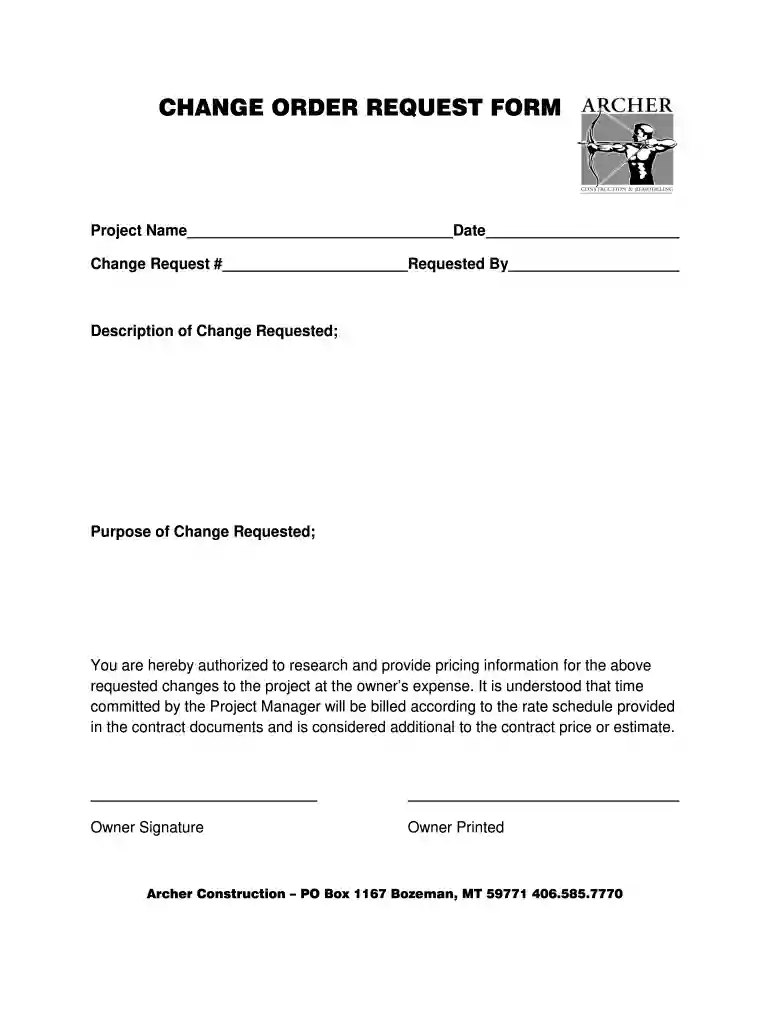
  1. Click ‘Get Form’ to open the contractors change order log in the editor.
  2. Begin by entering the 'Project Name' at the top of the form. This identifies the specific project related to the change request.
  3. Next, fill in the 'Change Request #' field. This unique identifier helps track multiple requests efficiently.
  4. Input the 'Date' of the request to document when this change was initiated.
  5. In the 'Requested By' section, provide your name or the name of the individual making the request for clarity.
  6. Describe the changes in detail in the 'Description of Change Requested' field, ensuring all necessary information is included.
  7. State the 'Purpose of Change Requested' to explain why these changes are necessary for project progression.
  8. Finally, ensure that both you and the owner sign and print their names in the designated areas to authorize and finalize this request.

Start using our platform today for free to streamline your document editing and signing process!

be ready to get more

Complete this form in 5 minutes or less

Get form

Got questions?

We have answers to the most popular questions from our customers. If you can't find an answer to your question, please contact us.
Contact us
No, an RFI is not a change order in and of itself but oftentimes RFIs can lead to change orders. RFIs, or Requests for Information are documents sent by those seeking clarity on some aspect of a project or project contract.
Its a document that functions as a systematic log which includes all modifications to the original contractual agreement. Keeping an up-to-date construction change order log helps to ensure that relevant parties are aware of all changes and their impact on the projects scope.
A change order is a written amendment to an existing contract after the effective date that alters the work, the contract sum, or the contract time. While contracts are intended to be the final word for projects, sometimes things need to change.
The Change Order Request (COR) Log is used to monitor the progress of the each change request until it is rolled up into an official change order on the project. A COR entry will usually be incorporated into an approved Change Order (CO) but only if the COR and the CO are of the same type (normal or internal).
A change log, change management log, change order log or change control log templatewhatever you call itis a document that allows you to capture change as it happens and track it throughout the project until the issue raised has been put to bed.

Security and compliance

At DocHub, your data security is our priority. We follow HIPAA, SOC2, GDPR, and other standards, so you can work on your documents with confidence.

Learn more
ccpa2
pci-dss
gdpr-compliance
hipaa
soc-compliance