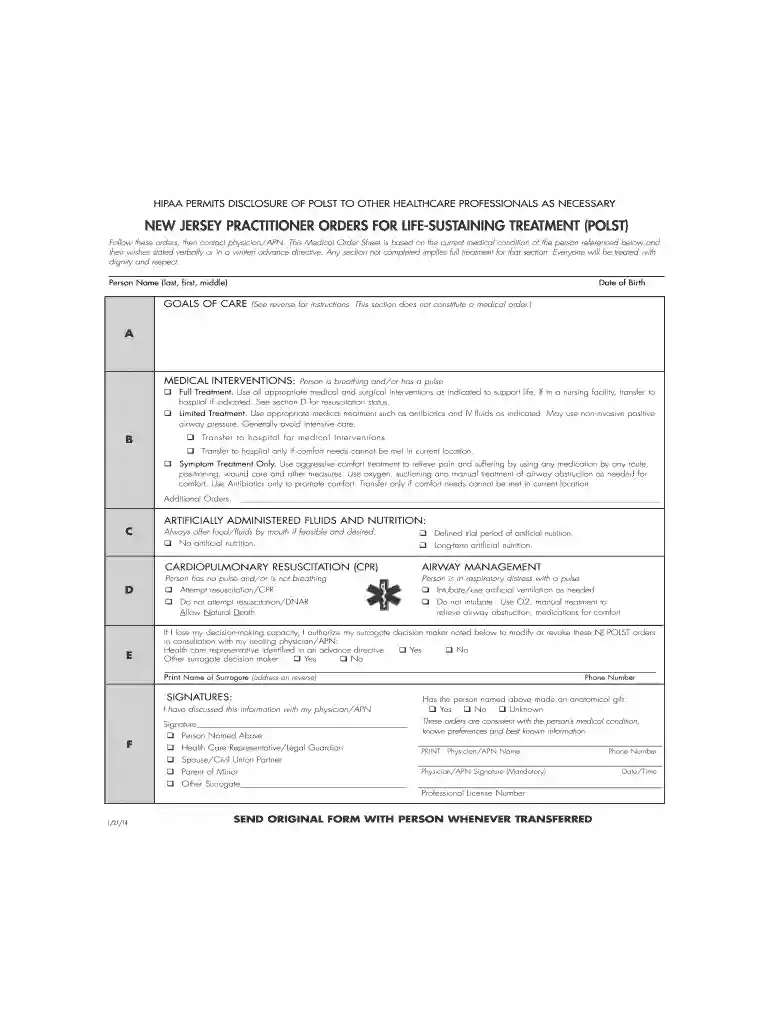
polst form nj Preview on Page 1

New jersey polst blank 2026

Here's how it works

  • 01. Edit your polst form nj online

    Type text, add images, blackout confidential details, add comments, highlights and more.

  • 02. Sign it in a few clicks

    Draw your signature, type it, upload its image, or use your mobile device as a signature pad.

  • 03. Share your form with others

    Send polst form new jersey via email, link, or fax. You can also download it, export it or print it out.

How to use or fill out New Jersey POLST Blank with our platform

Form edit decoration
9.5
Ease of Setup
DocHub User Ratings on G2
9.0
Ease of Use
DocHub User Ratings on G2
  1. Click ‘Get Form’ to open the New Jersey POLST blank in the editor.
  2. Begin by entering the person's name and date of birth at the top of the form. This information is crucial for identifying the individual.
  3. In Section A, outline the goals of care. Consider what outcomes are most important to the person, such as quality of life or specific events they wish to attend.
  4. Move to Section B, where you will select medical interventions. Choose between full treatment, limited treatment, or symptom treatment only based on the individual's preferences.
  5. In Section C, indicate preferences regarding artificially administered fluids and nutrition. Ensure that these choices align with the person’s wishes.
  6. Section D requires decisions about CPR and airway management. Clearly mark preferences for resuscitation efforts.
  7. If applicable, designate a surrogate decision maker in Section E who can modify these orders if necessary.
  8. Finally, ensure that a physician or APN signs in Section F to validate the document. This step is essential for compliance.

Start using our platform today to easily fill out your New Jersey POLST blank online for free!

See more polst form nj versions

We've got more versions of the polst form nj form. Select the right polst form nj version from the list and start editing it straight away!

VersionsForm popularityFillable & printable
20144.8 Satisfied (155 Votes)
20124.3 Satisfied (122 Votes)

be ready to get more

Complete this form in 5 minutes or less

Got questions?

We have answers to the most popular questions from our customers. If you can't find an answer to your question, please contact us.

This form, signed by a patients attending physician, advanced practice nurse or physicians assistant, provides instructions for health care personnel to follow for a range of life-prolonging interventions. Practitioner Orders for Life-Sustaining Treatment (POLST) NJ.gov health advancedirective polst NJ.gov health advancedirective polst
How to Order the National POLST Form. Visit your program website or docHub out to your program contact to order POLST forms. Forms are not available to individuals since they are medical orders that should be completed by providers. National POLST Form: Portable Medical Order National POLST national-form National POLST national-form
The POLST form should be clearly posted or maintained near the patient. It is recommended that POLST be copied on bright pink paper to help ensure that the document stands out and is followed. However, POLST on any color paper is valid. DNR And POLST Forms | EMSA Emergency Medical Services Authority - CA.gov dnrandpolstforms Emergency Medical Services Authority - CA.gov dnrandpolstforms

Security and compliance

At DocHub, your data security is our priority. We follow HIPAA, SOC2, GDPR, and other standards, so you can work on your documents with confidence.

nj polst

The Physician Orders for Life-Sustaining Treatment (

by RB Wolf 2014 Cited by 13 New Jersey, North Carolina, Rhode Island, Utah, Vermont and Wash- ington, by statute, more broadly allow others such as a Certified Nurse.Read more

Learn more
POLST-Fillable-Form.pdf

POLST orders are actual orders that transfer with the person and are valid in all settings in New Jersey. It is recommended that POLST be reviewed periodically,Read more

Learn more
If you believe that this page should be taken down, please follow our DMCA take down process here