




Here's how it works

01. Edit your ifta colorado login online
Type text, add images, blackout confidential details, add comments, highlights and more.

02. Sign it in a few clicks
Draw your signature, type it, upload its image, or use your mobile device as a signature pad.

03. Share your form with others
Send colorado ifta login via email, link, or fax. You can also download it, export it or print it out.
How to use or fill out International Fuel Tax Agreement Tax Report IFTA with our platform

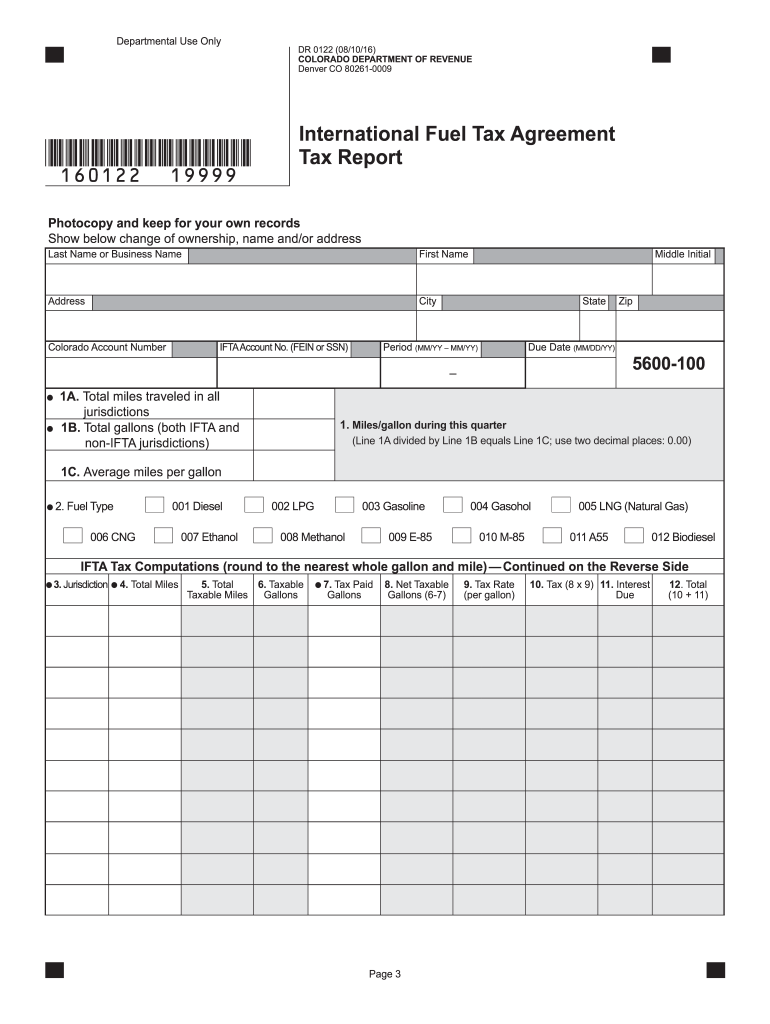
- Click ‘Get Form’ to open the International Fuel Tax Agreement Tax Report in the editor.
- Begin by entering the total miles traveled during the reporting period on Line 1A. Ensure you round to the nearest whole mile.
- On Line 1B, input the total gallons of fuel placed in the propulsion tank for all qualified vehicles, rounding to the nearest whole gallon.
- Calculate your average miles per gallon by dividing Line 1A by Line 1B and rounding to two decimal places for Line 1C.
- Indicate the appropriate fuel type on Line 2. Remember, a separate form is required for each fuel type.
- List all IFTA jurisdictions where you traveled in Column 3, ensuring not to include jurisdictions with zero miles.
- For Column 4, enter total miles traveled in each jurisdiction, rounding as necessary. For non-IFTA jurisdictions, report those separately below column totals.
- Complete Columns 5 through 12 as instructed, ensuring accurate calculations and rounding where specified.
- Finally, sign and date your report before submitting it to ensure compliance with filing requirements.
Start using our platform today for free to streamline your IFTA tax report process!
Fill out International Fuel Tax Agreement Tax Report IFTA ... - Colorado.gov - colorado online
It's free
It's free
See more International Fuel Tax Agreement Tax Report IFTA ... - Colorado.gov - colorado versions
We've got more versions of the International Fuel Tax Agreement Tax Report IFTA ... - Colorado.gov - colorado form. Select the right International Fuel Tax Agreement Tax Report IFTA ... - Colorado.gov - colorado version from the list and start editing it straight away!
Got questions?
We have answers to the most popular questions from our customers. If you can't find an answer to your question, please contact us.
Contact us
What is needed for IFTA reporting?
Information Required for IFTA Reporting IFTA details - Country, base jurisdiction, and the IFTA Account Number need to be submitted. Vehicle Data - Details about the vehicle, such as the truck/unit number, gross vehicle type, fleet name, fleet number, make, and model may need to be provided.
How to find IFTA report?
View IFTA Reports On the Motive Fleet Dashboard, click on Fuel in the left-hand side menu. Click on the IFTA summary tab. Filter the report through filters of Date, Jurisdiction, Fuel Type, and IFTA Vehicles. Click on the Trip Reports tab to view a more detailed view of individual trips.
How to check IFTA application status?
If you do not receive your IFTA credentials within 30 days of placing your order, please contact Permits Plus Inc @ 1-877-722-8059 to check on the status of your order.
What is the International Fuel Tax Agreement?
The purpose of IFTA is to establish and maintain a single fuel tax license for all of your qualified motor vehicles, authorizing them to travel in all IFTA jurisdictions, requiring you to file only one tax return each quarter with your base jurisdiction to report your fuel usage and mileage for all IFTA member states
How do I set up an IFTA account?
IFTA Account Registration USDOT # Legal Name. (Legal name must match FMCSA USDOT record.) Tax Identification Number. (Provide FEIN or SSN if a sole proprietor. It must match FMCSA USDOT record.) Number of Additional Decals. IRP Account. (Must have an IRP Account prior to filing for the IFTA account.
Security and compliance
At DocHub, your data security is our priority. We follow HIPAA, SOC2, GDPR, and other standards, so you can work on your documents with confidence.
Learn more


People also ask
How do I get my IFTA report?
Download IFTA Reports Click on Reports from the left-hand side menu of the Dashboard. Click on the IFTA button under the Browse section. Click on the Distance Summary report. Click on the Date field to select the start and end dates for a report.
How to get IFTA for trucking?
The process for applying for an IFTA license may vary from state to state. Some states require the truckers to submit an online application (Eg: California), whereas other states accept both e-filing and paper filing for IFTA License applications (Eg: Texas).
How do I download my IFTA report?
To download the report, click the three dots in the top right corner and choose either Export as PDF or Export as CSV. Note: There may be instances of incomplete data if IFTA reports are pulled immediately after the end of the month.


