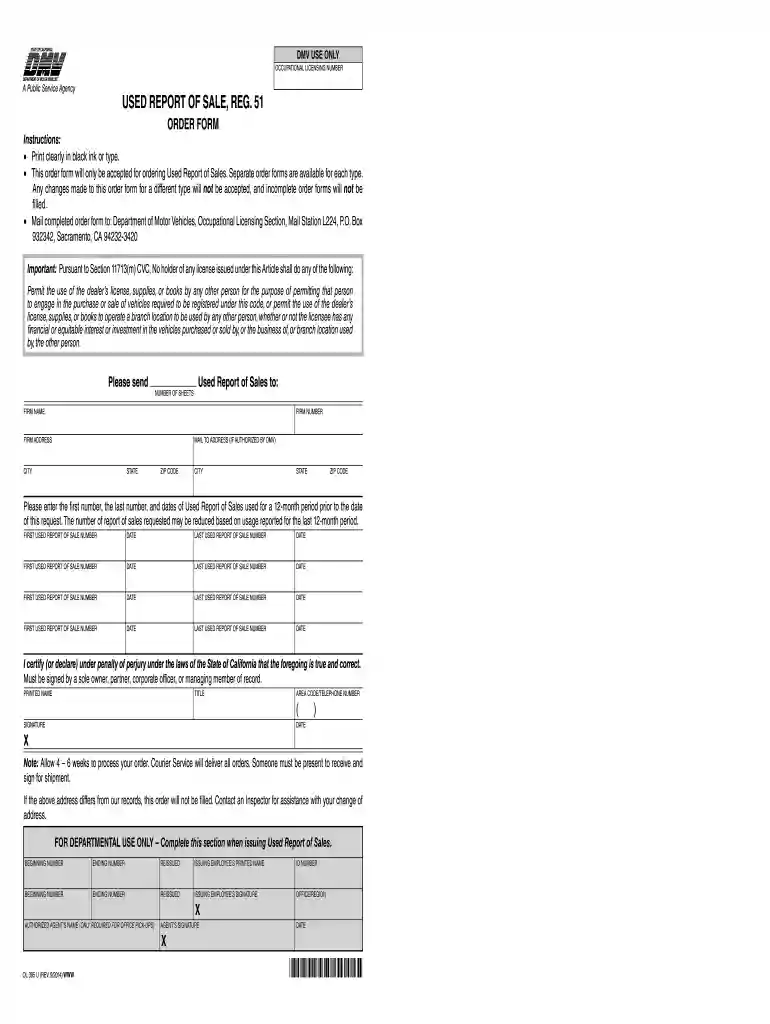
reg 51 form pdf Preview on Page 1

California sale form 2026

Here's how it works

  • 01. Edit your reg 51 form pdf online

    Type text, add images, blackout confidential details, add comments, highlights and more.

  • 02. Sign it in a few clicks

    Draw your signature, type it, upload its image, or use your mobile device as a signature pad.

  • 03. Share your form with others

    Send reg 51 via email, link, or fax. You can also download it, export it or print it out.

How to use or fill out California Sale Form with our platform

Form edit decoration
9.5
Ease of Setup
DocHub User Ratings on G2
9.0
Ease of Use
DocHub User Ratings on G2
  1. Click ‘Get Form’ to open the California Sale Form in the editor.
  2. Begin by filling in your firm name, firm number, and firm address clearly. Ensure all information is accurate to avoid processing delays.
  3. Next, provide the mailing address if different from your firm address. This is crucial for receiving your Used Report of Sales.
  4. Enter the first and last numbers of the Used Report of Sales you have utilized over the past 12 months, along with their corresponding dates. Be precise as this will affect your order quantity.
  5. In the certification section, print your name, title, and contact number. Ensure that you sign and date the form to validate it.
  6. Review all entries for completeness and accuracy before submitting. Use our platform’s features to save or print a copy for your records.

Start using our platform today to streamline your document editing and submission process for free!

See more reg 51 form pdf versions

We've got more versions of the reg 51 form pdf form. Select the right reg 51 form pdf version from the list and start editing it straight away!

VersionsForm popularityFillable & printable
20144.8 Satisfied (142 Votes)

be ready to get more

Complete this form in 5 minutes or less

Got questions?

We have answers to the most popular questions from our customers. If you can't find an answer to your question, please contact us.

Notarization requirements for bills of sale vary by state and transaction type. Vehicles: States like Louisiana require notarization for vehicle sales. Conversely, states like California do not. Boats: Some states mandate notarization for boat transactions, ensuring secure ownership transfer.
Yes, you can create your own bill of sale using a template or an online form. However, its essential you include all required information and that both parties sign the document.
Vehicle/Vessel Transfer and Reassignment Form (REG 262) This multi-purpose form is only available directly from California DMV, but is only necessary in certain situations. For example if power of attorney is required, or if the title is missing, or if there is not enough room on the Title for any required information.
No, a notarized bill of sale is a bill of sale that has been authenticated by a notary public. A regular bill of sale does not require notarization but still serves as proof of the transaction.
Sure a bill of sale can be handwritten. As a matter of fact, it appears that a bill of sale is not technically required in California. It is just highly recommended.

Security and compliance

At DocHub, your data security is our priority. We follow HIPAA, SOC2, GDPR, and other standards, so you can work on your documents with confidence.

reg 51 form

Administrative Settlement Agreement: Suzuki Motor

1068.101(a)(1), (b)(5) a person may not sell, offer for sale, or introduce or deliver into commerce in the United States or import into the United States anyRead more

Learn more
1.020 Bill of Sale (VC 1652)

A bill of sale, as referenced in this manual generally refers to a DMV form, but any bill of sale that identifies the vehicle/vessel is acceptable.Read more

Learn more
CONTRACT AND BILL OF SALE FOR AUTOMOBILE

The Buyer agrees to register the Vehicle in his/her name with the California Department of Motor Vehicles within one week of the date of the sale.Read more

Learn more
If you believe that this page should be taken down, please follow our DMCA take down process here