Type text, add images, blackout confidential details, add comments, highlights and more.
02. Sign it in a few clicks
Draw your signature, type it, upload its image, or use your mobile device as a signature pad.
03. Share your form with others
Send it via email, link, or fax. You can also download it, export it or print it out.
How to use or fill out ftb 3520 2015 form with our platform
Ease of Setup
DocHub User Ratings on G2
Ease of Use
DocHub User Ratings on G2
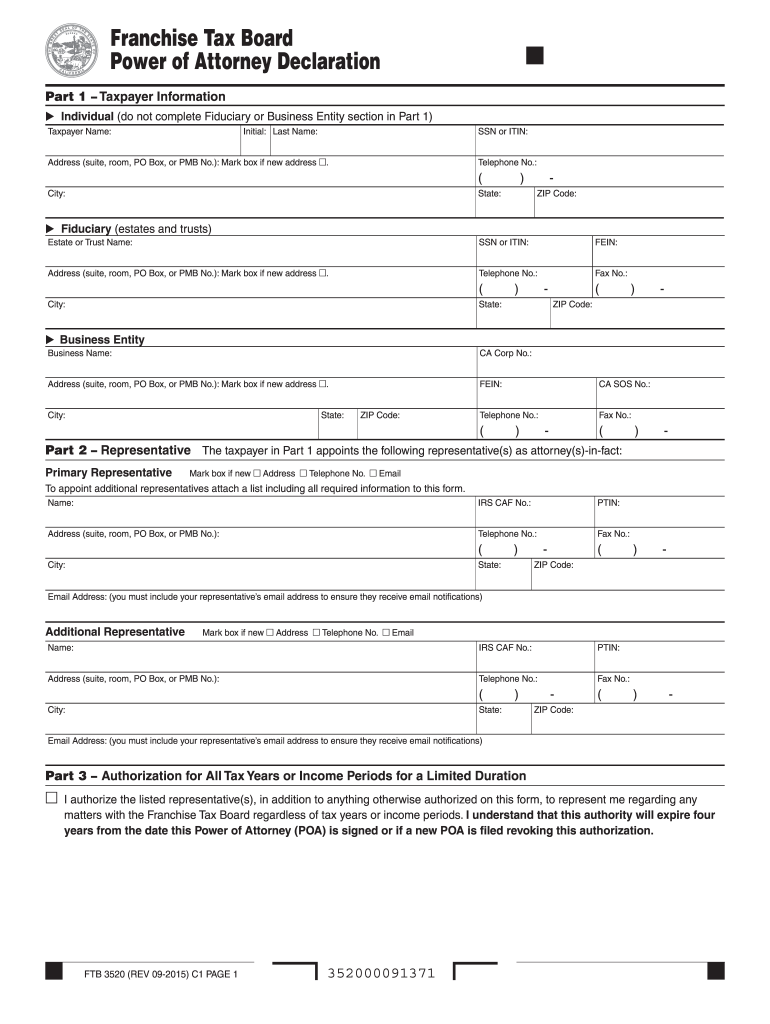
Click ‘Get Form’ to open the FTB 3520 2015 form in the editor.
In Part 1, enter your taxpayer information. If you are an individual, provide your name, SSN or ITIN, address, and telephone number. For fiduciaries or business entities, include the respective details.
Move to Part 2 to appoint your representative. Fill in their full name, IRS CAF number, PTIN, address, and email. Ensure the email is correct for notifications.
In Part 3, indicate if you authorize your representative for all tax years or specific periods. Mark the appropriate box based on your needs.
Complete Part 4 by specifying the tax years or income periods covered by this POA. Be precise; avoid general references.
Review Parts 5 through 9 for additional privileges and sign where required. Ensure all information is accurate before submitting.
Start using our platform today to fill out your FTB 3520 form easily and for free!
The Nassau Community College Interior Design Guidelines is a living document established to guide Design. Consultants through many phases of renovation andRead more
California Tax Power of Attorney (Form 3520) - DocHub PDF
Form FTB 3520, Franchise Tax Board Power of Attorney Declaration is forever in effect when you select powers in part 4, 5, and 7. You can issue a revocationRead more
Instructions for Form FTB 3520-PIT - Franchise Tax Board
Use form FTB 3520-PIT to authorize an individual to represent you in any matter before FTB, and to request, receive and inspect your confidential taxRead more
Cookie consent notice
This site uses cookies to enhance site navigation and personalize your experience.
By using this site you agree to our use of cookies as described in our Privacy Notice.
You can modify your selections by visiting our Cookie and Advertising Notice.