2012 new york tax form-2025

Get Form
2012 new york tax form Preview on Page 1

Here's how it works

01. Edit your form online
Type text, add images, blackout confidential details, add comments, highlights and more.

02. Sign it in a few clicks
Draw your signature, type it, upload its image, or use your mobile device as a signature pad.

03. Share your form with others
Send it via email, link, or fax. You can also download it, export it or print it out.

How to use or fill out 2012 New York Tax Form with DocHub

Form edit decoration
9.5
Ease of Setup
DocHub User Ratings on G2
9.0
Ease of Use
DocHub User Ratings on G2
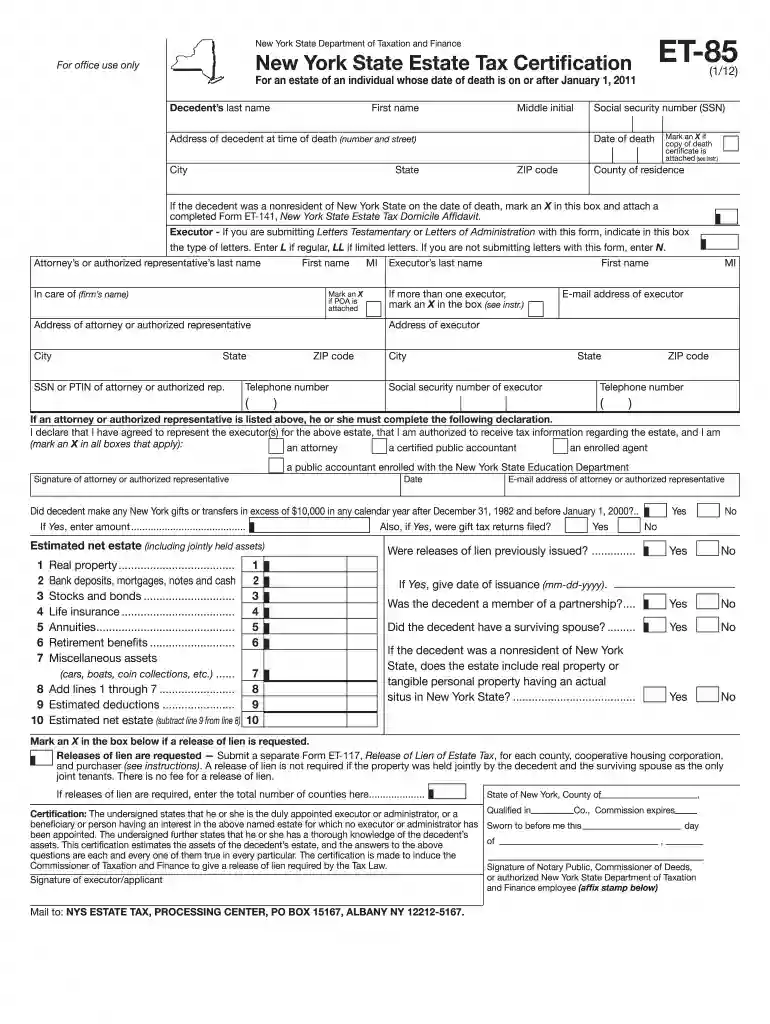
  1. Click ‘Get Form’ to open the 2012 New York Estate Tax Certification form in our editor.
  2. Begin by entering the decedent’s last name, first name, middle initial, and social security number in the designated fields.
  3. Fill in the address of the decedent at the time of death, including city, state, and ZIP code. Ensure accuracy for proper processing.
  4. Indicate the date of death and mark an X if a copy of the death certificate is attached. If applicable, check the box for nonresidents and attach Form ET-141.
  5. Provide details about the executor, including their name, address, email, and telephone number. If there are multiple executors, mark the appropriate box.
  6. Complete sections regarding estimated net estate values by entering amounts for real property, bank deposits, stocks, and other assets as outlined in the form.
  7. Review all entries for accuracy before signing. The executor must certify that they have knowledge of the decedent's assets and sign accordingly.

Start filling out your 2012 New York tax form online for free with our platform today!

See more 2012 new york tax form versions

We've got more versions of the 2012 new york tax form form. Select the right 2012 new york tax form version from the list and start editing it straight away!
Versions Form popularity Fillable & printable
2023 4.6 Satisfied (44 Votes)
2020 4.8 Satisfied (76 Votes)
2019 4.2 Satisfied (54 Votes)
2014 4.3 Satisfied (47 Votes)
2014 4.1 Satisfied (28 Votes)
2012 4.1 Satisfied (45 Votes)
2008 4 Satisfied (46 Votes)
be ready to get more

Complete this form in 5 minutes or less

Get form

Got questions?

We have answers to the most popular questions from our customers. If you can't find an answer to your question, please contact us.
Contact us
The fastest and easiest way for taxpayers to view their tax records is by logging on to their IRS Online Account. There, they can: View, print or download their tax transcripts.
The latest date, by law, you can claim a credit or federal income tax refund for a specific tax year is generally the later of these 2 dates: 3 years from the date you filed your federal income tax return, or. 2 years from the date you paid the tax.
To request copies of e-filed or paper returns for tax years 1990 and forward, complete and mail Form DTF-505, Authorization for Release of Photocopies of Tax Returns and/or Tax Information. Returns filed before 1990 are not available.
The information you provide on Form IT-2104 determines how much money your employer withholds from each paycheck. Every allowance you are eligible to claim reduces the amount of money withheld, which means more money in your pocket during the year.
Get federal tax forms for current and prior years Download them from IRS.gov. Order online and have them delivered by U.S. mail. Order by phone at 1-800-TAX-FORM (1-800-829-3676)

People also ask

In order to file a 2012 IRS Tax Return, download, complete, print, and sign the 2012 IRS Tax Forms below and mail them to the address listed on the IRS and State Forms. Select your state(s) and download, complete, print, and sign your 2012 State Tax Return income forms.
Log in to your MyGov account, select Link a Service, and choose the ATO. Youll be prompted for your Tax File Number (TFN) and other details such as bank account information from a previous tax return, a notice of assessment reference number, or your superannuation fund details.

Related links