




01. Edit your 2307 bir form excel online
Type text, add images, blackout confidential details, add comments, highlights and more.

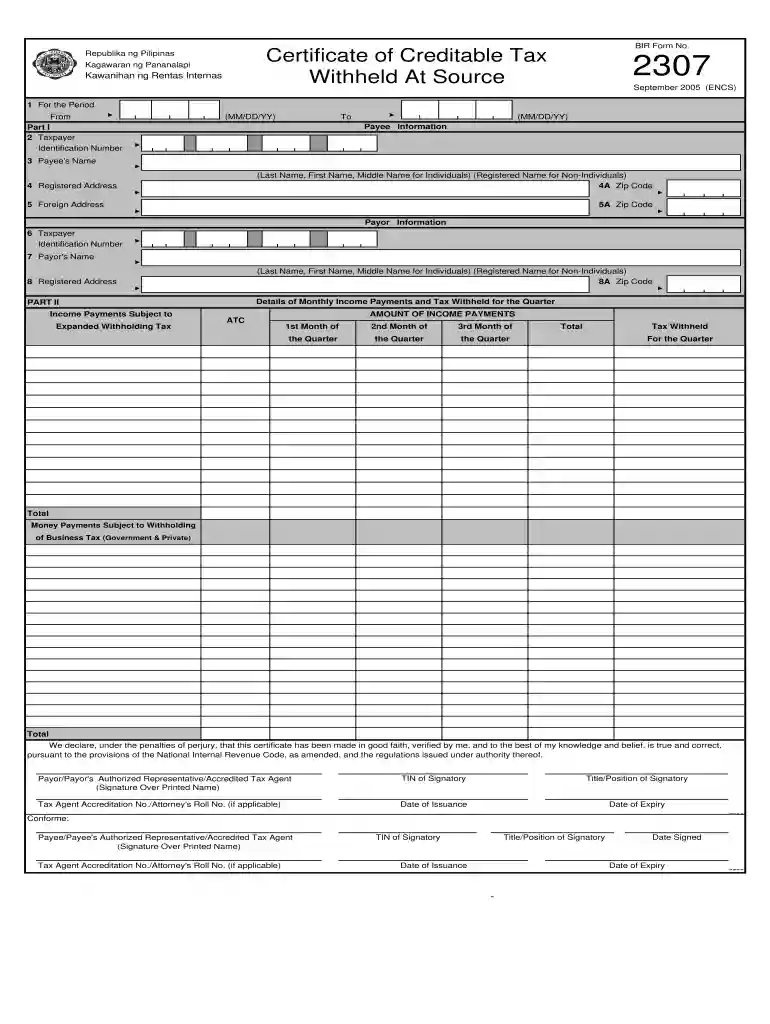
Type text, add images, blackout confidential details, add comments, highlights and more.

Draw your signature, type it, upload its image, or use your mobile device as a signature pad.

Send bir form 2307 excel format free download via email, link, or fax. You can also download it, export it or print it out.
The 2307 form, officially known as the Certificate of Creditable Tax Withheld At Source, is a crucial document in the Philippines used by taxpayers to report income subject to expanded withholding tax. This editable version allows users to fill in details electronically, enhancing convenience and efficiency. Within the context of U.S. businesses and expatriates dealing with international tax obligations, being familiar with the functionalities of an editable version of this form can streamline compliance processes.
To utilize the editable version of the 2307 form effectively, follow these steps:
Download the Form: Access a trusted source for the 2307 form editable download, ensuring it is formatted in Excel or PDF.
Fill in Your Details: Input the necessary information, including taxpayer identification numbers, payee details, and amounts withheld. The editable fields facilitate quick entry without printing the form.
Verify Information: Double-check the form for accuracy. All entries should match your financial records to avoid issues during tax filing.
Save and Share: Once completed, save the document and share it with the necessary parties, such as your accountant or the BIR if required.
Keep a Record: Maintain a copy of the filled form for your records, as it serves as an official document for tax compliance.
Understanding key terminologies associated with the 2307 form is vital for proper usage:
Adhering to filing deadlines is essential for compliance:
To accurately complete the 2307 form, collect the following documents:
The 2307 form can be submitted through various methods, ensuring flexibility depending on user preferences:
Focusing on the essential components of the form helps improve completion speed:
Here are practical scenarios illustrating the usage of the 2307 form:
For American businesses operating in the Philippines or with Filipino compliance needs, understanding IRS guidelines can aid in proper handling of the 2307 form, ensuring adherence to both U.S. and Philippine regulations, particularly regarding international tax obligations.
Overall, the 2307 form editable download serves as a practical solution for businesses managing withholding tax responsibilities. With features that enhance usability and ensure compliance, understanding how to effectively use and complete this form is vital for any taxpayer navigating these requirements.
We've got more versions of the 2307 bir form excel form. Select the right 2307 bir form excel version from the list and start editing it straight away!
At DocHub, your data security is our priority. We follow HIPAA, SOC2, GDPR, and other standards, so you can work on your documents with confidence.




The data in the Physician Roster will not be editable from within the online submission platform. If the Provider Organization needs to make an edit to theRead more
This new format will be introduced first for AKDN/C and WB will refuse to download the old format to these devices. It will protect the exchange of FW files.Read more
SFF: FILL OUT A NEW FORM BUTTON IS DISABLED IN THE MY FORMS PAGE. Add permission list to make sure that fluid form page works well in small form factor device.Read more


