



01. Edit your vanderbilt assessment online
Type text, add images, blackout confidential details, add comments, highlights and more.

Type text, add images, blackout confidential details, add comments, highlights and more.

Draw your signature, type it, upload its image, or use your mobile device as a signature pad.

Send vanderbilt scales teacher via email, link, or fax. You can also download it, export it or print it out.
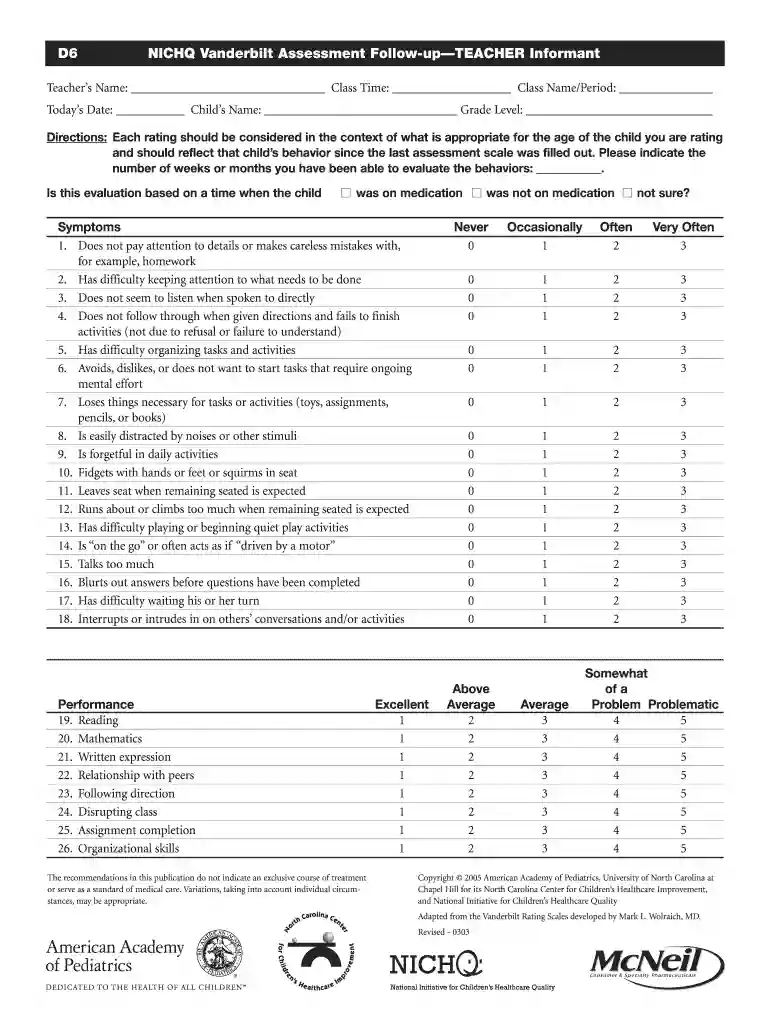
The Vanderbilt Assessment Teacher fillable PDF is a specialized form designed for educators to evaluate students, particularly in relation to potential ADHD and related behaviors. This tool gathers insights into a child's academic performance and behavioral issues, facilitating a structured approach to assessment. The form allows for detailed rating of specific symptoms associated with ADHD, enabling educators to provide comprehensive feedback that can guide further evaluation and intervention strategies.
The form contains multiple sections that address various aspects of a child's behavior and performance.
When completing the Vanderbilt Assessment Teacher PDF, it is essential to follow a systematic approach to ensure accuracy and comprehensiveness.
The Vanderbilt Assessment Teacher fillable PDF serves several crucial purposes in educational settings:
Sensitive information about a student's behavior and academic performance is collected through the Vanderbilt Assessment Teacher form, necessitating careful handling to ensure compliance with legal standards.
Real-world scenarios illustrate the applications of the Vanderbilt Assessment Teacher form:
Utilizing the Vanderbilt Assessment Teacher fillable PDF enables educators to gather essential information regarding a child's behavior and performance, facilitating better outcomes for students struggling with attention-related issues. Through effective collaboration and data collection, schools can ensure that all children receive the support they need to succeed academically and socially.
If you regularly deal with documents kept in your Google Drive, DocHub is a superb solution for you to easily and quickly complete, modify, and sign them. This editor integrates well with Google services, so you can export your vanderbilt adhd assessment teacher from your Google Drive to the editor without the need of downloading and re-uploading it. Right-click on your document, select Open With → DocHub PDF Sign and Edit. In our editor, add and assign Signature Fields for all people involved, then click on the Menu button above → Send → select how you want to share your form.
It is a no-brainer on a computer or via a mobile device to fill out a vanderbilt assessment teacher pdf with DocHub. All you need to do is open any installed internet browser on your smartphone and proceed to the DocHub site. Once authenticated, add your document and open it in editing mode. Use our toolbar to make your edits and save modifications. Optionally, keep your file in your files or send it to a recipient on the spot.
At DocHub, your data security is our priority. We follow HIPAA, SOC2, GDPR, and other standards, so you can work on your documents with confidence.




by C Condon 2010 Cited by 169 Since the Vanderbilt Assessment of Leadership in Education (VAL-ED) was developed in 2006, it has become one of the most widely used and respected measures ofRead more
Vanderbilt ADHD Diagnostic Teacher Rating Scale. Teachers Name Does not follow through on instructions and fails to finish schoolwork (not due to.Read more
Teachers Name: Class Time: Class Name/Period: Todays Date: Childs Name: Grade Level: Directions: Each rating should be considered in the contextRead more


