Type text, add images, blackout confidential details, add comments, highlights and more.
02. Sign it in a few clicks
Draw your signature, type it, upload its image, or use your mobile device as a signature pad.
03. Share your form with others
Send rf100 form online via email, link, or fax. You can also download it, export it or print it out.
How to use or fill out rf100a form with our platform
Ease of Setup
DocHub User Ratings on G2
Ease of Use
DocHub User Ratings on G2
Click ‘Get Form’ to open the rf100a form in the editor.
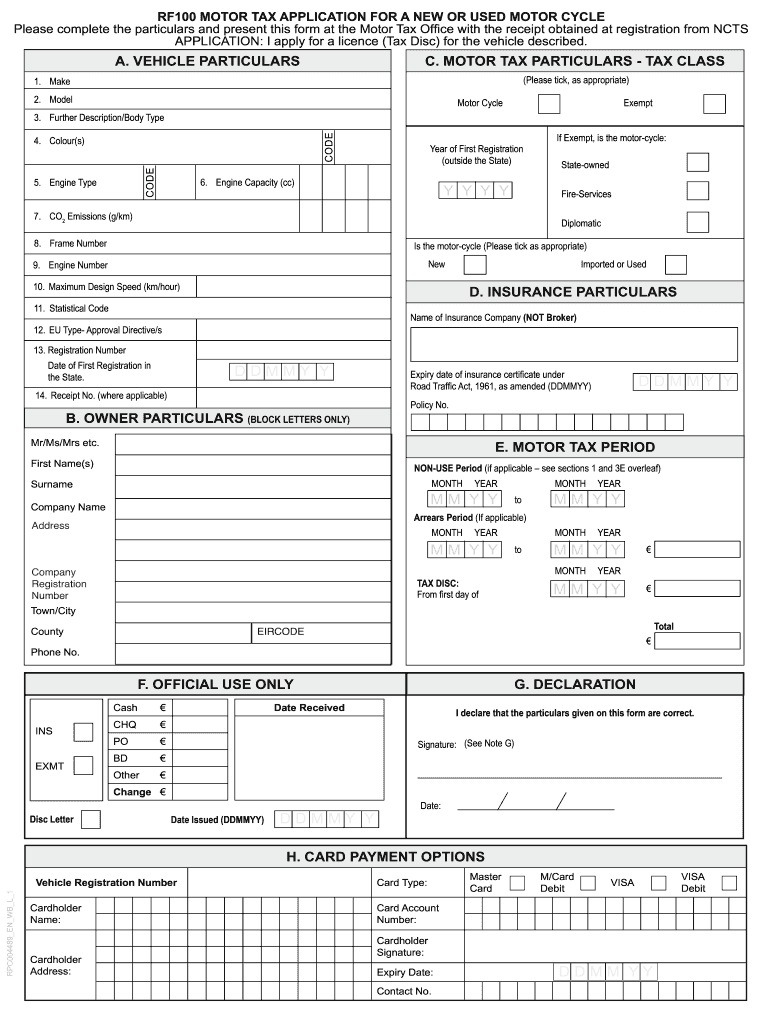
Begin with Section A, where you will enter vehicle particulars such as Make, Model, Colour, and Engine Type. Ensure all details are accurate as they are crucial for your application.
Move to Section B and fill in the Owner Particulars. Use block letters for clarity, providing your full name and address. If applicable, include company details.
In Section C, select the appropriate Tax Class by ticking the corresponding box. If your desired class is not listed, write it in the provided space.
Proceed to Section D to input your Insurance Particulars. Include the name of your insurance company, policy number, and expiry date of your insurance certificate.
Complete Section E by indicating the Motor Tax Period. Specify any non-use periods if applicable and calculate the total fee required for your tax disc.
Sign in Section G to declare that all information provided is correct. This signature must be from the vehicle's keeper.
Finally, if paying by card, fill out Section H with your card details before submitting the form at your local Motor Tax Office.
Start using our platform today to easily complete your rf100a form online for free!
Synthesis of Mixed Dinucleotides by Mechanochemistry - PMC
by F Hayat 2022 Cited by 10 We report the synthesis of vitamin B1, B2, and B3 derived nucleotides and dinucleotides generated either through mechanochemical or solution phase chemistry.Read more
Cookie consent notice
This site uses cookies to enhance site navigation and personalize your experience.
By using this site you agree to our use of cookies as described in our Privacy Notice.
You can modify your selections by visiting our Cookie and Advertising Notice.