




Here's how it works



How to use or fill out synchrony sales slip b with our platform

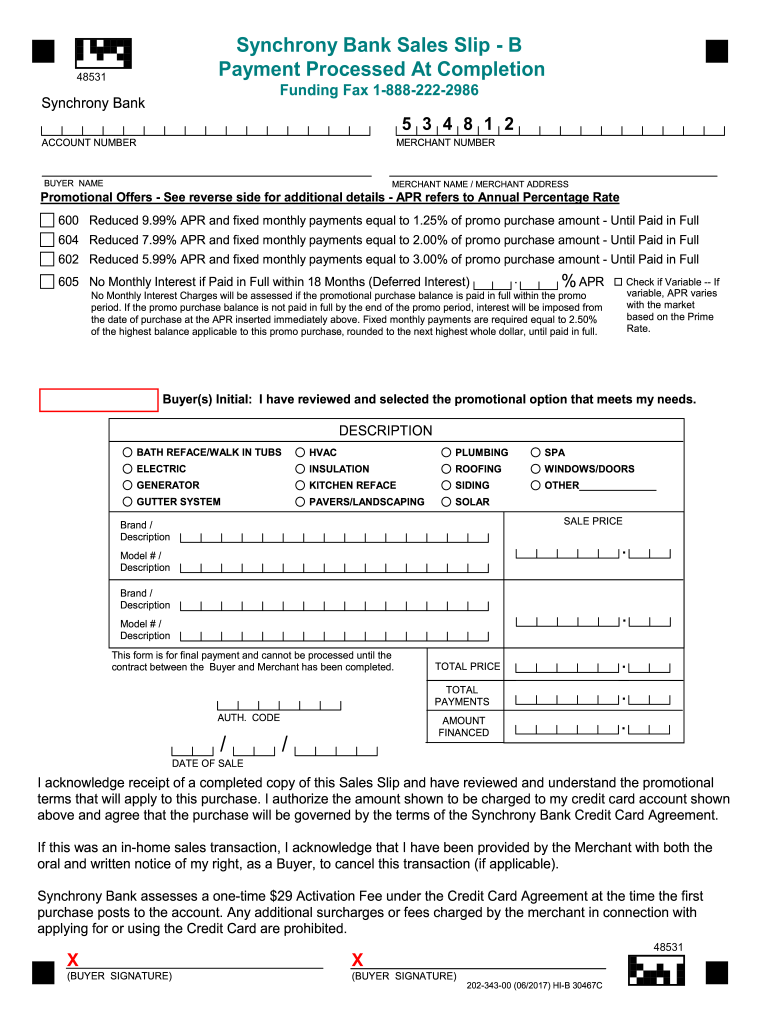
- Click ‘Get Form’ to open the synchrony sales slip b in the editor.
- Begin by entering your ACCOUNT NUMBER and MERCHANT NUMBER at the top of the form. This information is crucial for processing your payment.
- Fill in the BUYER NAME and MERCHANT NAME/ADDRESS fields accurately to ensure proper identification.
- In the Promotional Offers section, select your desired offer by checking the appropriate box. If you choose a Deferred Interest option, make sure to record the APR in the designated space.
- Initial in the Buyers Initial box under Promotional Offers to confirm that you have reviewed and selected your promotional option.
- Complete the DESCRIPTION section by detailing the products or services financed, including SALE PRICE and TOTAL PRICE.
- Finally, sign where indicated to authorize the transaction and acknowledge receipt of this completed Sales Slip.
Start using our platform today for free to streamline your document editing and signing process!
It's free
See more synchrony sales slip b versions
| Versions | Form popularity | Fillable & printable |
|---|---|---|
| 2017 | 4.8 Satisfied (116 Votes) |
Got questions?
Can I fill out and sign my dochub com fillable form online?
Sure, and it’s really straightforward! DocHub is a web-based PDF editor with advanced document processing capabilities that allow you quickly edit your forms, complete blank fields and insert new ones for other people to fill out, and create electronic signatures in several ways. Upload your dochub com fillable form, give information as requested, and select how you want to eSign your document - by typing your name, drawing your signature, uploading its image, or using a QR code.
How do you edit synchrony transact on Android?
Document editing with DocHub is equally convenient on desktop and mobile devices. You just need an internet browser to modify your synchrony transact on Android. Open our website and sign in to access the tools you require. Add your document and introduce your intended changes. Next, you can keep your form in your document storage or send it out instantly.
What is the parent company of Synchrony Bank?
Is Synchrony Bank owned by Chase?
How to become a vendor for Synchrony Bank?
Security and compliance
At DocHub, your data security is our priority. We follow HIPAA, SOC2, GDPR, and other standards, so you can work on your documents with confidence.
Learn more


