




01. Edit your 8606 form online
Type text, add images, blackout confidential details, add comments, highlights and more.

Type text, add images, blackout confidential details, add comments, highlights and more.

Draw your signature, type it, upload its image, or use your mobile device as a signature pad.

Send 8606 formar instrucciones via email, link, or fax. You can also download it, export it or print it out.
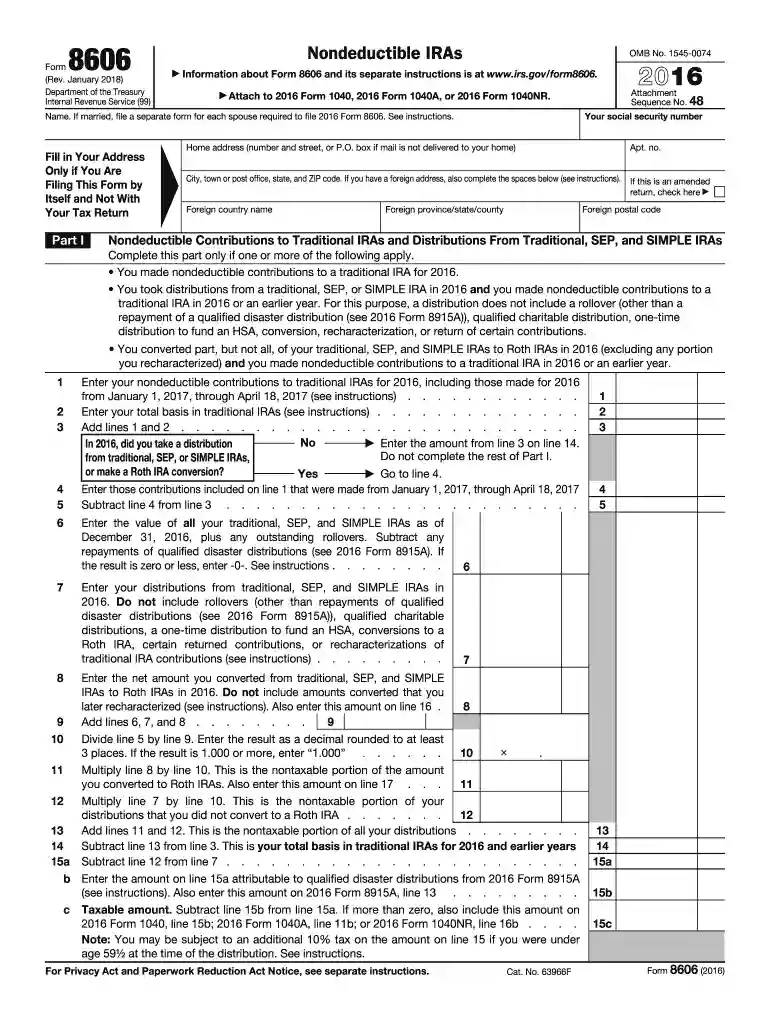
Form 8606, officially known as the Nondeductible IRAs form, is required by the IRS to report nondeductible contributions to traditional IRAs and certain distributions or conversions that occur during the tax year. In 2016, this form was crucial for taxpayers who made after-tax contributions to their IRAs, as it helped determine the taxable part of these distributions. The primary role of Form 8606 is to ensure proper tracking of IRA contributions that aren't deducted on tax returns, helping avoid double taxation in the future.
The form includes several critical sections that users need to understand:
For taxpayers who only have nondeductible IRAs, reporting using Form 8606 is mandatory, ensuring that the IRS has a clear record of all contributions and distributions.
You can acquire Form 8606 for the 2016 tax year directly from the IRS website. It's essential to have the correct year version to ensure accurate reporting, as tax regulations and form requirements might vary from year to year. Alternatively, tax software such as TurboTax may provide access to the relevant form when filing annual tax returns.
The IRS provides specific instructions that accompany Form 8606 to ensure taxpayers can accurately complete and submit it. It is critical to comply with these guidelines to avoid penalties and to ensure the proper tracking of IRA contributions and conversions.
Failing to file Form 8606 when required may result in a $50 penalty per missed form submission. Additionally, inaccurately reporting your nondeductible contributions can lead to further complications. Therefore, it's essential to complete and file this form accurately and timely.
This form is commonly used by individuals who:
These individuals must report using Form 8606 to ensure proper tax treatment of their IRA-related transactions.
To be required to file this form, the following conditions generally must be met:
This eligibility ensures that all applicable taxpayers properly report IRA transactions that could impact their taxes.


You can submit Form 8606 via electronic filing along with your federal tax return using tax software like TurboTax. In certain cases, individuals may choose to submit a paper form through mail. Understanding these submission options ensures you can choose the most convenient and efficient method for your situation.
Several popular tax preparation software, including TurboTax and QuickBooks, support the filling out and submission of Form 8606. These platforms can simplify the process through automation and built-in compliance checks, reducing errors and ensuring accuracy across filings.
Form 8606 should be submitted by the standard tax due date for the applicable tax year. For 2016, this typically fell in April 2017. Keeping track of such deadlines is crucial to avoiding penalties and ensuring every aspect of your tax filing is timely and complete.
While Form 8606 serves a specific purpose, variations and related forms may be necessary depending on your unique financial situation or changes in tax laws. It's essential to verify with a tax professional or the IRS whether any updates or different forms apply to your circumstances for 2016.
We've got more versions of the 8606 form form. Select the right 8606 form version from the list and start editing it straight away!
| Versions | Form popularity | Fillable & printable |
|---|---|---|
| 2025 | 4.8 Satisfied (42 Votes) | |
| 2024 | 4.6 Satisfied (45 Votes) | |
| 2023 | 4.2 Satisfied (42 Votes) | |
| 2022 | 4.8 Satisfied (44 Votes) | |
| 2021 | 4.8 Satisfied (139 Votes) | |
| 2020 | 4.3 Satisfied (160 Votes) | |
| 2019 | 4.4 Satisfied (64 Votes) | |
| 2018 | 4.3 Satisfied (153 Votes) | |
| 2017 | 4.3 Satisfied (107 Votes) | |
| 2016 | 4.3 Satisfied (175 Votes) | |
| 2015 | 4 Satisfied (50 Votes) | |
| 2014 | 4 Satisfied (58 Votes) | |
| 2013 | 4 Satisfied (44 Votes) | |
| 1997 | 4.2 Satisfied (38 Votes) | |
| 1996 | 4 Satisfied (49 Votes) |
At DocHub, your data security is our priority. We follow HIPAA, SOC2, GDPR, and other standards, so you can work on your documents with confidence.
You took distributions from a traditional, SEP, or SIMPLE IRA in 2016 and you made nondeductible contributions to a traditional IRA in 2016 or an earlier year.Read more
On January 1, 2019, we adopted Financial Accounting Standards Board Accounting Standards Update 2016-02, Leases (Topic 842) which requires lessees toRead more
590-A, Contributions to Individual Retirement Arrangements (IRAs); Instructions for Form 8606. 2016 Workbook. Copyrighted by the Board of Trustees of theRead more


