Et 706 2014 form-2026

Get Form
et 706 2014 form Preview on Page 1

Here's how it works

01. Edit your form online
Type text, add images, blackout confidential details, add comments, highlights and more.

02. Sign it in a few clicks
Draw your signature, type it, upload its image, or use your mobile device as a signature pad.

03. Share your form with others
Send it via email, link, or fax. You can also download it, export it or print it out.

How to use or fill out et 706 2014 form with our platform

Form edit decoration
9.5
Ease of Setup
DocHub User Ratings on G2
9.0
Ease of Use
DocHub User Ratings on G2
  1. Click ‘Get Form’ to open the ET-706 form in the editor.
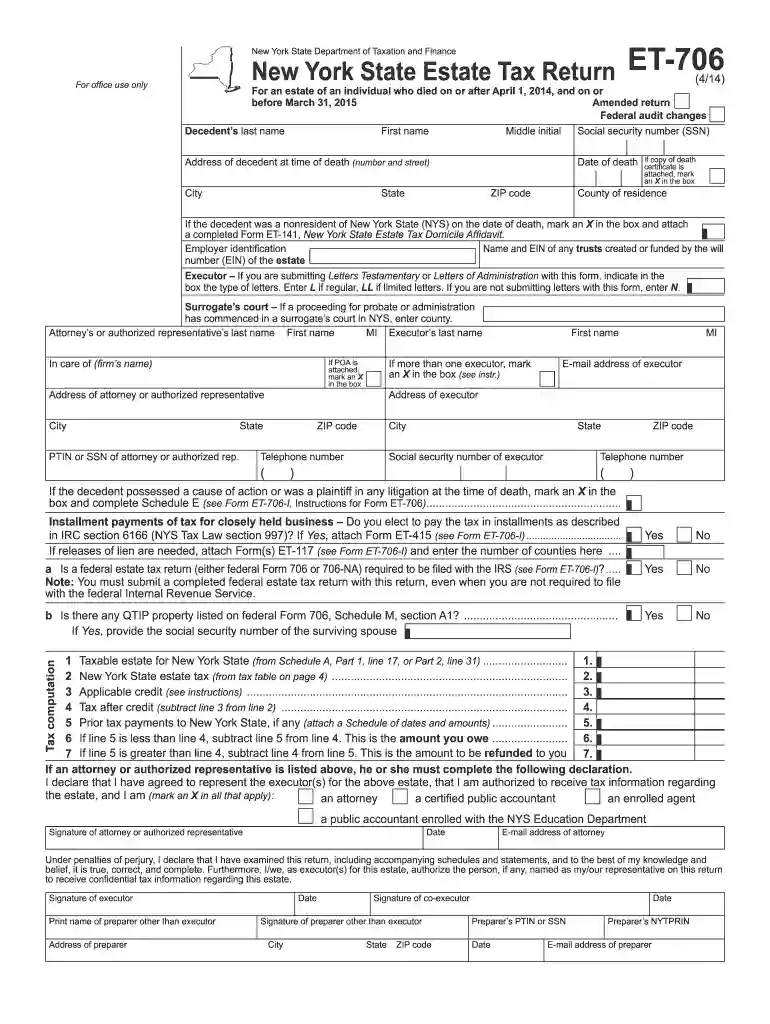
  2. Begin by filling in the decedent's personal information, including their last name, first name, middle initial, and social security number. Ensure accuracy as this information is crucial for processing.
  3. Provide the address of the decedent at the time of death, including city, state, and ZIP code. If a copy of the death certificate is attached, mark an X in the designated box.
  4. Indicate whether the decedent was a nonresident of New York State by marking the appropriate box and attaching Form ET-141 if applicable.
  5. Complete sections regarding executor details. Enter names, addresses, and contact information for all executors involved. If there are multiple executors, ensure to mark that section accordingly.
  6. Proceed to Schedule A for computation of taxable estate. Fill out each line carefully based on federal Form 706 data and any additional schedules required.
  7. Review all entries for accuracy before submitting your completed form through our platform. Make sure to sign where indicated and attach any necessary documents.

Start using our platform today to fill out your ET-706 form online for free!

See more et 706 2014 form versions

We've got more versions of the et 706 2014 form form. Select the right et 706 2014 form version from the list and start editing it straight away!
Versions Form popularity Fillable & printable
2019 4.8 Satisfied (41 Votes)
2017 4.4 Satisfied (193 Votes)
2016 4.4 Satisfied (183 Votes)
2015 4.2 Satisfied (108 Votes)
2014 4.1 Satisfied (28 Votes)
2013 4.2 Satisfied (35 Votes)
2011 4.4 Satisfied (40 Votes)
2010 4 Satisfied (41 Votes)
2006 4 Satisfied (59 Votes)
2004 4.4 Satisfied (69 Votes)
be ready to get more

Complete this form in 5 minutes or less

Get form

Got questions?

We have answers to the most popular questions from our customers. If you can't find an answer to your question, please contact us.
Contact us
How to report the taxable portion of the sale of inherited property. Upon selling an inherited asset, if the inherited property produces a gain, you must report it as income on your federal income tax return.
This code indicates that Form 706, which is used to determine the amount of the estate tax, has been accepted as filed and an examination has been concluded.
If the estate generates more than $600 in annual gross income, you are required to file Form 1041, U.S. Income Tax Return for Estates and Trusts. An estate may also need to pay quarterly estimated taxes. See Form 1041 instructions for information on when to file quarterly estimated taxes.
Understanding the schedules on two federal forms Form 706 is the Federal Estate Tax Return and Form 709 is the Federal Gift Tax Return as well as the potential pitfalls that can occur in trust administration, is crucial for accurate reporting.
An estate tax return (Form 706) must be filed if the gross estate of the decedent (who is a U.S. citizen or resident), increased by the decedents adjusted taxable gifts and specific gift tax exemption, is valued at more than the filing threshold for the year of the decedents death, as shown in the table below.

Security and compliance

At DocHub, your data security is our priority. We follow HIPAA, SOC2, GDPR, and other standards, so you can work on your documents with confidence.

Learn more
ccpa2
pci-dss
gdpr-compliance
hipaa
soc-compliance

People also ask

At our firm, we frequently encounter these errors that can put families at risk: Not filing Form 706 because the estate falls below the exemption threshold. Incomplete or inaccurate asset valuations that trigger IRS audits. Missing critical deadlines for filing or requesting extensions.
The executor of a decedents estate uses Form 706 to figure the estate tax imposed by chapter 11 of the Internal Revenue Code. This tax is levied on the entire taxable estate and not just on the share received by a particular beneficiary.

Related links