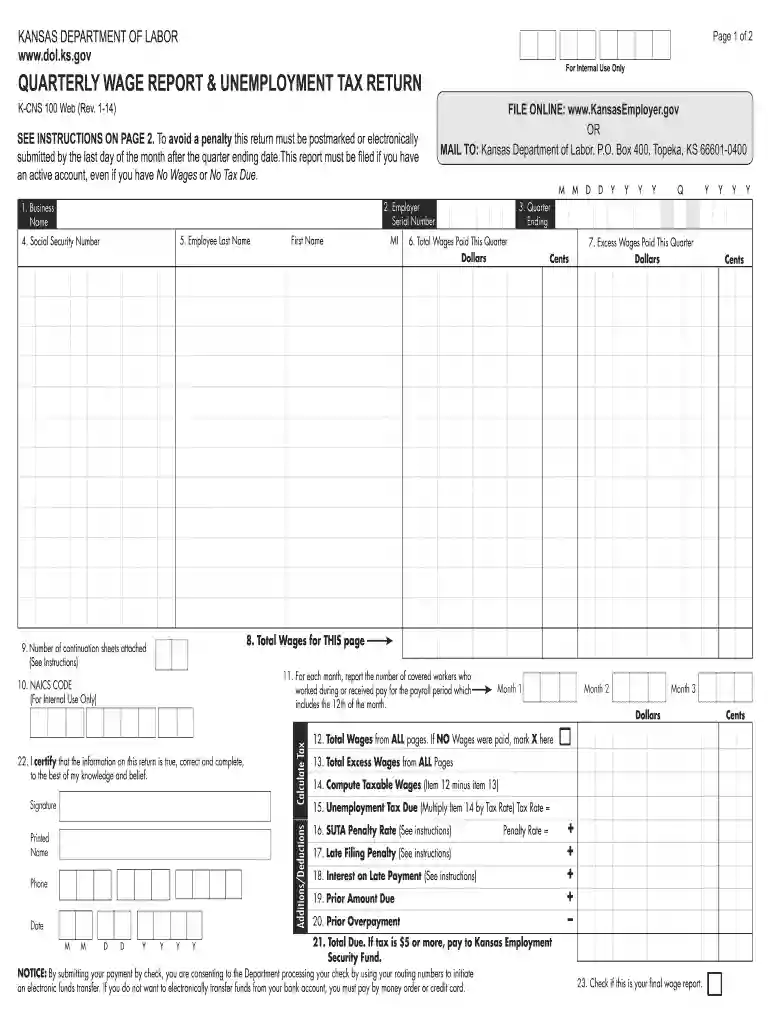
Kansas department of labor quarterly report 2026

Get Form
kansas unemployment tax form Preview on Page 1

Here's how it works

01. Edit your kansas unemployment tax form online
Type text, add images, blackout confidential details, add comments, highlights and more.

02. Sign it in a few clicks
Draw your signature, type it, upload its image, or use your mobile device as a signature pad.

03. Share your form with others
Send kansas quarterly wage report via email, link, or fax. You can also download it, export it or print it out.

How to use or fill out Kansas Department of Labor Quarterly Report with Our Platform

Form edit decoration
9.5
Ease of Setup
DocHub User Ratings on G2
9.0
Ease of Use
DocHub User Ratings on G2
  1. Click ‘Get Form’ to open the Kansas Department of Labor Quarterly Wage Report in the editor.
  2. Begin by entering your business name and employer serial number in the designated fields at the top of the form.
  3. Fill in the quarter ending date using the MM/DD/YYYY format, ensuring accuracy to avoid penalties.
  4. List each employee's last name, first name, middle initial, and Social Security number in the respective fields.
  5. Report total wages paid this quarter for each employee in the provided section, ensuring all amounts are accurate.
  6. Complete sections for excess wages and taxable wages as instructed, calculating totals carefully.
  7. Certify that all information is true by signing and providing your printed name, phone number, and date at the bottom of the form.

Start filling out your Kansas Department of Labor Quarterly Report online for free today!

See more kansas department of labor quarterly report versions

We've got more versions of the kansas department of labor quarterly report form. Select the right kansas department of labor quarterly report version from the list and start editing it straight away!
Versions Form popularity Fillable & printable
2018 4.9 Satisfied (47 Votes)
2014 4.4 Satisfied (477 Votes)
2010 4 Satisfied (24 Votes)
2006 4.3 Satisfied (72 Votes)
be ready to get more

Complete this form in 5 minutes or less

Get form

Got questions?

We have answers to the most popular questions from our customers. If you can't find an answer to your question, please contact us.
Contact us

Electronic document approval demands a software solution that works in compliance with data security and eSignature standards. DocHub is an excellent tool for that, because it fulfills all the above mentioned requirements. Whatever method you like to sign your k cns 100 in DocHub, your eSignature will be legally binding and court-admissible.

You may complete and eSign your kansas department of labor complaint on the internet, even on a tight deadline. All you need to access top-notch editing tools on any device is a DocHub profile, that you can register within a couple of moments. Once you register, upload your document or find what you are searching for in our catalog, complete it utilizing the editing tools you need, and put your electronic signature on it at the end.

As of July 1, 2024, the minimum salary for exempt employees must be at least $844 per week. Starting Jan. 1, 2025, this minimum increases to $1,128 per week. Reclassifying employees as non-exempt can have major implications.
Kansas State Unemployment Insurance (SUI) Kansas SUI Tax Details Taxable Wage Base$14,000 Employee Subject to Tax No Rates for Experienced Employers 0.00% - 6.65% Rates for New Employers 1.75%2 more rows Jan 13, 2025
Purpose of the K-4 form: A completed withholding allowance certificate will let your employer know how much Kansas income tax should be withheld from your pay on income you earn from Kansas sources. Because your tax situation may change, you may want to re-figure your withholding each year.

Security and compliance

At DocHub, your data security is our priority. We follow HIPAA, SOC2, GDPR, and other standards, so you can work on your documents with confidence.

Learn more
ccpa2
pci-dss
gdpr-compliance
hipaa
soc-compliance

People also ask

New Hire Report (K-CNS 436) This form may be used to report required information about new hires at a Kansas business within 20 days of the hiring.
New hire reporting is the process by which you report information on your newly-hired employees to the California Employment Development Departmentopens in a new window. New hire reports are matched against child support records at the state and national levels to locate parents who are not paying child support.
In certain states, independent contractors also require a new hire report (for example, California and Texas), even though the federal law does not mandate it.

kansas unemployment employer login