Meeting minutes template 2026

Get Form
sample of minutes of meeting pdf Preview on Page 1

Here's how it works

01. Edit your sample of minutes of meeting pdf online
Type text, add images, blackout confidential details, add comments, highlights and more.
02. Sign it in a few clicks
Draw your signature, type it, upload its image, or use your mobile device as a signature pad.
03. Share your form with others
Send free minutes template google docs via email, link, or fax. You can also download it, export it or print it out.

How to use or fill out meeting minutes template with our platform

Form edit decoration
9.5
Ease of Setup
DocHub User Ratings on G2
9.0
Ease of Use
DocHub User Ratings on G2
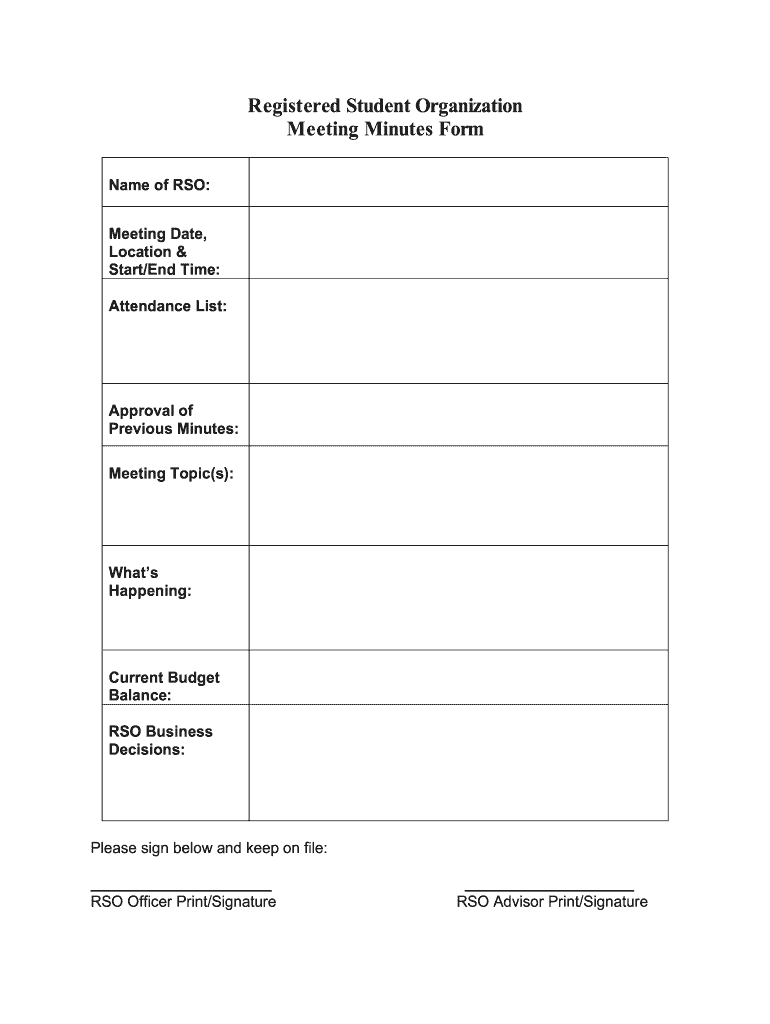
  1. Click ‘Get Form’ to open the meeting minutes template in the editor.
  2. Begin by entering the 'Name of RSO' at the top of the form. This identifies your registered student organization.
  3. Next, fill in the 'Meeting Date, Location & Start/End Time' section. This provides context for when and where the meeting took place.
  4. In the 'Attendance List' field, list all attendees to ensure accurate records of participation.
  5. For 'Approval of Previous Minutes', indicate whether previous minutes were approved and note any amendments if necessary.
  6. Under 'Meeting Topic(s)', summarize key discussion points to keep everyone informed about what was covered.
  7. 'What’s Happening' allows you to detail ongoing projects or announcements relevant to your organization.
  8. 'Current Budget Balance' is crucial for financial transparency; input your latest budget figures here.
  9. 'RSO Business Decisions' should capture any resolutions or decisions made during the meeting for future reference.
  10. Finally, ensure that both RSO Officer and Advisor sign below, providing their print names and signatures for official documentation.

Start using our platform today to streamline your document editing and enhance your meeting management!

be ready to get more

Complete this form in 5 minutes or less

Get form

Security and compliance

At DocHub, your data security is our priority. We follow HIPAA, SOC2, GDPR, and other standards, so you can work on your documents with confidence.

Learn more
ccpa2
pci-dss
gdpr-compliance
hipaa
soc-compliance