Ky inheritance tax 2012 form-2026

Get Form
ky inheritance tax 2012 form Preview on Page 1

Here's how it works

01. Edit your form online
Type text, add images, blackout confidential details, add comments, highlights and more.
02. Sign it in a few clicks
Draw your signature, type it, upload its image, or use your mobile device as a signature pad.
03. Share your form with others
Send it via email, link, or fax. You can also download it, export it or print it out.

How to use or fill out ky inheritance tax 2012 form with DocHub

Form edit decoration
9.5
Ease of Setup
DocHub User Ratings on G2
9.0
Ease of Use
DocHub User Ratings on G2
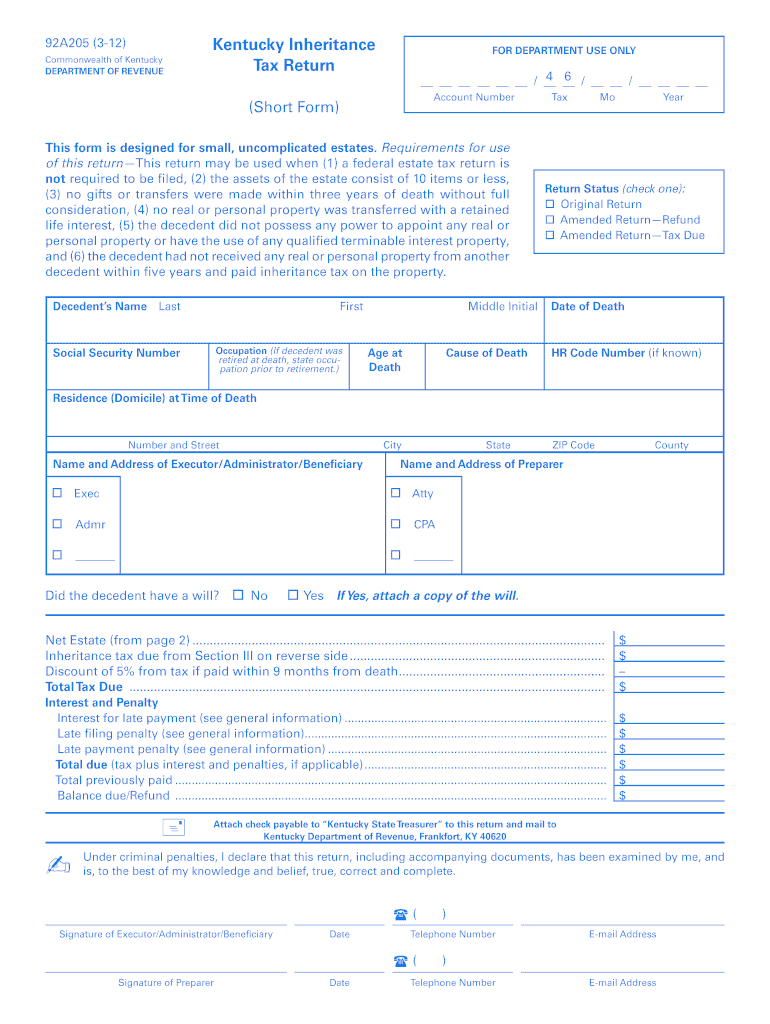
  1. Click ‘Get Form’ to open the Kentucky Inheritance Tax Return (Short Form) in our editor.
  2. Begin by filling in the decedent's name, Social Security Number, and occupation. Ensure you provide accurate details as this information is crucial for processing.
  3. Complete the residence address at the time of death, including city, state, and ZIP code. This helps establish jurisdiction for tax purposes.
  4. In Section I, list all items owned by the decedent. Include descriptions and fair cash values at the date of death. If applicable, complete Form 92A204 for real estate valuations.
  5. Proceed to Section II to itemize deductions such as funeral expenses and debts. Ensure that total deductions do not exceed $5,000 for certain categories.
  6. In Section III, list names of heirs and beneficiaries along with their respective shares of property received. Calculate the total inheritance tax due based on these distributions.
  7. Finally, review all entries for accuracy before signing as executor or preparer. Attach any required documents like a will if applicable.

Start using our platform today to fill out your Kentucky Inheritance Tax Return easily and for free!

See more ky inheritance tax 2012 form versions

We've got more versions of the ky inheritance tax 2012 form form. Select the right ky inheritance tax 2012 form version from the list and start editing it straight away!
Versions Form popularity Fillable & printable
2016 4.9 Satisfied (450 Votes)
2015 4.2 Satisfied (53 Votes)
2012 4.1 Satisfied (56 Votes)
be ready to get more

Complete this form in 5 minutes or less

Get form

Got questions?

We have answers to the most popular questions from our customers. If you can't find an answer to your question, please contact us.
Contact us
Transfer assets to a trust Trusts are another way that you can reduce or avoid inheritance tax. This is because any money, property, investments or other assets that are transferred into the ownership of a trust and its trustees will be outside of your estate for inheritance tax purposes.
In Kentucky, if you have no will, your spouse only gets all your property if you die and leave no descendants, parents, siblings, or descendants of siblings. If you have descendants but no spouse, your descendants inherit everything, divided equally among them.
Affidavit of Exemption It is not necessary to file a No Tax Due Inheritance Tax Return with the Department of Revenue. If an Affidavit of Exemption is submitted to the Court, do not send a copy of the affidavit to the Kentucky Department of Revenue.
KY 720 Information All corporations, other than S corporations, are required by law to file a Kentucky Corporation Income Tax and LLET Return. Any corporation electing S corporation treatment in accordance with Sections 1361(a) and 1362(a) of the Internal Revenue Code must use Form 720S and related schedules.
Kentucky inheritance taxes affect only estates or beneficial interests passing to Classes B and C beneficiaries. Class B beneficiaries have a $1,000 exemption; the remainder of assets are taxable at a rate of 4% to 16%. Class C beneficiaries receive a $500 exemption and 6% to 16% tax rate.

Security and compliance

At DocHub, your data security is our priority. We follow HIPAA, SOC2, GDPR, and other standards, so you can work on your documents with confidence.

Learn more
ccpa2
pci-dss
gdpr-compliance
hipaa
soc-compliance

People also ask

In general, any inheritance you receive does not need to be reported to the IRS. You typically dont need to report inheritance money to the IRS because inheritances arent considered taxable income by the federal government. That said, earnings made off of the inheritance may need to be reported.
Generally, beneficiaries do not pay income tax on money or property that they inherit, but there are exceptions for retirement accounts, life insurance proceeds, and savings bond interest. Money inherited from a 401(k), 403(b), or IRA is taxable if that money was tax deductible when it was contributed.

Related links