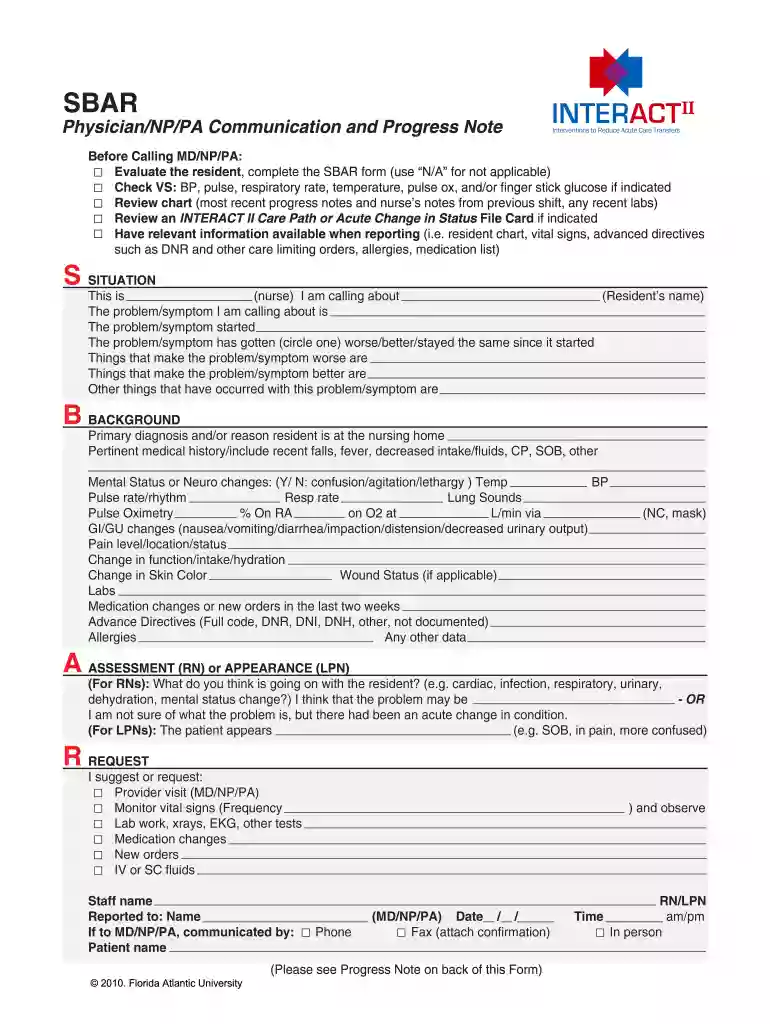
Sbar fillable 2026

Get Form
myaurora chart Preview on Page 1

Here's how it works

01. Edit your myaurora chart online
Type text, add images, blackout confidential details, add comments, highlights and more.

02. Sign it in a few clicks
Draw your signature, type it, upload its image, or use your mobile device as a signature pad.

03. Share your form with others
Send sbar via email, link, or fax. You can also download it, export it or print it out.

How to use or fill out sbar fillable with our platform

Form edit decoration
9.5
Ease of Setup
DocHub User Ratings on G2
9.0
Ease of Use
DocHub User Ratings on G2
  1. Click ‘Get Form’ to open the SBAR fillable form in the editor.
  2. Begin with the 'SITUATION' section. Fill in your name, the resident's name, and describe the problem or symptom you are addressing. Indicate when it started and whether it has worsened, improved, or remained the same.
  3. Move to the 'BACKGROUND' section. Provide details about the primary diagnosis, pertinent medical history, vital signs, and any changes in mental status or physical condition.
  4. In the 'ASSESSMENT' section, articulate your thoughts on what may be affecting the resident's health. If uncertain, note any acute changes observed.
  5. Finally, complete the 'REQUEST' section by specifying your suggestions for further action such as provider visits or lab work. Ensure all fields are filled accurately before submitting.

Start using our platform today to streamline your SBAR form completion for free!

be ready to get more

Complete this form in 5 minutes or less

Get form

Got questions?

We have answers to the most popular questions from our customers. If you can't find an answer to your question, please contact us.
Contact us

Electronic document signing requires a software solution that works in compliance with data protection and eSignature laws. DocHub is a great tool for that, because it fulfills all the aforementioned requirements. Whatever method you like to sign your sbar example in DocHub, your electronic signature will be legally binding and court-admissible.

You need only an internet connection and a browser to fill out your sbar example nursing on an iOS phone. Open the DocHub website and authenticate. Then, add your file or choose it from the list in your dashboard. Then use our editing instruments to fill out your form and preserve all your modifications. You may also send it to a dedicated recipient immediately.

SBAR stands for Situation, Background, Assessment and Recommendation. According to Safer Healthcare, SBAR was originally developed by the U.S. Navy as a way to communicate information on nuclear submarines.
They can use SBAR to communicate the important details of the case: Situation: An ambulance brought Mr. Background: The patient has no docHub past medical history. Assessment: Because the patient has a cough, chest pain and shortness of breath, I think he has pneumonia.
The four SBAR headings allow you to frame conversations in a standardised was as follows: Situation. Concisely identify the current situation and give a description of the purpose for this communication. Background. Put the current situation into its context. Assessment. Recommendation.

People also ask

SBAR, which stands for Situation, Background, Assessment, and Recommendation (or Request), is a structured communication framework that can help teams share information about the condition of a patient or team member or about another issue your team needs to address.
SBAR Example Situation: The patient has been hospitalized with an upper respiratory infection. Respiration are labored and have increased to 28 breaths per minute within the past 30 minutes. Usual interventions are ineffective.

sbar format