Type text, add images, blackout confidential details, add comments, highlights and more.
02. Sign it in a few clicks
Draw your signature, type it, upload its image, or use your mobile device as a signature pad.
03. Share your form with others
Send toyota reimbursement via email, link, or fax. You can also download it, export it or print it out.
How to use or fill out Toyota Claims with Our Platform
Ease of Setup
DocHub User Ratings on G2
Ease of Use
DocHub User Ratings on G2
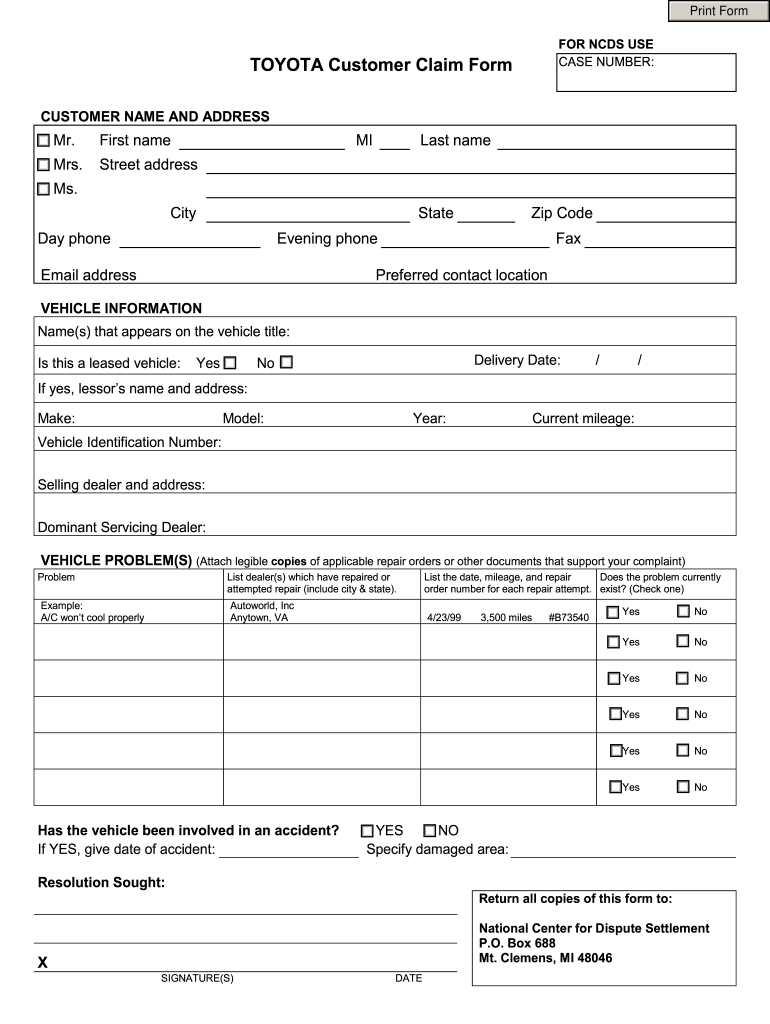
Click ‘Get Form’ to open the Toyota Customer Claim Form in the editor.
Begin by entering your personal information in the 'Customer Name and Address' section. Fill in your first name, last name, street address, city, state, zip code, and contact numbers.
In the 'Vehicle Information' section, provide details such as the vehicle's make, model, year, current mileage, and Vehicle Identification Number (VIN). If applicable, indicate whether it is a leased vehicle and include the lessor’s name and address.
Describe the vehicle problem(s) clearly. Attach any relevant repair orders or documents that support your complaint. List any dealers that have attempted repairs along with their locations.
Indicate if the problem currently exists by checking 'Yes' or 'No'. If your vehicle has been involved in an accident, provide the date and specify any damaged areas.
Finally, sign and date the form before submitting it to the National Center for Dispute Settlement at the provided address.
Start using our platform today to fill out your Toyota claims easily and for free!
If your claim qualifies for coverage, the dealership will repair your vehicle within. 30 days (unless a shorter period is required by law). If your claim isRead more
Plaintiff filed a lawsuit against the manufacturer, Toyota, based on the theory of defective design due to the absence of an air bag. Defendant contendsRead more
Cookie consent notice
This site uses cookies to enhance site navigation and personalize your experience.
By using this site you agree to our use of cookies as described in our Privacy Notice.
You can modify your selections by visiting our Cookie and Advertising Notice.