




01. Edit your rita form 37 2022 online
Type text, add images, blackout confidential details, add comments, highlights and more.

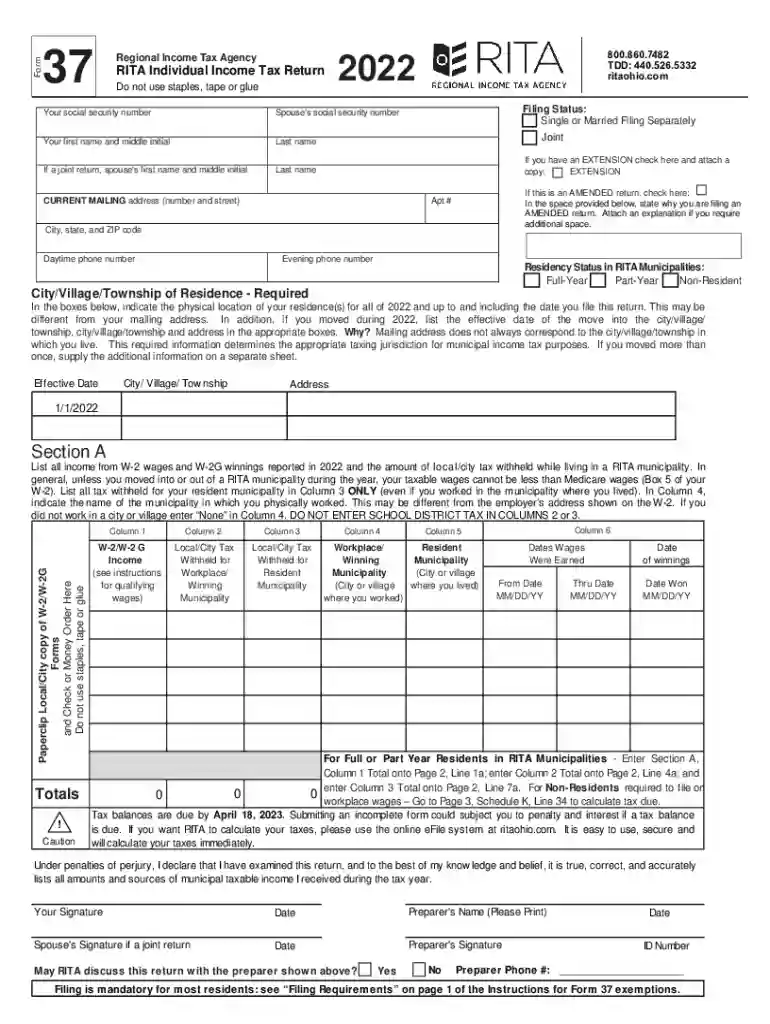
Type text, add images, blackout confidential details, add comments, highlights and more.

Draw your signature, type it, upload its image, or use your mobile device as a signature pad.

Send rita form 37 via email, link, or fax. You can also download it, export it or print it out.

Start using our platform today to simplify filling out your RITA form for free!
We've got more versions of the rita form 37 2022 form. Select the right rita form 37 2022 version from the list and start editing it straight away!
| Versions | Form popularity | Fillable & printable |
|---|---|---|
| 2024 | 4.3 Satisfied (44 Votes) | |
| 2023 | 4.4 Satisfied (28 Votes) | |
| 2022 | 4.5 Satisfied (45 Votes) | |
| 2021 | 4.1 Satisfied (48 Votes) | |
| 2020 | 4.8 Satisfied (122 Votes) | |
| 2019 | 4.3 Satisfied (52 Votes) | |
| 2018 | 4.2 Satisfied (54 Votes) | |
| 2017 | 4.4 Satisfied (1828 Votes) | |
| 2016 | 4.4 Satisfied (474 Votes) | |
| 2015 | 4.4 Satisfied (207 Votes) | |
| 2014 | 4.4 Satisfied (1186 Votes) | |
| 2013 | 4.3 Satisfied (44 Votes) | |
| 2012 | 4.3 Satisfied (70 Votes) | |
| 2011 | 4.3 Satisfied (60 Votes) | |
| 2010 | 4 Satisfied (30 Votes) |
At DocHub, your data security is our priority. We follow HIPAA, SOC2, GDPR, and other standards, so you can work on your documents with confidence.
In Person: Obtain assistance completing your return. Monday-Friday 8am to 5pm at any of the following locations: Brecksville Office - 10107 Brecksville RoadRead more
Regional Council of Governments. The Board is authorized to administer and enforce the income tax laws. Address: 10107 Brecksville Road City: OH Zip: 44141


