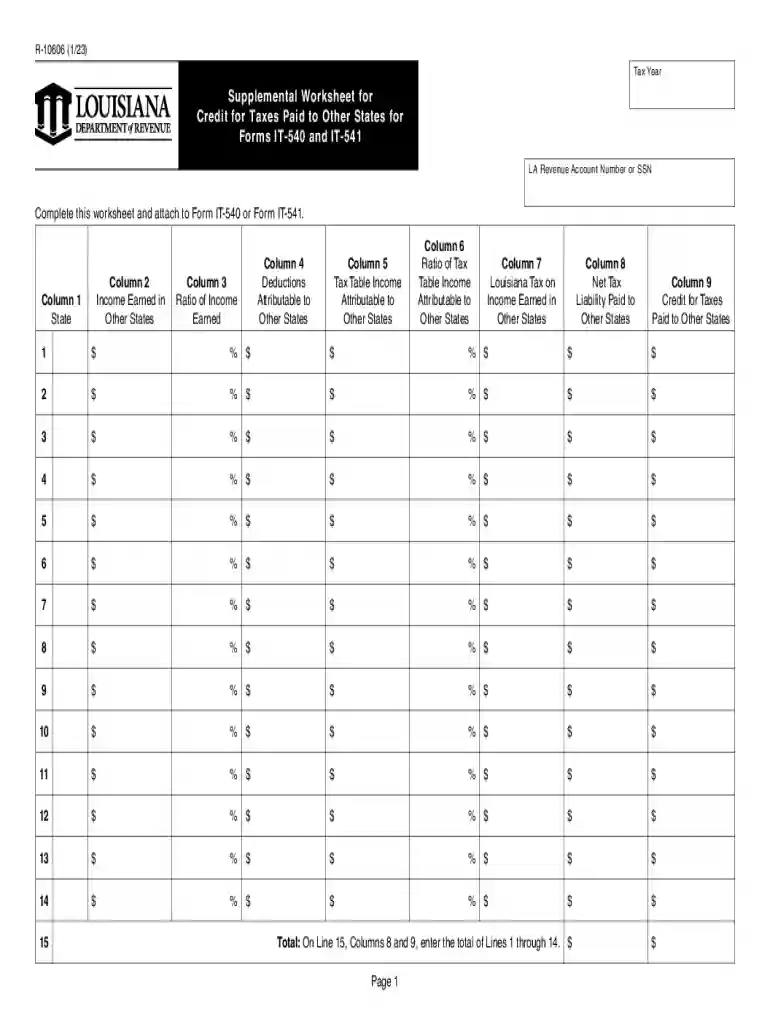
Form R-10606 Supplemental Worksheet for Credit for Taxes ... 2026

Get Form
r 10606 Preview on Page 1

Here's how it works

01. Edit your r 10606 online
Type text, add images, blackout confidential details, add comments, highlights and more.

02. Sign it in a few clicks
Draw your signature, type it, upload its image, or use your mobile device as a signature pad.

03. Share your form with others
Send form r 10606 via email, link, or fax. You can also download it, export it or print it out.

Definition and Purpose of Form R-10606

Form R-10606, also known as the Supplemental Worksheet for Credit for Taxes, is specifically designed for Louisiana residents who need to claim credit for taxes paid to other states. This form assists taxpayers in accurately reporting income earned across different states and calculating the necessary deductions and credits when filing their Louisiana income tax returns on Forms IT-540 and IT-541. By providing a structured way to report state-specific income figures and tax liabilities, Form R-10606 ensures that taxpayers avoid double taxation and receive the correct credit for taxes paid to other states.

How to Use the Form R-10606

  1. Gather Required Documents: Before starting, collect all relevant documentation including W-2 forms, 1099s, and other income statements from each state where taxes were paid.
  2. Enter State Income Details: Use the worksheet to input income figures specific to each state. Ensure that the information matches your records.
  3. Calculate Ratios and Credits: Follow the instructions on the form to compute the income ratios, which are crucial for calculating your credits.
  4. Cross-Verify With Tax Paid: Make sure the reported income and tax paid figures align with those documented in your other state tax returns.
  5. Final Review: Double-check all inputs to ensure that the calculations are accurate and that all sections of the worksheet are complete before submission.

Steps to Complete the Form R-10606

Step 1: Collect Income Data

  • Identify all income sources and the states in which they were earned.
  • Ensure each source corresponds with official documentation like pay stubs or tax forms.

Step 2: Input State Abbreviations and Income

  • Use the first columns of the worksheet to record the two-letter state abbreviations.
  • Accurately enter income figures as per each state's documentation.

Step 3: Calculate Tax Obligations and Credits

  • Enter the total amount of taxes paid to each state.
  • Calculate the applicable tax credit by following the detailed instructions provided with the form.

Step 4: Finalize and Double-check

  • Review the completed worksheet for any discrepancies.
  • Double-check calculations and ensure all necessary fields are filled.

Eligibility Criteria for Using Form R-10606

To utilize Form R-10606, you must meet the following criteria:

  • Be a resident of Louisiana with income earned in other states.
  • Have paid taxes to another state beyond Louisiana.
  • Have valid documentation proving both the income earned and taxes paid in other states during the tax year.
decoration image ratings of Dochub

Key Elements of the Form R-10606

  • State Abbreviations: A column dedicated to listing states where income was earned.
  • Income Figures: Separate columns for entering income earned in each state.
  • Tax Liabilities: Sections detailing tax paid to each state, essential for calculating credit.
  • Credit Calculation: Includes instructions for computing the credit amount based on ratios of income.

State-Specific Rules for Form R-10606

Each state may have specific rules regarding the taxation of out-of-state income.

  • Louisiana's Reciprocity Agreements: Be aware of any existing reciprocity agreements Louisiana has with other states, which may impact your tax credits.
  • Double Taxation Prevention: The form is designed to help prevent double taxation by allowing for tax credits, but state-specific rules can influence these benefits.

Examples of Using Form R-10606

Example 1: Dual-State Income

  • Scenario: A Louisiana resident works partly in Texas and partly in Louisiana.
  • Application: Use Form R-10606 to report Texas income and calculate credit against the Louisiana tax liability.

Example 2: Temporary Out-of-State Employment

  • Scenario: Employed temporarily in Georgia but paying taxes in both states.
  • Solution: Record the Georgia income, calculate the taxes paid, and find the applicable credit amount.

Required Documents for Form R-10606

  • State-Specific W-2 Forms: For accurately reporting wages and taxes paid.
  • 1099 Forms: To report other income such as dividends and contract work.
  • State Tax Returns: Copies of tax returns filed in other states to verify tax credits.

Each block in this structured content provides comprehensive guidance on the specific issues related to Form R-10606, ensuring that users have the information necessary to accurately complete and utilize the worksheet for tax credits. It includes practical examples and detailed explanations to address varied scenarios faced by Louisiana taxpayers.

See more Form R-10606 Supplemental Worksheet for Credit for Taxes ... versions

We've got more versions of the Form R-10606 Supplemental Worksheet for Credit for Taxes ... form. Select the right Form R-10606 Supplemental Worksheet for Credit for Taxes ... version from the list and start editing it straight away!
Versions Form popularity Fillable & printable
2023 4.9 Satisfied (60 Votes)
2022 4.3 Satisfied (62 Votes)
2021 4 Satisfied (54 Votes)
2020 4.1 Satisfied (36 Votes)
2018 4.1 Satisfied (23 Votes)
2016 4.3 Satisfied (29 Votes)
be ready to get more

Complete this form in 5 minutes or less

Get form

Got questions?

We have answers to the most popular questions from our customers. If you can't find an answer to your question, please contact us.
Contact us
Are there any exemptions from the sales tax? Food for home consumption; Utilities such as electricity, natural gas and water; Drugs prescribed by a physician or dentists; and. Articles traded-in on new articles.
R-10606 (1/21) Supplemental Worksheet for. Credit for Taxes Paid to Other States for Forms. IT-540 and IT-541.
By Jan. 31 of each year, Covered California sends the federal IRS form 1095-A Health Insurance Marketplace statement to members. This form is used to: Provide information for your federal taxes. Calculate the amount of Premium Tax Credit you received, any credit you may be due after filing, or the tax amount you owe.
Form 1065: U.S. Return of Partnership Income is a tax document issued by the IRS used to declare the profits, losses, deductions, and credits of a business partnership. In addition to Form 1065, partnerships must also submit a Schedule K-1 prepared for each partner.
Your tax liability is simply how much you owe in taxes. If youre a full-time employee, its usually a simple matter of consulting the tax tables for the year, and calculating your income tax on Form 1040. If youre self-employed or run your own business, its a bit more complicated.

Security and compliance

At DocHub, your data security is our priority. We follow HIPAA, SOC2, GDPR, and other standards, so you can work on your documents with confidence.

Learn more
ccpa2
pci-dss
gdpr-compliance
hipaa
soc-compliance
be ready to get more

Complete this form in 5 minutes or less

Get form

People also ask

Form 1099-C is your flag in cases of forgiven or canceled debt. If you dont receive one because youve moved, there was another discrepancy, or if your debt was less than $600, you must still include the amount on your tax return.
The Form 1098-T is a form provided to you and the IRS by an eligible educational institution that reports, among other things, amounts paid for qualified tuition and related expenses. The form may be useful in calculating the amount of the allowable education tax credits.

Related links