Processing Time Frames - Teacher Retirement System of Texas Preview on Page 1

Processing Time Frames - Teacher Retirement System of Texas 2026

Here's how it works

  • 01. Edit your form online

    Type text, add images, blackout confidential details, add comments, highlights and more.

  • 02. Sign it in a few clicks

    Draw your signature, type it, upload its image, or use your mobile device as a signature pad.

  • 03. Share your form with others

    Send it via email, link, or fax. You can also download it, export it or print it out.

How to use or fill out Processing Time Frames - Teacher Retirement System of Texas

Form edit decoration
9.5
Ease of Setup
DocHub User Ratings on G2
9.0
Ease of Use
DocHub User Ratings on G2
  1. Click ‘Get Form’ to open it in the editor.
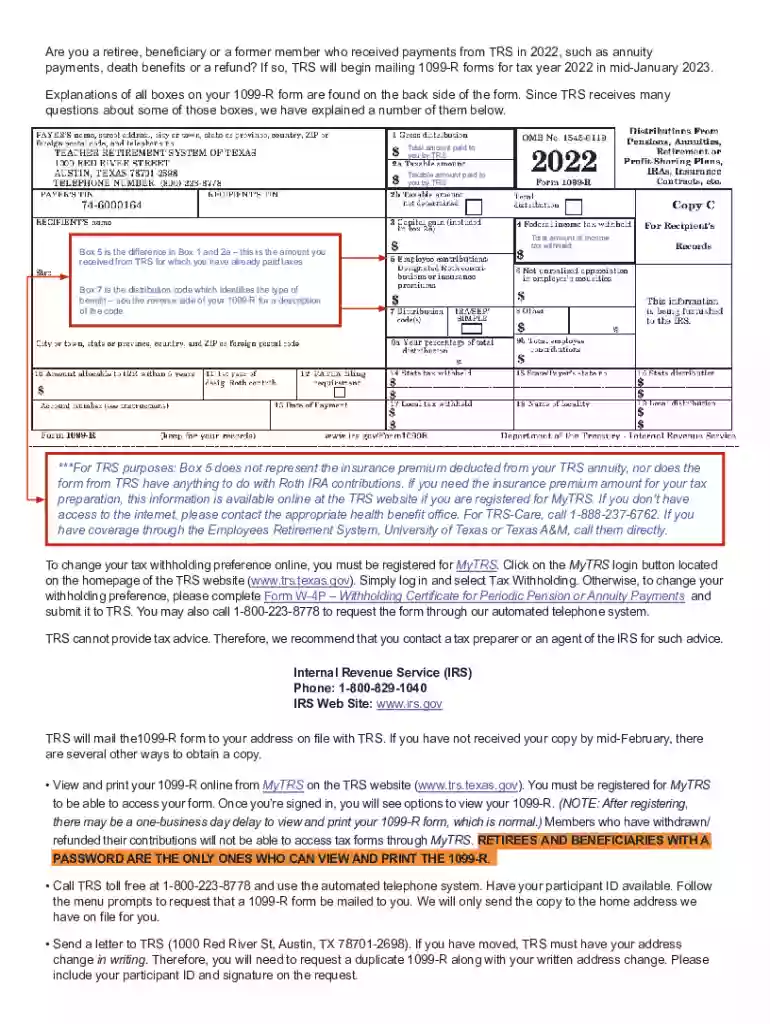
  2. Begin by reviewing the sections related to your payments from TRS, including total amounts and taxable amounts. Ensure you understand Box 5 and Box 7 as they provide crucial information regarding your tax situation.
  3. If you need to change your tax withholding preference, locate the section that guides you on accessing MyTRS. Follow the instructions provided for logging in and making changes online.
  4. For those who prefer offline methods, find the details on completing Form W-4P. Make sure to fill it out accurately and submit it as instructed.
  5. Lastly, if you have not received your 1099-R form by mid-February, refer to the options available for obtaining a copy through MyTRS or by contacting TRS directly.

Start using our platform today to streamline your document editing and ensure a hassle-free experience!

See more Processing Time Frames - Teacher Retirement System of Texas versions

We've got more versions of the Processing Time Frames - Teacher Retirement System of Texas form. Select the right Processing Time Frames - Teacher Retirement System of Texas version from the list and start editing it straight away!

VersionsForm popularityFillable & printable
20244.3 Satisfied (60 Votes)
20234.6 Satisfied (39 Votes)
20224.5 Satisfied (54 Votes)
20214.9 Satisfied (51 Votes)
20204.8 Satisfied (170 Votes)
20194.4 Satisfied (136 Votes)
20184.4 Satisfied (123 Votes)
20164.4 Satisfied (254 Votes)

be ready to get more

Complete this form in 5 minutes or less

Security and compliance

At DocHub, your data security is our priority. We follow HIPAA, SOC2, GDPR, and other standards, so you can work on your documents with confidence.

Related links

THE COMPUTER DIRECTORY

volt-amperes, max.). UNIFORMITY: Operating time varies by only about 0.1 millisecond under constant drive conditions. NO CONTACT BOURead more

Learn more
Processing Time Frames

Most retirement benefits are processed within 45 days after TRS receives all required information including: Properly completed application(s) and requiredRead more

Learn more
Teacher Retirement System of Texas (TRS)

All benefits-eligible employees are automatically enrolled as members of the Teacher Retirement System of Texas (TRS) on their first day of employment.

Learn more
If you believe that this page should be taken down, please follow our DMCA take down process here