







Definition & Meaning
The U.S. Territories - Self Employment Tax - IRS Video Portal is a specific resource provided by the IRS to help taxpayers, particularly those in U.S. territories, understand and manage their self-employment taxes. This portal offers video tutorials that explain the nuances of filing taxes for self-employed individuals residing in territories such as Puerto Rico, Guam, and the U.S. Virgin Islands. The portal aims to provide clear guidance on tax obligations, exemptions, and filing requirements specific to these regions.
How to Use the U.S. Territories - Self Employment Tax - IRS Video Portal
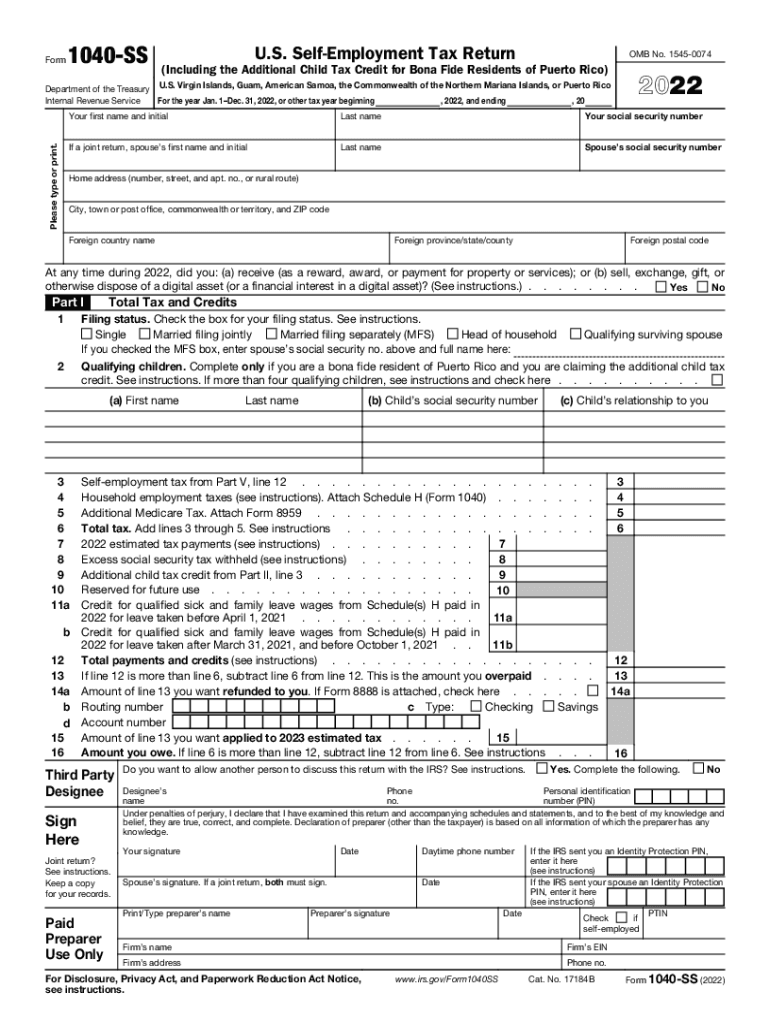
To utilize the IRS Video Portal effectively, taxpayers should first navigate to the official IRS website, where the video resources are hosted. Upon accessing the portal, users can search or browse through an array of videos covering various topics related to self-employment tax. These videos are categorized by topics such as tax filing processes, common mistakes, and specific instructions for different forms, including Form 1040-SS and Form 1040-PR. Each video is structured to offer visual and auditory guidance, making complex tax concepts more digestible.
Steps to Complete the U.S. Territories - Self Employment Tax - IRS Video Portal
- Access the Portal: Go to the IRS website and locate the Video Portal dedicated to U.S. territories' self-employment tax topics.
- Identify Relevance: Select videos that align with your specific tax situation.
- View Tutorials: Watch the selected tutorials thoroughly to understand the detailed processes of filing your returns.
- Take Notes: Summarize key points from the videos that apply to your circumstances.
- Implement Instructions: Use the information obtained to fill out your tax forms accurately.
- Review Frequently: Revisit the portal periodically for updates or to refresh your understanding of tax obligations.
Required Documents
Self-employed individuals in U.S. territories need to gather several essential documents before beginning the tax filing process. These include:
- Personal identification such as a Social Security number.
- Detailed records of all income and expenses related to self-employment.
- Previous tax returns for reference.
- Completed Form 1040-SS or 1040-PR for reporting self-employment income.
- Supporting documentation for any claimed deductions or credits.
Filing Deadlines / Important Dates
The filing deadline for self-employed individuals in U.S. territories generally aligns with the federal deadline, typically April 15th. However, residents in disaster areas or those who serve in combat zones may be eligible for extensions. It is crucial to verify specific deadlines applicable to your territory by checking IRS communications or announcements. Late filings may incur penalties, emphasizing the importance of adhering to set deadlines.
Eligibility Criteria
Eligibility for filing using the U.S. Territories - Self Employment Tax guidelines hinges on your residency and self-employment status within a U.S. territory. Bona fide residents of Puerto Rico, Guam, American Samoa, the Northern Mariana Islands, and the U.S. Virgin Islands who earn income from self-employment are generally required to file Form 1040-SS or 1040-PR. Those who have earned $400 or more from self-employment must report this income, ensuring they meet their tax obligations.


IRS Guidelines
The IRS provides comprehensive guidelines for self-employed individuals in U.S. territories, which can be accessed via their official website or the video portal. These guidelines cover:
- Reporting requirements for different types of income.
- Accepted deductions and credits for self-employed individuals.
- Instructions for calculating self-employment tax.
- Procedures for filing electronically or via mail.
Penalties for Non-Compliance
Failure to comply with self-employment tax requirements can result in significant penalties, including:
- Late filing penalties calculated based on the unpaid taxes.
- Interest charges on unpaid taxes from the original filing date until the balance is cleared.
- Additional penalties for fraudulent filing or substantial understatement of tax liabilities.
Understanding the risks associated with non-compliance underscores the importance of timely and accurate filings.
Digital vs. Paper Version
Taxpayers have the option to submit their self-employment tax forms either digitally or through paper filings. The digital submission offers advantages, such as faster processing times and instant confirmation of receipt. Electronic filing is encouraged by the IRS for its efficiency and reliability, especially for those with complex tax scenarios or time constraints. Conversely, paper submissions can be more time-consuming and have a higher risk of errors due to manual processing.
Business Types That Benefit Most
Certain business structures may benefit more from using the U.S. Territories - Self Employment Tax - IRS Video Portal, including:
- Sole proprietors who manage all business operations independently.
- Small businesses operating as LLCs requiring clear tax instructions.
- Freelancers and consultants offering services within U.S. territories.
- Partnerships where partners must individually file their share of earnings.
Each business type can leverage the portal to ensure compliance and optimize tax responsibilities.
Software Compatibility
For those using tax software, compatibility with platforms such as TurboTax and QuickBooks is advantageous. These applications can integrate data from IRS forms and e-filing systems, streamlining the tax preparation process. They often offer features like automatic form population and error-checking capabilities, which reduce the potential for mistakes and facilitate easier management of tax documentation.
Examples of Using the U.S. Territories - Self Employment Tax - IRS Video Portal
Consider a freelance graphic designer based in Puerto Rico who needs to report her 2022 earnings. She accesses the IRS Video Portal to watch tutorials on Form 1040-SS completion and learns about applicable deductions. By following the portal's step-by-step guidance, she can accurately prepare her form, maximizing her eligible deductions while ensuring compliance with her self-employment tax obligations.
Similarly, a consultant operating in the U.S. Virgin Islands might use the portal to understand quarterly estimated tax payments and how to adjust them based on fluctuating income.
The examples above illustrate the varied scenarios in which the U.S. Territories - Self Employment Tax - IRS Video Portal serves as a critical resource for residents managing their tax filings within U.S. territories.




