




01. Edit your nebraska schedule 1 online
Type text, add images, blackout confidential details, add comments, highlights and more.

Type text, add images, blackout confidential details, add comments, highlights and more.

Draw your signature, type it, upload its image, or use your mobile device as a signature pad.

Send nebraska schedule 1 instructions via email, link, or fax. You can also download it, export it or print it out.
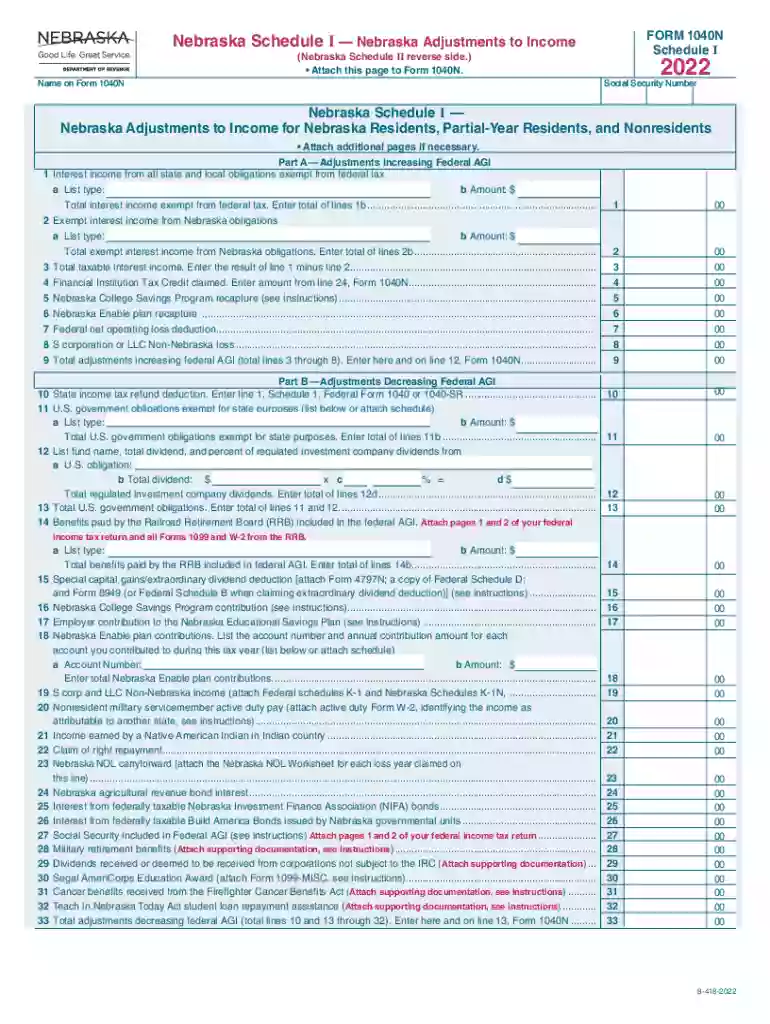
Nebraska Schedule I, part of the state’s tax forms, specifically addresses adjustments to income reported on Form 1040N for residents, partial-year residents, and nonresidents in Nebraska. These adjustments play a crucial role in accurately determining state tax liabilities, ensuring that income reported to the federal government is correctly adjusted to reflect Nebraska-specific tax rules. By understanding these adjustments, taxpayers can identify opportunities for deductions or credits that may reduce their overall tax burden at the state level.
Nebraska Schedule I is used primarily by individuals who need to adjust their federal adjusted gross income (AGI) for state tax purposes. The form captures specific modifications that Nebraska law requires to be made to the federal AGI to comply with state tax regulations. To use the form:
Nebraska Schedule I assists in calculating the correct taxable income necessary for completing Form 1040N and determines if additional tax is owed or if a refund is due.
Completing Nebraska Schedule I involves a series of methodical steps to ensure accurate reporting:
Following these steps helps avoid discrepancies and potential penalties.
Understanding key terminologies associated with Schedule I is vital for proper form completion:
Familiarity with these terms ensures that taxpayers can accurately navigate the nuances of the form.
Nebraska Schedule I comprises essential elements that must be carefully considered:
Each element plays a pivotal role in ensuring compliance and accuracy, underpinning the broader tax filing process.
While Nebraska Schedule I specifically caters to state tax filings, understanding IRS guidelines is imperative:
The relationship between federal guidelines and Nebraska Schedule I is integral to accurate tax reporting.
A successful Schedule I filing requires specific documentation:
Ensuring these documents are accessible streamlines the completion process and substantiates claimed adjustments.
Critical dates to remember when handling Nebraska Schedule I:
Awareness and adherence to these timelines are essential to maintain compliance and avoid late penalties.
Practical use cases illustrate how Nebraska Schedule I adjustments impact tax situations:
These examples highlight the form's application, helping taxpayers leverage adjustments for optimal tax outcomes.
We've got more versions of the nebraska schedule 1 form. Select the right nebraska schedule 1 version from the list and start editing it straight away!
A lot of software solutions are available on the market for document editing and signing. DocHub is one of the most in-demand online solutions that comply with all security and compliance standards and ensures your electronically signed paperwork is legally enforceable. All you need to give it a try is to sign up for an account, add your adjustments to income from schedule 1, fill out the requested information, and click Sign. Generate your eSignature by typing, drawing it, uploading its picture to your template, or scanning a unique QR code.
If you edit your federal agi with DocHub, you will not need to look for other software or solutions to sign it. An electronic signature is part of DocHub’s comprehensive editing toolset, which enables you to implement changes in your form without switching between platforms. Simply complete your form, double-check the correctness of your data and put your electronic signature at the end to make it submission-ready within a few minutes.
At DocHub, your data security is our priority. We follow HIPAA, SOC2, GDPR, and other standards, so you can work on your documents with confidence.
Income derived from Nebraska sources shall include, but not be limited to, items relating to real and tangible personal property, a business, trade, professionRead more
Sep 16, 2013 The final regulations provide guidance on a discount rate-related specified application of the income method and a discount rate-related bestRead more


