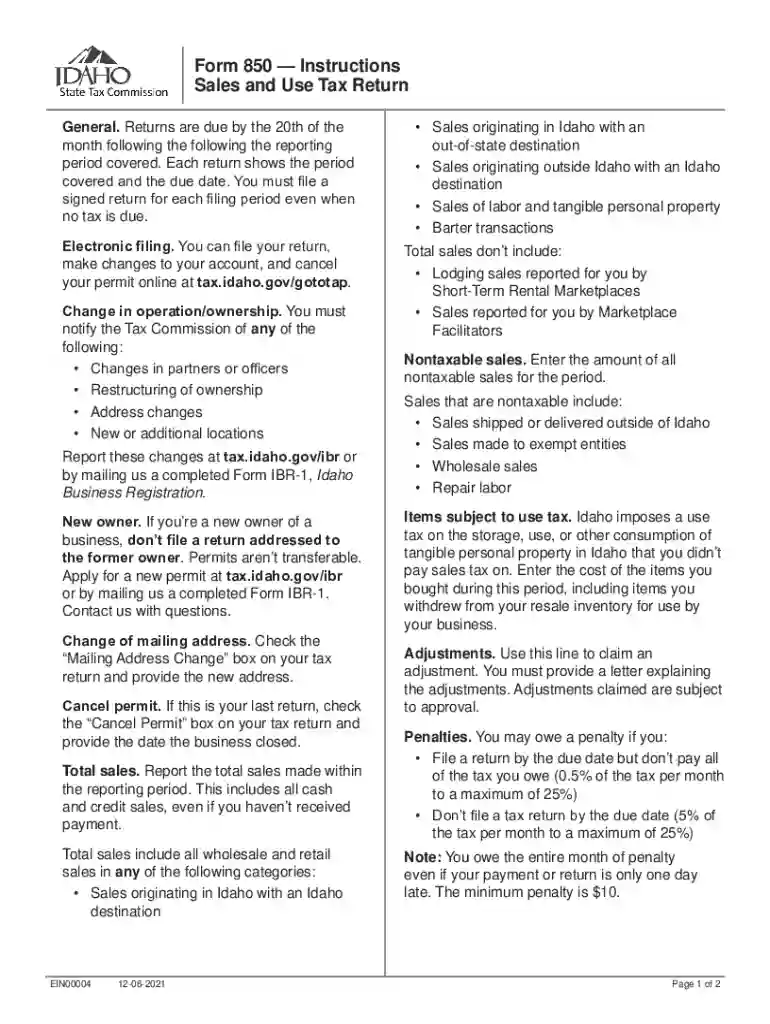
Form 850 Instructions, Sales and Use Tax Return approved 2026

Get Form
Form 850 Instructions, Sales and Use Tax Return approved Preview on Page 1

Here's how it works

01. Edit your form online
Type text, add images, blackout confidential details, add comments, highlights and more.

02. Sign it in a few clicks
Draw your signature, type it, upload its image, or use your mobile device as a signature pad.

03. Share your form with others
Send it via email, link, or fax. You can also download it, export it or print it out.

How to use or fill out Form 850 Instructions, Sales and Use Tax Return approved with our platform

Form edit decoration
9.5
Ease of Setup
DocHub User Ratings on G2
9.0
Ease of Use
DocHub User Ratings on G2
  1. Click ‘Get Form’ to open it in the editor.
  2. Begin by entering your total sales for the reporting period. This includes all cash and credit sales, ensuring you account for sales originating both in and out of Idaho.
  3. Next, report any nontaxable sales. This includes sales shipped outside Idaho or made to exempt entities.
  4. If applicable, enter the cost of items subject to use tax that you purchased during this period.
  5. For adjustments, provide a detailed explanation in a letter attached to your return.
  6. Finally, review your entries for accuracy before submitting your return electronically or by mail.

Start using our platform today to streamline your Form 850 completion process for free!

See more Form 850 Instructions, Sales and Use Tax Return approved versions

We've got more versions of the Form 850 Instructions, Sales and Use Tax Return approved form. Select the right Form 850 Instructions, Sales and Use Tax Return approved version from the list and start editing it straight away!
Versions Form popularity Fillable & printable
2023 4.8 Satisfied (35 Votes)
2022 4.4 Satisfied (24 Votes)
2021 4.8 Satisfied (79 Votes)
2017 4.2 Satisfied (30 Votes)
2013 4 Satisfied (56 Votes)
2012 4 Satisfied (43 Votes)
be ready to get more

Complete this form in 5 minutes or less

Get form

Got questions?

We have answers to the most popular questions from our customers. If you can't find an answer to your question, please contact us.
Contact us

You need to use only trustworthy software solutions with strong data protection compliance to approve your documents electronically. DocHub is just the type of service you need! It stores data on Amazon Web Servers and complies with all essential security standards and eSignature laws, so it’s a reliable way to electronically sign your Form 850 Instructions, Sales and Use Tax Return approved or other documents using this tool.

With DocHub, there are several convenient ways to edit your Form 850 Instructions, Sales and Use Tax Return approved online. You can drag and drop the form and modify it directly at the DocHub website or use our browser extension to fill out your form immediately. Additionally, you can modify your PDF on your phone, as DocHub works with all the accessible mobile platforms.

The CDTFA assigns a filing frequency (quarterly prepay, quarterly, monthly, fiscal yearly, yearly) based on your reported sales tax or your anticipated taxable sales at the time of registration.
Step-by-Step Guide to Obtaining a Texas Resale Certificate Step 1: Obtain a Texas Sales and Use Tax Permit. Step 2: Download the Resale Certificate Form. Step 3: Complete the Form with Accurate Business Information. Step 4: Sign and Date the Certificate. Step 5: Present the Completed Certificate to Your Supplier.
E-filers: Expect your refund about seven to eight weeks after you receive an acknowledgement that we have your tax return. Paper filers: Expect your refund about 10 to 11 weeks after we receive your return.

Security and compliance

At DocHub, your data security is our priority. We follow HIPAA, SOC2, GDPR, and other standards, so you can work on your documents with confidence.

Learn more
ccpa2
pci-dss
gdpr-compliance
hipaa
soc-compliance
be ready to get more

Complete this form in 5 minutes or less

Get form

People also ask

Report your sales tax deduction on Schedule A. In the section entitled Taxes You Paid be sure to check the box indicating your choice to deduct state sales tax instead of state income tax and enter the amount of your deduction.
Filing sales tax online is generally recommended, but businesses may also submit the State, Local, and District Sales and Use Tax Return paper form (CDTFA-401-A). This form replaces the CABOE-401-A2. Taxpayers can file and pay returns online through the California Taxpayers Services Portal.
California sales tax is imposed on all California retailers. It applies to all retail sales of merchandise (tangible personal property) in the state. Retailers are required to obtain a sellers permit and to report and pay sales tax to the California Department of Tax and Fee Administration (CDTFA).
Sales Use Tax in California Espaol Retailers engaged in business in California must register with the California Department of Tax and Fee Administration (CDTFA) and pay the states sales tax, which applies to all retail sales of goods and merchandise except those sales specifically exempted by law.
Convert the tax rate to a decimal: Divide the tax rate by 100. For the California sales tax rate of 7.25%, this would be 7.25% / 100 = 0.0725. Calculate the tax amount: Multiply the item price by the tax rate. If an item costs $15.95, this would be 0.0725 (tax rate) x $15.95 (item price) = $1.15 in sales tax.

Related links