




Here's how it works

01. Edit your sprint fraud department number online
Type text, add images, blackout confidential details, add comments, highlights and more.

02. Sign it in a few clicks
Draw your signature, type it, upload its image, or use your mobile device as a signature pad.

03. Share your form with others
Send financial fraud investigation office documents via email, link, or fax. You can also download it, export it or print it out.
How to use or fill out sprint fraud department with our platform

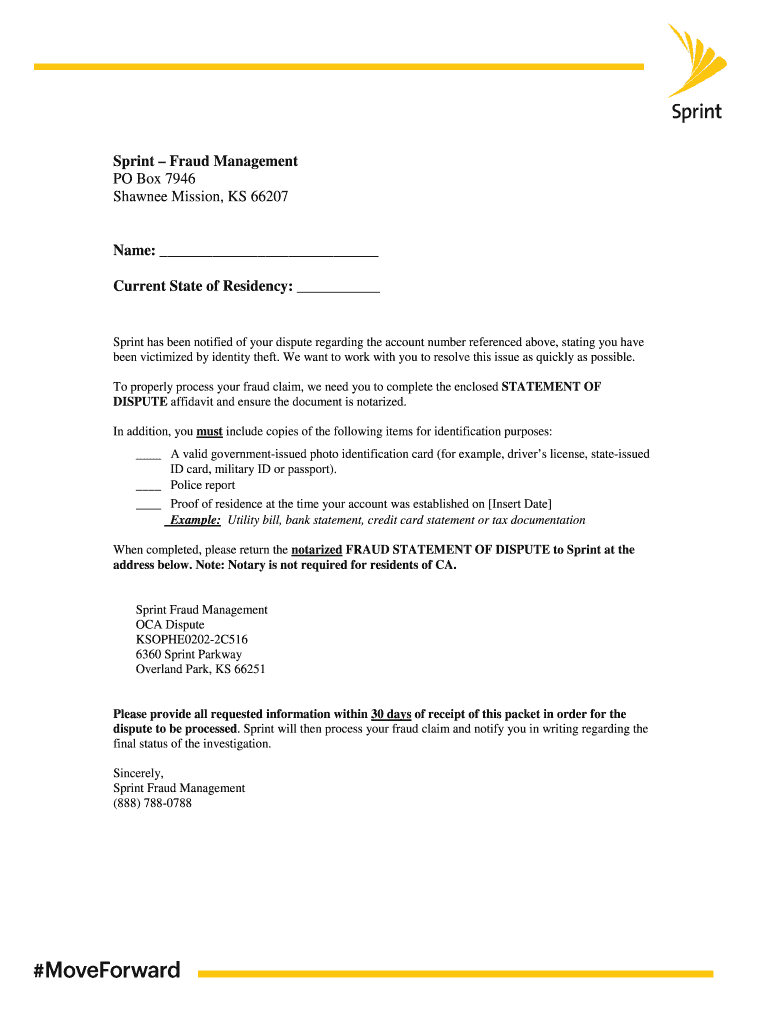
- Click ‘Get Form’ to open the Sprint Fraud Department form in the editor.
- Begin by filling in your name and current state of residency at the top of the form. This information is crucial for identifying your account.
- In the 'Petitioner Information' section, provide your name as it appears on your Sprint account, along with your account number and wireless phone number.
- Complete your current address, including street, city, state, and zip code. Ensure that all contact numbers are accurate for effective communication.
- Detail the nature of the disputed charges by specifying the amount and date of invoice in dispute. Include a brief explanation of the fraudulent activity.
- Sign and date the 'Petitioner Statement' to affirm that you did not authorize any fraudulent activity related to your account.
- If required, complete the Notary Information section by having a notary public witness your signature and place their stamp below.
Start using our platform today to easily fill out and submit your Sprint Fraud Department form online for free!
Fill out sprint fraud department online
It's free
Security and compliance
At DocHub, your data security is our priority. We follow HIPAA, SOC2, GDPR, and other standards, so you can work on your documents with confidence.
Learn more


Related forms

Vial of Life Medical Information Sheet - Dartmouth-Hitchcock
The document titled 'Vial of LIFE' is a medical information sheet designed to collect and organize essential health info ...
Brevard Pre-Trial Conference Checklist Brevard Pre-Trial Conference Checklist
The document is a Pretrial Conference Checklist designed for legal practitioners to ensure all necessary preparations an ...

CONTROLLED PRESCRIPTION MEDICATION TREATMENT AGREEMENT (1) docx
The document is a Controlled Prescription Medication Treatment Agreement outlining the responsibilities and guidelines f ...

Police Department Consolidation
The document is a feasibility study analyzing the potential consolidation of the Police Departments for Montvale, Park R ...
GRAY Jerry N Johnsondoc
The document is a ceremonial resolution from the Council of the District of Columbia honoring Jerry N. Johnson for his 1 ...