Type text, add images, blackout confidential details, add comments, highlights and more.
02. Sign it in a few clicks
Draw your signature, type it, upload its image, or use your mobile device as a signature pad.
03. Share your form with others
Send irs 1040 form 2020 via email, link, or fax. You can also download it, export it or print it out.
How to use or fill out IRS Form 1040-SR with DocHub
Ease of Setup
DocHub User Ratings on G2
Ease of Use
DocHub User Ratings on G2
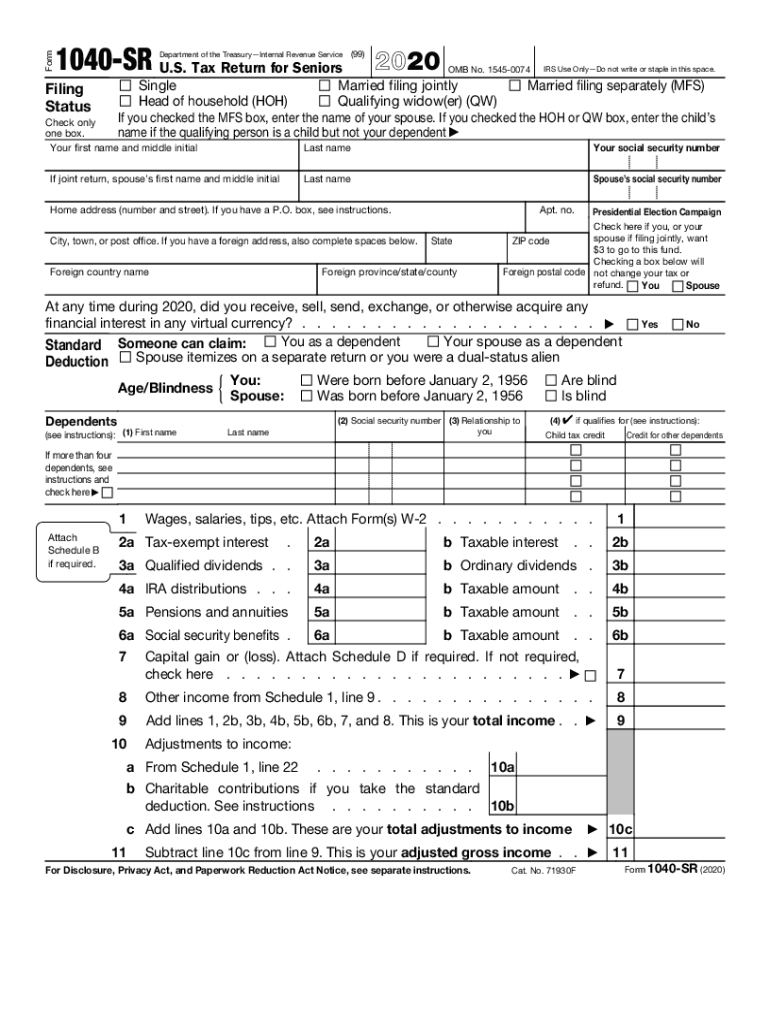
Click ‘Get Form’ to open the IRS Form 1040-SR in our platform.
Begin by selecting your filing status at the top of the form. Check only one box for options like Single, Married Filing Jointly, or Head of Household.
Enter your personal information including your name, Social Security number, and address. If filing jointly, include your spouse's details as well.
Proceed to report your income. Fill in wages, interest, dividends, and any other income sources as indicated on the form.
Calculate your adjusted gross income by entering any adjustments from Schedule 1 and subtracting them from your total income.
Complete the deductions section by checking applicable boxes for standard deductions based on age or blindness.
Finally, review all entries for accuracy before signing and submitting the form electronically through our editor.
Start using our platform today to fill out IRS Form 1040-SR easily and for free!
Irs form 1040 sr onlineIrs form 1040 sr instructionsIRS Form 1040-SR instructions 2025 PDF downloadIRS Form 1040-SR 2024IRS Form 1040-SR instructions 2024IRS Form 1040-SR instructions 2023IRS Form 1040-SR 2024 PDFIRS Form 1040-SR 2025
Security and compliance
At DocHub, your data security is our priority. We follow HIPAA, SOC2, GDPR, and other standards, so you can work on your documents with confidence.
Single. Married filing jointly (even if only one had income). Married filing separately (MFS). Head of household (HOH). Qualifying surviving spouse (QSS).
Cookie consent notice
This site uses cookies to enhance site navigation and personalize your experience.
By using this site you agree to our use of cookies as described in our Privacy Notice.
You can modify your selections by visiting our Cookie and Advertising Notice.