
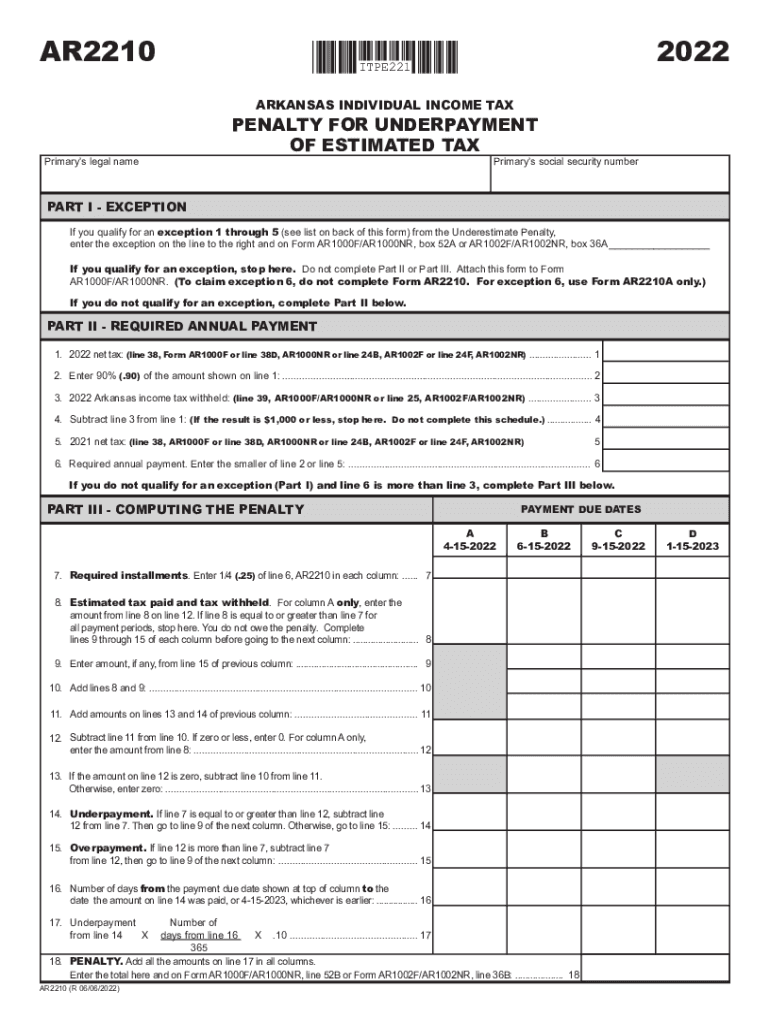







Definition & Meaning
The "Estimated Income Tax Penalty - e-Form RS Login" refers to an electronic process used by taxpayers to assess penalties related to underpayment of estimated income taxes. This penalty may apply when taxpayers fail to pay enough taxes throughout the year via withholding or estimated tax payments. The e-Form RS is a digital login system used for managing and submitting information pertinent to estimated tax penalties, offering a streamlined way to ensure compliance with income tax requirements.
Key Elements
- Underpayment of Estimated Tax: Taxpayers who do not pay enough tax during the year might face penalties. This occurs through either withholding from wages or making estimated tax payments.
- Digital Access: The e-Form RS Login system allows users to access, manage, and submit documentation related to estimated tax penalties through an online interface.
- Purpose: Ensures taxpayers accurately report and pay their due taxes within a specific timeframe to avoid penalties.
Steps to Complete the Estimated Income Tax Penalty - e-Form RS Login
-
Access the e-Form RS Login Portal: Visit the designated online portal where the e-Form RS is hosted. Ensure you have a stable internet connection and compatible browser for proper access.
-
Authenticate Your Identity: Log in using your credentials. If you’re a first-time user, create an account by providing personal details such as your Social Security Number or Tax Identification Number.
-
Enter Required Information: Fill in all required fields pertaining to your income, deductions, and estimated tax payments. Ensure accuracy to avoid miscalculations or additional penalties.
-
Review and Submit the Form: Carefully review all entered data. Double-check entries to ensure compliance with IRS standards. Once confirmed, submit the form digitally through the portal.
-
Confirmation and Record Keeping: After submission, receive a confirmation email or reference number. Save or print this confirmation for your records as proof of compliance with tax regulations.
How to Use the Estimated Income Tax Penalty - e-Form RS Login
Utilizing the e-Form RS Login involves navigating through a secure online environment designed for managing tax-related duties effectively. Here’s a detailed guide on how to harness this system:
-
User-Friendly Interface: The login portal is designed with an intuitive user interface that facilitates seamless navigation. This ensures that even users with minimal technical skills can manage their tax form efficiently.
-
Real-Time Updates: As you fill out the form, real-time updating helps avoid errors. The system often provides prompts or alerts when critical information is missing or incorrectly entered.
-
Help and Support Features: The platform frequently includes built-in help features, such as FAQs or customer support contact details, to aid you throughout the process.
Important Terms Related to the Estimated Income Tax Penalty - e-Form RS Login
Key Terminology
-
Estimated Tax: The method employed by those not subject to withholding, like self-employed individuals or certain retirees, to prepay taxes during the year.
-
Penalty Exceptions: Certain conditions may exempt taxpayers from penalties for underpayments. These include misleading instructions, incorrect estimates only due to figures provided by IRS, or natural disasters.
-
Annualization Method: This approach might be used when income sources fluctuate during a tax year, allowing taxpayers to adjust estimates to more accurately reflect their tax liability.
IRS Guidelines
The IRS has specific guidelines that govern the calculation and submission of estimated tax penalties. These regulations ensure that taxpayers comply with federal tax requirements and adjust their payments accordingly:
-
Threshold for Penalty: A penalty is generally applied if tax payments are less than 90% of the tax due on the current year's return, or 100% of the tax shown on the prior year's return, whichever is less.
-
Safe Harbor Rules: If taxpayers pay at least 100% of the previous year's tax liability (110% for adjusted gross incomes exceeding specific thresholds), they might avoid penalties.
-
Payment Timelines: Estimated payments typically follow a quarterly schedule, with deadlines in April, June, September, and January, reflecting the tax liability for those periods.
Required Documents
When engaging with the e-Form RS Login, having necessary documentation at hand will streamline the process and ensure completeness:
-
Previous Year’s Tax Return: Essential for determining the safe harbor amount, this document helps ascertain an accurate baseline for estimated payments.
-
Income Records: Keep receipts, pay stubs, or statements from self-employed work to ensure all income sources are accounted for accurately.
-
Deductions and Credits Documentation: Records of eligible deductions and credits can affect your total estimated tax liability, reducing potential penalties.
Penalties for Non-Compliance
Failing to comply with estimated tax payment requirements can result in significant penalties. Recognizing these potential financial impacts can motivate accurate reporting and timely payments:
-
Penalty Structure: Generally calculated as the interest on unpaid amounts from the date they were due until payment, penalty rates fluctuate based on federal short-term interest rates plus three percentage points.
-
Avoidance via Exceptions: In some cases, taxpayers can file a waiver request if the failure to pay was due to reasonable causes rather than willful neglect, thus potentially reducing or eliminating the penalty.
Examples of Using the Estimated Income Tax Penalty - e-Form RS Login
Practical Use Cases
-
Self-Employed Individual: An entrepreneur or freelancer who receives sporadic income throughout the year can utilize the e-Form RS Login to report quarterly tax payments and avoid unexpected penalties.
-
Retired Taxpayer with Investment Income: Retirees with supplementary income from dividends or stock sales may benefit from this system to estimate their tax obligations accurately across the year.
-
Individuals with Multiple Income Streams: Those juggling multiple part-time jobs or side businesses can navigate changing tax liabilities efficiently within the digital platform, ensuring compliance.
Filing Deadlines / Important Dates
Adhering to specific deadlines is crucial to avoid penalties and ensure timely submissions:
-
Quarterly Payment Dates: April 15, June 15, September 15, and January 15 are the standard estimated tax payment deadlines for the respective quarters of a fiscal year.
-
Year-End Reconciliation: After the fiscal year concludes on December 31, taxpayers have until the following April 15 to reconcile and report their annual tax liabilities.
By understanding and using the "e-Form RS Login" wisely, taxpayers can manage their estimated income tax penalties with greater clarity and accuracy, leveraging the system to uphold compliance and avoid any undue penalties.




