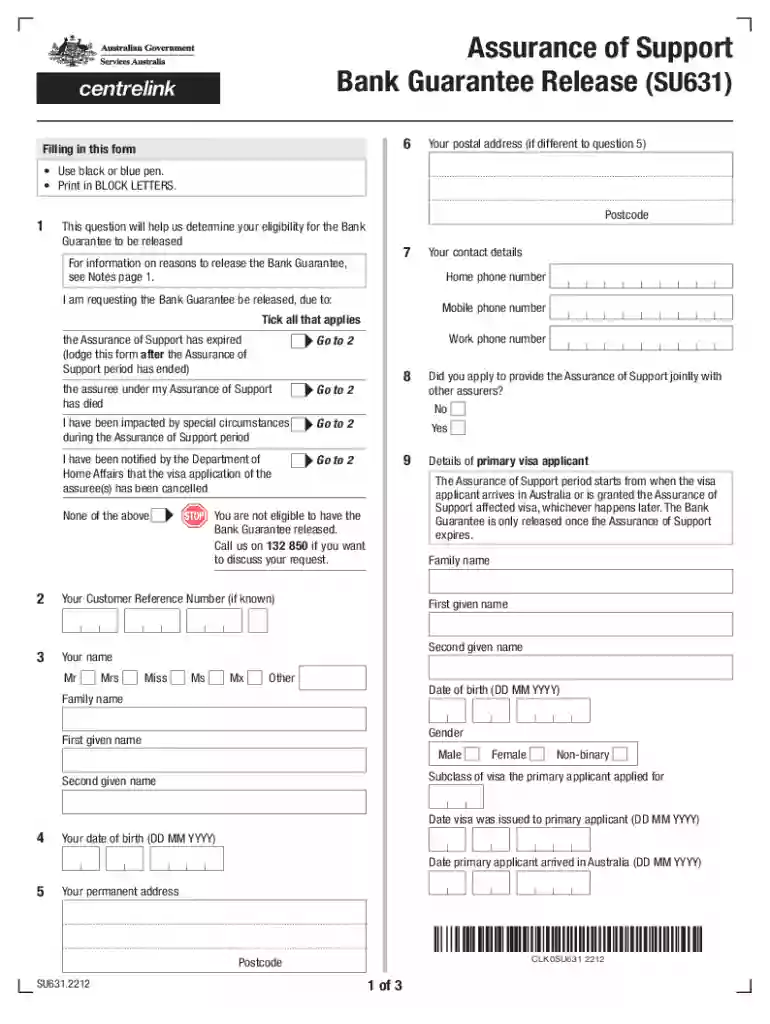
su631 Preview on Page 1

Instructions for Preparation of Financial Statements for Bank ... 2026

Here's how it works

  • 01. Edit your su631 online

    Type text, add images, blackout confidential details, add comments, highlights and more.

  • 02. Sign it in a few clicks

    Draw your signature, type it, upload its image, or use your mobile device as a signature pad.

  • 03. Share your form with others

    Send su631 form via email, link, or fax. You can also download it, export it or print it out.

How to use or fill out Instructions for Preparation of Financial Statements for Bank ... with our platform

Form edit decoration
9.5
Ease of Setup
DocHub User Ratings on G2
9.0
Ease of Use
DocHub User Ratings on G2
  1. Click ‘Get Form’ to open it in the editor.
  2. Begin by entering your postal address in BLOCK LETTERS. Ensure you use a black or blue pen for clarity.
  3. Indicate your request for the Bank Guarantee release by ticking the appropriate boxes based on your situation, such as if the Assurance of Support has expired or if the assuree has died.
  4. Provide your contact details, including home and mobile phone numbers, and your Customer Reference Number if known.
  5. Fill in details about the primary visa applicant, including their name, date of birth, and visa subclass. Make sure to include dates relevant to their arrival and visa issuance.
  6. If applicable, complete information regarding any second visa applicants and answer questions about children under 18 years of age in the application.
  7. Attach any required documents such as the Assurance of Support expiry letter or medical evidence supporting special circumstances.
  8. Review all entries for accuracy before signing and submitting the form online or via post as instructed.

Start using our platform today to streamline your document editing and submission process for free!

See more su631 versions

We've got more versions of the su631 form. Select the right su631 version from the list and start editing it straight away!

VersionsForm popularityFillable & printable
20224.9 Satisfied (54 Votes)
20144.5 Satisfied (62 Votes)

be ready to get more

Complete this form in 5 minutes or less

Got questions?

We have answers to the most popular questions from our customers. If you can't find an answer to your question, please contact us.

Step 5: Prepare the Cash Flow Statement Cash flow reveals your businesss cash sources and uses.
5 steps to prepare your financial statements Step 1: gather all relevant financial data. Step 2: categorize and organize the data. Step 3: draft preliminary financial statements. Step 4: review and reconcile all data. Step 5: finalize and report.
Technically, there are only four types of financial statements for a business entity. The fifth category is Notes to Financial Statements, or Footnotes that are included on other types of financial statements.
How to post in accounting Enter the account information. Create unique journal entries. Enter the debits and credits. Move entries to a general ledger. Calculate account balances. Check for and correct errors.
The standard requires a complete set of financial statements to comprise a statement of financial position, a statement of profit or loss and other comprehensive income, a statement of changes in equity and a statement of cash flows.

Security and compliance

At DocHub, your data security is our priority. We follow HIPAA, SOC2, GDPR, and other standards, so you can work on your documents with confidence.

People also ask

The 9 steps in preparing financial statements are: Identify all business transactions for the period. Record transactions in a general journal. Resolve anomalies and make adjusting journal entries. Post the adjusted journal entries to the general ledger. Prepare an income statement. Prepare a balance sheet.
Defining the accounting cycle with steps: (1) Financial transactions, (2) Journal entries, (3) Posting to the Ledger, (4) Trial Balance Period, and (5) Reporting Period with Financial Reporting and Auditing.

Related links

CRA Guide to Data Reporting and Collection

The CRA Data Entry software is provided free of charge by the. FFIEC to help financial institutions automate the filing of their CRA data. The software includesRead more

Learn more
Instructions for Preparation of Financial Statements for

Bank holding companies are required to prepare and file the Consolidated Financial Statements for Bank Holding. Companies in accordance with generally accepted.Read more

Learn more
If you believe that this page should be taken down, please follow our DMCA take down process here