




Here's how it works

01. Edit your it 219 online
Type text, add images, blackout confidential details, add comments, highlights and more.

02. Sign it in a few clicks
Draw your signature, type it, upload its image, or use your mobile device as a signature pad.

03. Share your form with others
Send it 219 instructions via email, link, or fax. You can also download it, export it or print it out.
How to use or fill out Instructions for Form IT-219 - Tax.NY.gov with our platform

- Click ‘Get Form’ to open it in the editor.
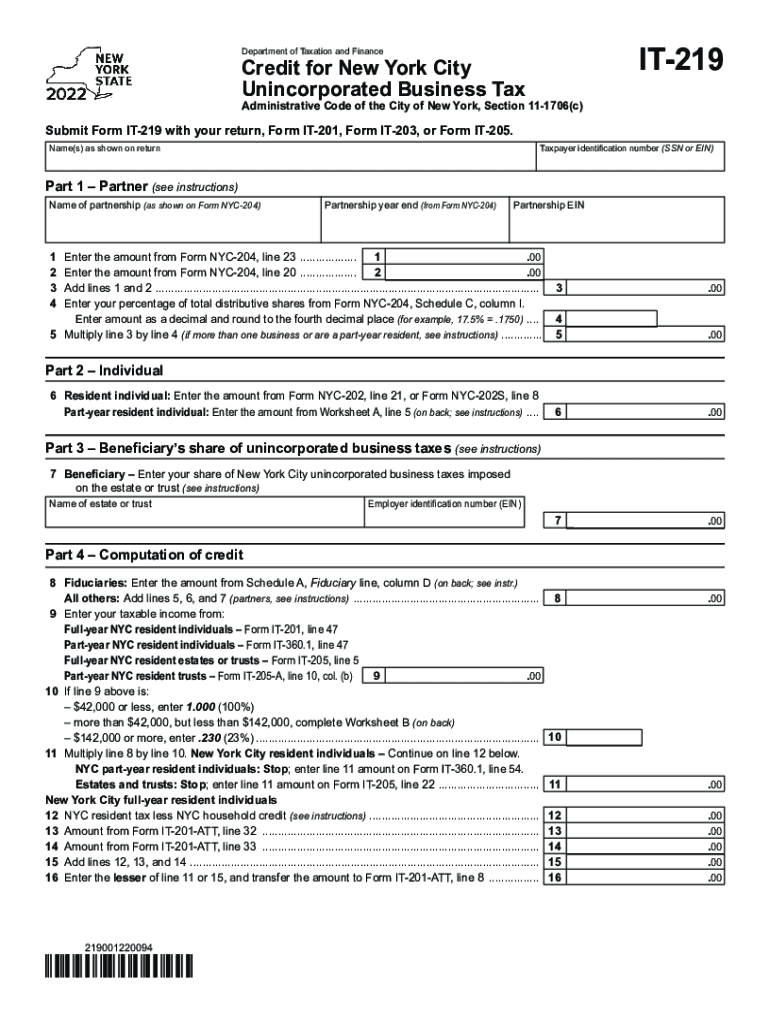
- Begin by entering your name(s) as shown on your tax return and your taxpayer identification number (SSN or EIN).
- In Part 1, provide details about the partnership, including the name, year-end, and EIN. Fill in amounts from Form NYC-204 as instructed.
- For Part 2, if you are a resident individual, enter the amount from Form NYC-202. If part-year resident, refer to Worksheet A for calculations.
- In Part 3, indicate your share of unincorporated business taxes imposed on the estate or trust. Include the name and EIN of the estate or trust.
- Complete Part 4 by calculating credits based on previous entries. Follow instructions carefully for taxable income and applicable percentages.
Start using our platform today to easily complete your Form IT-219 online for free!
Fill out Instructions for Form IT-219 - Tax.NY.gov online
It's free
It's free
See more Instructions for Form IT-219 - Tax.NY.gov versions
We've got more versions of the Instructions for Form IT-219 - Tax.NY.gov form. Select the right Instructions for Form IT-219 - Tax.NY.gov version from the list and start editing it straight away!
Got questions?
We have answers to the most popular questions from our customers. If you can't find an answer to your question, please contact us.
Contact us
How to do an income tax assessment?
This is done by self-calculation of the amount of income earned in the past financial year and paying tax accordingly. After an assessee has filed his details, it goes into processing. The Income Tax Department analyses all the details that a taxpayer submits. This is Income Tax Assessment.
How to fill out tax information?
Step 1: Log in to the e-Filing portal using your user ID and password. Step 2: On your Dashboard, click e-File Income Tax Returns File Income Tax Return. Step 4: In case you have already filled the Income Tax Return and it is pending for submission, click Resume Filing.
What do I need to fill out a self-assessment tax return?
What information will I need to fill in a Self Assessment tax return? your ten-digit Unique Taxpayer Reference (UTR) your National Insurance number. details of your untaxed income from the tax year, including income from self-employment, dividends and interest. records of any expenses relating to self-employment.
Who is exempt from NYC UBT tax?
Who is Exempt from this Tax? Performing services as an employee is not subject to UBT. An owner, lessee, or fiduciary who is engaged in holding, leasing, or managing real property for their own account. Entities engaged primarily with qualifying investment activities are partially exempt from UBT on the income.
How to file taxes to get the most refund?
Here are some actions you can take that can help you get the most back on taxes: Itemize your deductions. Contribute to tax-advantaged accounts. Ensure you are claiming the right credits. Adjust your filing status.
Security and compliance
At DocHub, your data security is our priority. We follow HIPAA, SOC2, GDPR, and other standards, so you can work on your documents with confidence.
Learn more


People also ask
How to fill an income tax assessment form?
You will be redirected to the Income Tax Return Page. Enter the required details. You will find your Permanent Account Number (PAN) auto-filled in the form. Select the mode of Filing. Click on Continue. Select the status. Select the appropriate ITR form. Summary of tax computation.
How to fill out a PDF tax form?
- Visit the IRS website and download the required tax form. - Open the form using a reputable PDF editor like PDF Expert. - Use the Fill Sign tool to fill in all the required information carefully. Add a date and checkmarks if necessary.
What are the biggest tax mistakes people make?
Avoid These Common Tax Mistakes Not Claiming All of Your Credits and Deductions. Not Being Aware of Tax Considerations for the Military. Not Keeping Up with Your Paperwork. Not Double Checking Your Forms for Errors. Not Adhering to Filing Deadlines or Not Filing at All. Not Fixing Past Mistakes. Not Planning for Next Year.