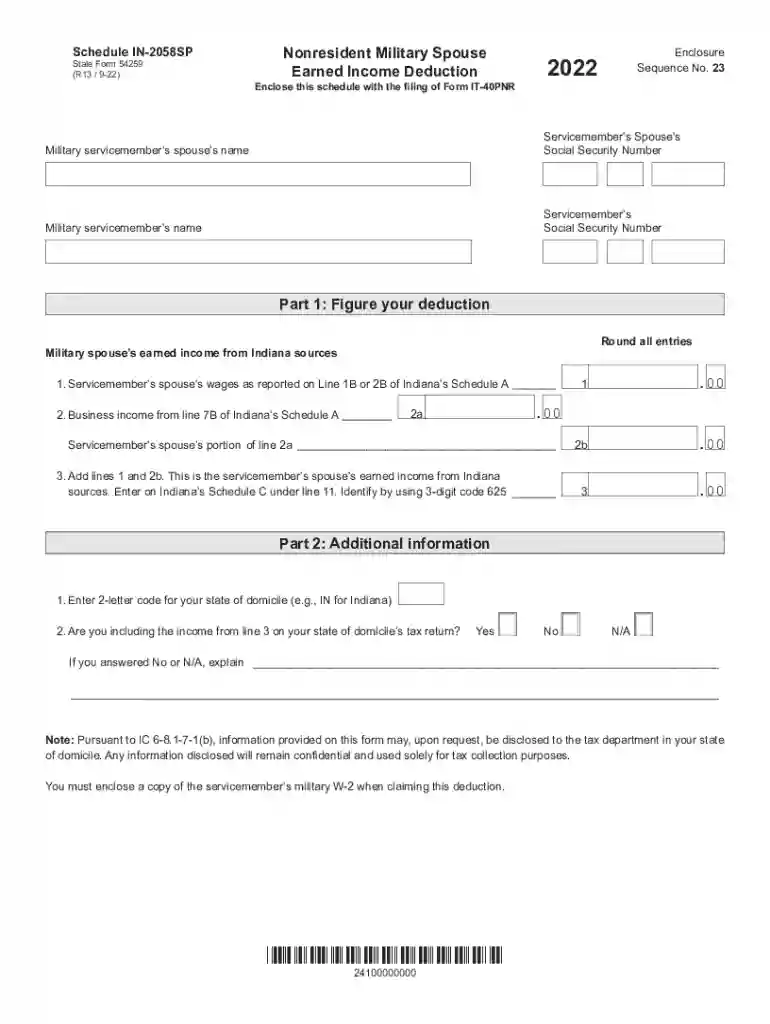
Military Personnel Information Request Individual Income 2026

Get Form
Military Personnel Information Request Individual Income Preview on Page 1

Here's how it works

01. Edit your form online
Type text, add images, blackout confidential details, add comments, highlights and more.

02. Sign it in a few clicks
Draw your signature, type it, upload its image, or use your mobile device as a signature pad.

03. Share your form with others
Send it via email, link, or fax. You can also download it, export it or print it out.

How to use or fill out Military Personnel Information Request Individual Income with our platform

Form edit decoration
9.5
Ease of Setup
DocHub User Ratings on G2
9.0
Ease of Use
DocHub User Ratings on G2
  1. Click ‘Get Form’ to open the Military Personnel Information Request Individual Income in the editor.
  2. Begin by entering the military servicemember’s spouse’s name and Social Security Number in the designated fields. This information is crucial for identifying the individual associated with the income deduction.
  3. Next, input the military servicemember’s name and Social Security Number. Ensure accuracy as this data links to tax records.
  4. In Part 1, calculate your deduction by entering the earned income from Indiana sources. Round all entries as specified. Add lines 1 and 2b to determine total earned income from Indiana sources.
  5. Proceed to Part 2, where you will enter your state of domicile code and indicate whether you are including this income on your state tax return. Provide explanations if necessary.
  6. Finally, remember to enclose a copy of the servicemember’s military W-2 when submitting this form for claiming deductions.

Start using our platform today for free to streamline your document editing and form completion!

See more Military Personnel Information Request Individual Income versions

We've got more versions of the Military Personnel Information Request Individual Income form. Select the right Military Personnel Information Request Individual Income version from the list and start editing it straight away!
Versions Form popularity Fillable & printable
2023 4.6 Satisfied (20 Votes)
2022 4.7 Satisfied (42 Votes)
2021 4.8 Satisfied (147 Votes)
2020 4.4 Satisfied (208 Votes)
be ready to get more

Complete this form in 5 minutes or less

Get form

Got questions?

We have answers to the most popular questions from our customers. If you can't find an answer to your question, please contact us.
Contact us
Call the Military Pay customer care center (1-888-332-7411) to request a corrected W-2. Use AskDFAS; clickable icons are located on the myPay and DFAS homepages. FAQs are available for information and the application allows members to submit a secure message to the appropriate DFAS military pay office.
If youve separated within 13 months, you can login to your myPay account to get your W2. If you cant access your myPay account, you can submit a tax statement request via askDFAS and well mail you a hard copy.
To do this, log into your IRS online account at IRS.gov and select the Wage and Income Transcript for 2021 and 2022. These transcripts will show reported wages and tax withholdings, though they may not be formatted exactly like a W-2.
When Do Military W-2s Come Out? W-2s are typically issued to active-duty, reserve and National Guard members by the end of January each year. The specific date can vary slightly from year to year, but they are usually available to military personnel by the last day of January.
How and When Will I Get My IRS 1095 Form? Army, Navy, Marine Corps, and Air Force members, retirees, and surviving spouses can get the form on the MyPay website with all of your other tax documents. For those who dont have a MyPay account, the form will be mailed.

Security and compliance

At DocHub, your data security is our priority. We follow HIPAA, SOC2, GDPR, and other standards, so you can work on your documents with confidence.

Learn more
ccpa2
pci-dss
gdpr-compliance
hipaa
soc-compliance
be ready to get more

Complete this form in 5 minutes or less

Get form