




01. Edit your form online
Type text, add images, blackout confidential details, add comments, highlights and more.

Type text, add images, blackout confidential details, add comments, highlights and more.

Draw your signature, type it, upload its image, or use your mobile device as a signature pad.

Send it via email, link, or fax. You can also download it, export it or print it out.
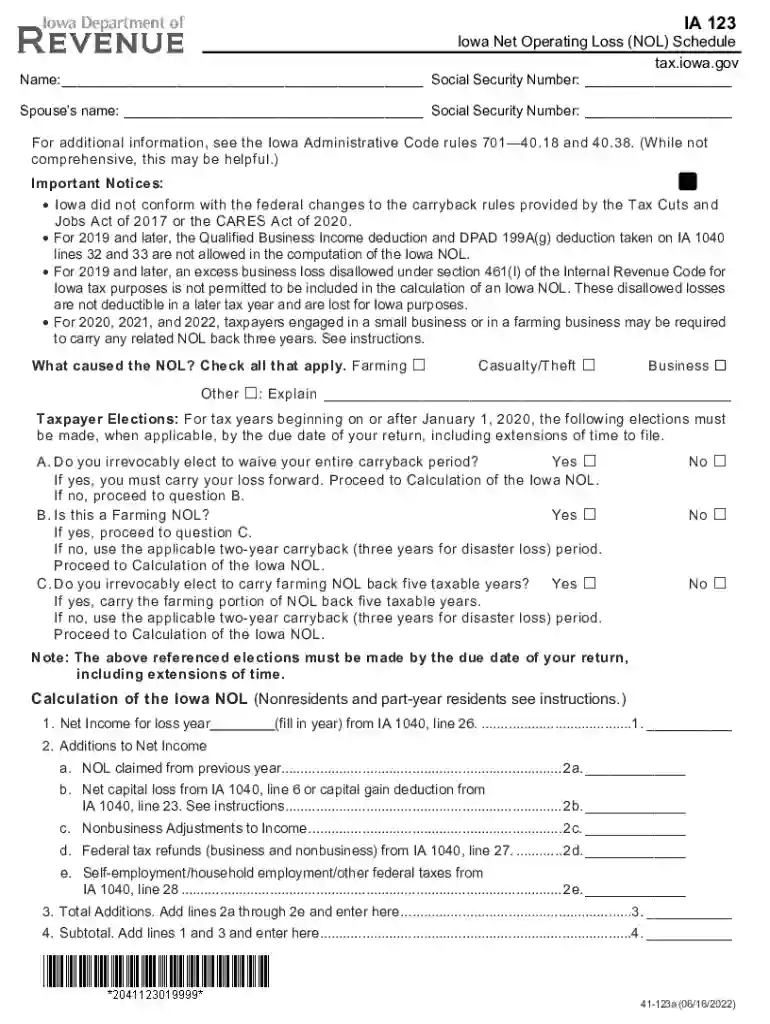
The Application of Net Operating Loss for Iowa, often referenced as e-Form RS Login, is a critical document that facilitates the reporting and management of net operating losses (NOL) for Iowa taxpayers. This form is primarily used to calculate NOL and apply it to either carryback or carryforward tax scenarios. Net operating losses are important for those who've experienced more expenses than revenue in a given tax year, providing taxpayers with a mechanism to offset taxable income, potentially reducing their tax liabilities. Understanding its role in your financial reporting can help ensure compliance and optimization of your tax obligations.
Identify Losses: Before utilizing the e-Form RS Login, gather all records of financial losses that might qualify as NOLs. This includes business receipts, expense reports, and any documentation that can substantiate your claim of a net operating loss.
Access the Form: The e-Form RS Login can be accessed online through the Iowa Department of Revenue’s website. Ensure you have reliable internet access, as the process involves interaction with the digital platform.
Complete the Form: Fill out the form with precise details about your financial loss. Key sections include identifying specifics of income lost, sectors affected, and any adjustments necessary for carryback or carryforward applications. Ensure that all fields are completed accurately to avoid discrepancies.
Submit and Monitor: Once filled, submit the form electronically ensuring it's correctly titled under the "Application of Net Operating Loss for Iowa." Monitor your submission's status through the e-Form RS Login portal to track acceptance and processing.
Completing the Application of Net Operating Loss form involves a detailed process:
Gather Required Information: Collect all financial documents, such as W-2s, 1099s, and business expense reports. This ensures that you can accurately detail any financial losses.
Log Into the e-Form Portal: Utilize your secure credentials for the e-Form RS Login. Make sure your profile is current to avoid any access issues.
Fill Out the Relevant Sections:
Review for Accuracy: Double-check all inputs for errors or missed entries. Errors can delay the processing or lead to incorrect tax adjustments.
Submit the Form: Once satisfied, submit your completed e-Form RS through the official channel. Keep acknowledgment receipts as proof for your records.
The e-Form RSM is crucial for mitigating tax burdens during financially challenging periods. By properly applying for NOLs, businesses and individuals can utilize past fiscal losses to reduce tax liabilities in more profitable years. This strategic tax management tool not only assists in financial recovery but also provides a legal framework for adjusting tax obligations over time, ensuring compliance with state regulations while optimizing tax efficiency.
To qualify for the application:
Ensuring these criteria are met facilitates an efficient application process, increasing the likelihood of a successful outcome.


Preparing the following documents is essential:
These documents serve as the foundation for compilations and assertions reported within the form, facilitating accuracy and compliance in submissions.
While federal tax law provides some guidelines concerning NOLs, Iowa has specific state applications that must be adhered to:
Understanding these state-specific nuances ensures that the application not only meets compliance requirements but also provides beneficial outcomes aligned with Iowa’s tax framework.
We've got more versions of the Application of Net Operating Loss for Iowa - e-Form RS Login form. Select the right Application of Net Operating Loss for Iowa - e-Form RS Login version from the list and start editing it straight away!
At DocHub, your data security is our priority. We follow HIPAA, SOC2, GDPR, and other standards, so you can work on your documents with confidence.
Jan 28, 2026 Form 172 covers NOLs for individuals, estates and trusts: How to figure an NOL. When to use an NOL. How to claim an NOL deduction.
Jun 5, 1997 The policies and procedures set forth here are intended as guidance to Agency and other government employees.Read more
Aug 10, 1998 The function of the Internal Revenue Service is to adminis- ter the Internal Revenue Code. Tax policy for raising revenue.Read more


