




Here's how it works

01. Edit your wv it 104 online
Type text, add images, blackout confidential details, add comments, highlights and more.

02. Sign it in a few clicks
Draw your signature, type it, upload its image, or use your mobile device as a signature pad.

03. Share your form with others
Send west virginia withholding form via email, link, or fax. You can also download it, export it or print it out.
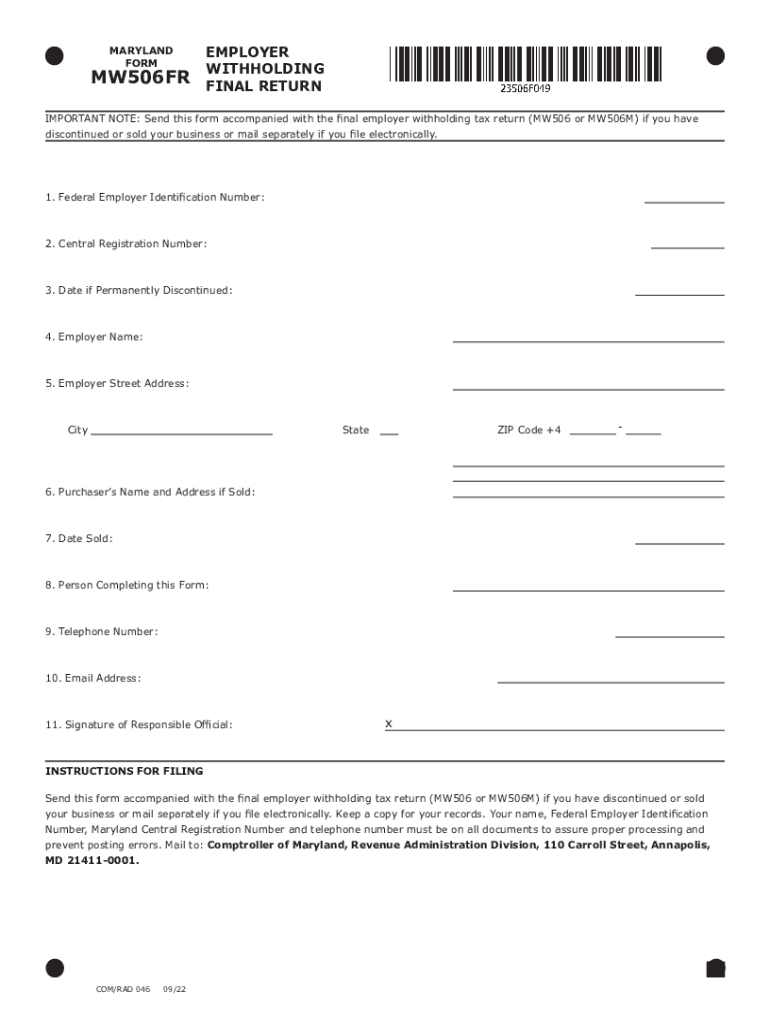
How to use or fill out Withholding Tax Forms - West Virginia Tax Division with our platform

- Click ‘Get Form’ to open it in the editor.
- Begin by entering your Federal Employer Identification Number in the designated field. This is crucial for identification purposes.
- Next, input your Central Registration Number. This number helps in tracking your business registration status.
- If your business has been permanently discontinued, provide the date in the specified section.
- Fill in your Employer Name and Street Address, ensuring all details are accurate for correspondence.
- Complete the City, State, and ZIP Code +4 fields to finalize your address information.
- If applicable, enter the Purchaser’s Name and Address if you have sold your business.
- Indicate the Date Sold to maintain a clear record of transactions.
- Provide the name of the person completing this form along with their Telephone Number and Email Address for follow-up inquiries.
- Finally, ensure that a responsible official signs the form before submission to validate it.
Start using our platform today to fill out your Withholding Tax Forms easily and for free!
Fill out Withholding Tax Forms - West Virginia Tax Division online
It's free
It's free
See more Withholding Tax Forms - West Virginia Tax Division versions
We've got more versions of the Withholding Tax Forms - West Virginia Tax Division form. Select the right Withholding Tax Forms - West Virginia Tax Division version from the list and start editing it straight away!
Got questions?
We have answers to the most popular questions from our customers. If you can't find an answer to your question, please contact us.
Contact us
What form do I need for tax withholding?
Complete Form W-4 so that your employer can withhold the correct federal income tax from your pay.
How to properly fill out a tax withholding form?
Note: The W-4 form 2024 steps are the same as the W-4 form 2025 steps. Step 1: Enter your personal information. Step 2: Account for all jobs you and your spouse have. Step 3: Claim your children and other dependents. Step 4: Make other adjustments. Step 5: Sign and date your form.
How to get the withholding tax?
How to Compute Withholding Tax on Compensation (Step-By-Step Guide) Start with the Gross Taxable Salary. Calculate and Deduct the Statutory Contributions. Apply the Withholding Tax Table and Compute the Tax. Deduct the Withholding Tax. File the BIR Return and Remit the Withholding Tax.
How to print a withholding certificate?
To reprint your withholding certificate, login to iTax Select certificates Select reprint withholding certificates Consult Click on certificate number to reprint.
How to get a withholding certificate?
Withholding Tax payment After successfully remitting the deducted amount to KRA, a Withholding Certificate shall be sent to the email registered on iTax by the taxpayer.
Security and compliance
At DocHub, your data security is our priority. We follow HIPAA, SOC2, GDPR, and other standards, so you can work on your documents with confidence.
Learn more


People also ask
What is a WV IT 104 form?
TAX DIVISION. WV IT-104. Employees Withholding. Exemption Certificate. Complete this form and present it to your employer to avoid any delay in adjusting the amount of state income tax to be withheld from your wages.
Where can I get a withholding certificate?
Payment of withholding tax is done online via iTax by generating a payment slip and presenting it at any of the appointed KRA banks to pay the tax due. After successfully remitting the deducted amount to KRA, a Withholding Certificate shall be sent to the email registered on iTax by the taxpayer.
What is a WHT certificate?
Withholding tax certificates specify withholding tax rate exceptions that are granted by a tax authority. You can define withholding tax rate exceptions for all invoices of a supplier site or for specific invoices of that site. A tax can have one or more certificates.