Type text, add images, blackout confidential details, add comments, highlights and more.
02. Sign it in a few clicks
Draw your signature, type it, upload its image, or use your mobile device as a signature pad.
03. Share your form with others
Send tax exempt form ny via email, link, or fax. You can also download it, export it or print it out.
How to use or fill out tax exempt form with our platform
Ease of Setup
DocHub User Ratings on G2
Ease of Use
DocHub User Ratings on G2
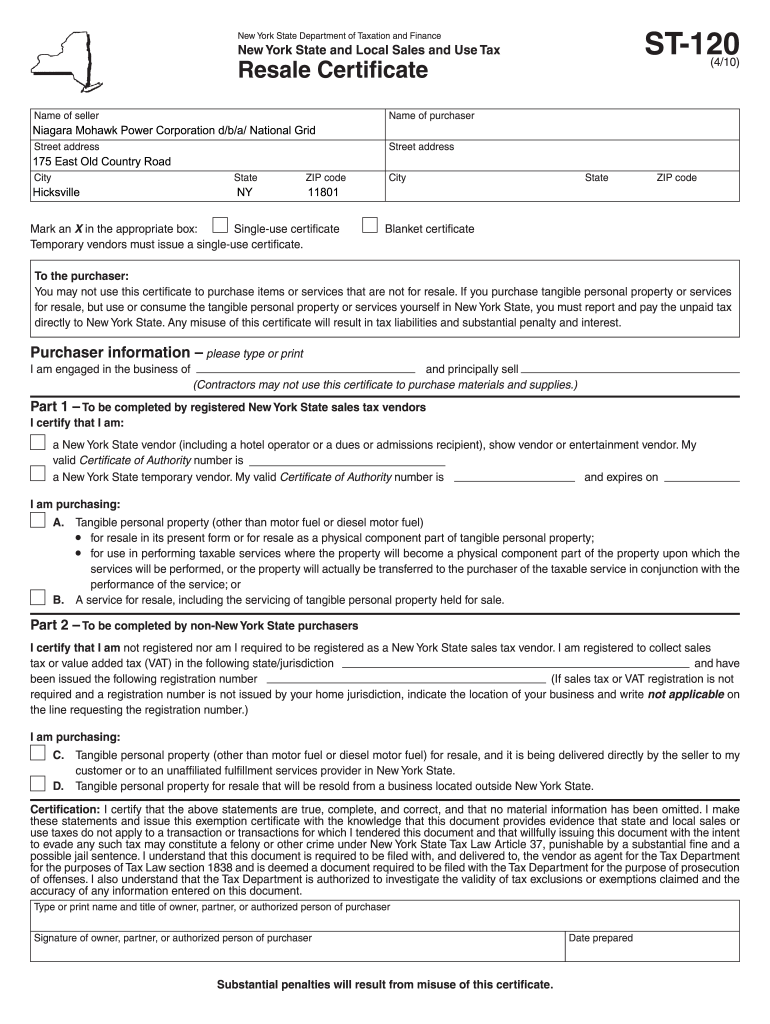
Click ‘Get Form’ to open the tax exempt form in the editor.
Begin by entering the seller's name and address in the designated fields. Ensure accuracy as this information is crucial for validation.
Next, fill in the purchaser's details, including their name, address, and business type. This section helps establish the legitimacy of the exemption claim.
Mark an 'X' in either the Single-use or Blanket certificate box based on your purchasing needs. A Single-use certificate is for one-time purchases, while a Blanket certificate covers multiple transactions.
Complete Part 1 if you are a registered New York State vendor, providing your Certificate of Authority number and specifying what you are purchasing.
If you are a non-New York State purchaser, fill out Part 2 with your registration details from your home jurisdiction.
Finally, certify that all information is true by signing and dating the form at the bottom before submitting it to the seller.
Start using our platform today to easily complete your tax exempt form online for free!
tax exempt form near ballwin, motax exempt form near st. louis, moTax exempt form pdfTax exempt Form MissouriMissouri Tax exempt Form pdfSales tax exempt formFederal tax exempt FormTax exempt form for business
Security and compliance
At DocHub, your data security is our priority. We follow HIPAA, SOC2, GDPR, and other standards, so you can work on your documents with confidence.
Cookie consent notice
This site uses cookies to enhance site navigation and personalize your experience.
By using this site you agree to our use of cookies as described in our Privacy Notice.
You can modify your selections by visiting our Cookie and Advertising Notice.