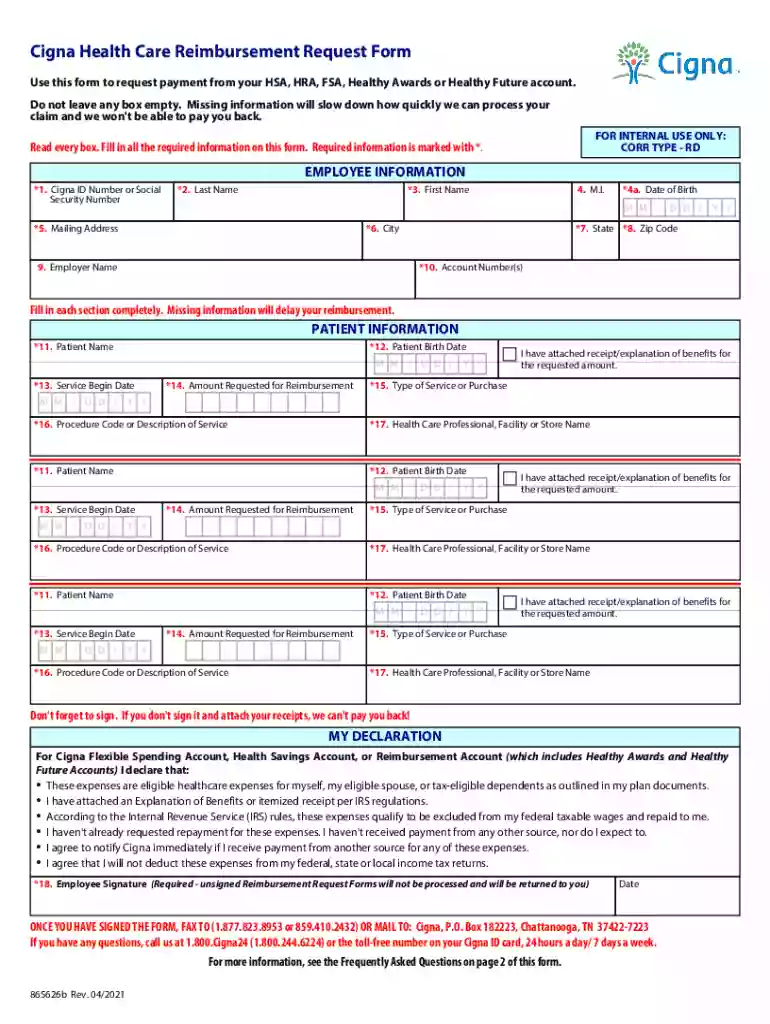
865625b Cigna HSA, HRA, and FSA Reimbursement Request Form. 865625b Interactive 2026

Get Form
cigna hsa reimbursement form Preview on Page 1

Here's how it works

01. Edit your cigna hsa reimbursement form online
Type text, add images, blackout confidential details, add comments, highlights and more.

02. Sign it in a few clicks
Draw your signature, type it, upload its image, or use your mobile device as a signature pad.

03. Share your form with others
Send cigna hsa reimbursement via email, link, or fax. You can also download it, export it or print it out.

How to use or fill out 865625b Cigna HSA, HRA, and FSA Reimbursement Request Form. 865625b Interactive

Form edit decoration
9.5
Ease of Setup
DocHub User Ratings on G2
9.0
Ease of Use
DocHub User Ratings on G2
  1. Click ‘Get Form’ to open it in the editor.
  2. Begin by entering your Employee Information. Fill in your Cigna ID Number or Social Security Number, Last Name, First Name, Date of Birth, and Mailing Address. Ensure all fields marked with an asterisk (*) are completed.
  3. Next, provide Patient Information. Enter the Patient's Name, Birth Date, Service Begin Date, and the Amount Requested for Reimbursement. Attach any necessary receipts or Explanation of Benefits.
  4. In the Type of Service or Purchase section, specify what services were rendered. Include Procedure Code or Description of Service and the name of the Health Care Professional or Facility.
  5. Finally, sign and date the form in Box 18. Remember that unsigned forms will not be processed.

Start using our platform today to streamline your reimbursement process effortlessly!

See more 865625b Cigna HSA, HRA, and FSA Reimbursement Request Form. 865625b Interactive versions

We've got more versions of the 865625b Cigna HSA, HRA, and FSA Reimbursement Request Form. 865625b Interactive form. Select the right 865625b Cigna HSA, HRA, and FSA Reimbursement Request Form. 865625b Interactive version from the list and start editing it straight away!
Versions Form popularity Fillable & printable
2021 4.6 Satisfied (35 Votes)
2011 4 Satisfied (28 Votes)
be ready to get more

Complete this form in 5 minutes or less

Get form

Got questions?

We have answers to the most popular questions from our customers. If you can't find an answer to your question, please contact us.
Contact us
At the start of the plan year, your employer deposits a specific dollar amount into an HRA. Your HRA will be used to pay 100% of your eligible health care expenses until the money is used up. The money used from your HRA counts toward your deductible, reducing your share.
Online Submission Log in to the FSAFEDS app using the same username and password as your online account. Select whether to submit a claim or pay a provider. Follow the prompts to enter claims details. Take photos of your itemized receipts (and other documentation if needed) or upload from your mobile device.
be ready to get more

Complete this form in 5 minutes or less

Get form