Authorized-Representative-Request-Form. Accessible PDF 2026

Get Form
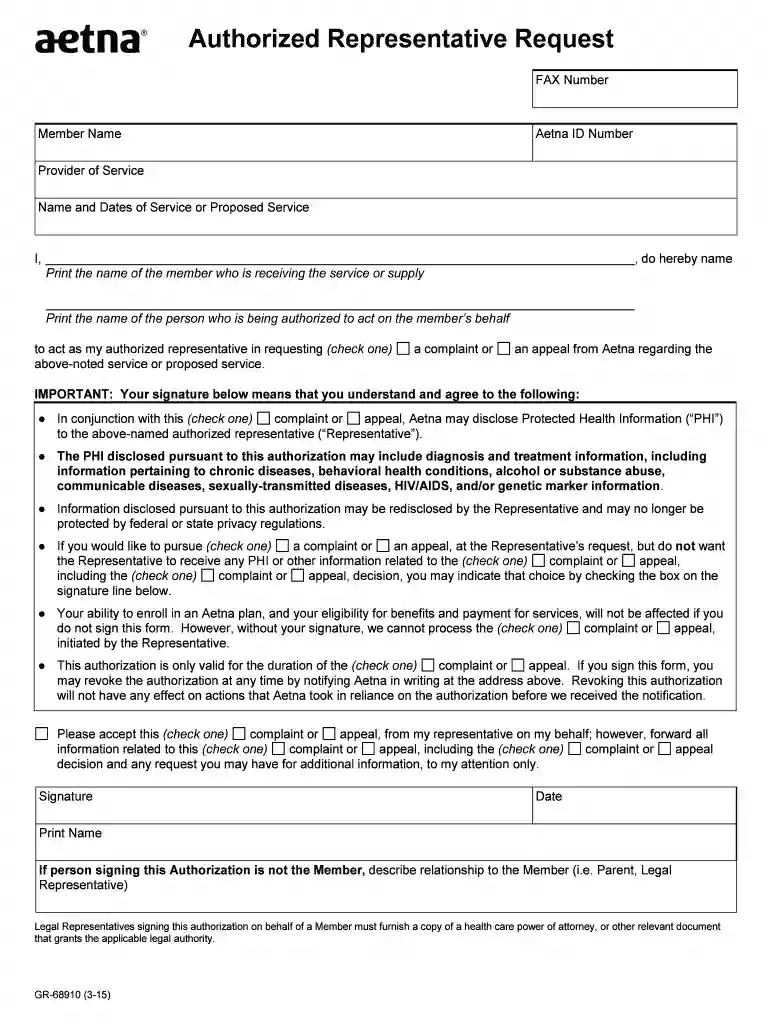
authorized representative request Preview on Page 1

Here's how it works

01. Edit your authorized representative request online
Type text, add images, blackout confidential details, add comments, highlights and more.

02. Sign it in a few clicks
Draw your signature, type it, upload its image, or use your mobile device as a signature pad.

03. Share your form with others
Send it via email, link, or fax. You can also download it, export it or print it out.

How to use or fill out Authorized-Representative-Request-Form. Accessible PDF

Form edit decoration
9.5
Ease of Setup
DocHub User Ratings on G2
9.0
Ease of Use
DocHub User Ratings on G2
  1. Click ‘Get Form’ to open it in the editor.
  2. Begin by entering the FAX Number and Member Name at the top of the form. Ensure that the Aetna ID Number is accurately filled in for identification purposes.
  3. In the 'Provider of Service' section, specify the name of the service provider along with the relevant dates of service or proposed service.
  4. Clearly print your name in the designated area to authorize someone to act on your behalf. This person will be referred to as your authorized representative.
  5. Select whether you are requesting a complaint or an appeal by checking the appropriate box.
  6. Review and check any boxes regarding disclosure of Protected Health Information (PHI) as per your preferences, ensuring you understand what information may be shared.
  7. Sign and date the form at the bottom, and if applicable, indicate your relationship to the member if you are not signing as them.

Start using our platform today to easily complete your Authorized Representative Request Form for free!

See more Authorized-Representative-Request-Form. Accessible PDF versions

We've got more versions of the Authorized-Representative-Request-Form. Accessible PDF form. Select the right Authorized-Representative-Request-Form. Accessible PDF version from the list and start editing it straight away!
Versions Form popularity Fillable & printable
2015 4.7 Satisfied (54 Votes)
2013 4 Satisfied (31 Votes)
be ready to get more

Complete this form in 5 minutes or less

Get form

Got questions?

We have answers to the most popular questions from our customers. If you can't find an answer to your question, please contact us.
Contact us
How to create fillable PDF files: Open Acrobat: Click on the Tools tab and select Prepare Form. Select a file or scan a document: Acrobat will automatically analyze your document and add form fields. Add new form fields: Use the top toolbar and adjust the layout using tools in the right pane. Save your fillable PDF:
1:57 13:30 And the checkbox. Areas it was able to accurately. Apply these form fields to my document.MoreAnd the checkbox. Areas it was able to accurately. Apply these form fields to my document.
Appointment of Authorized Representative Use this form to appoint an individual or organization as your Medi-Cal authorized representative. Your authorized representative may act for you on all duties related to your Medi-Cal eligibility and enrollment. Or, you may also limit duties.
For help you may press the F1 key while viewing a form. button in the upper right hand corner of the menu bar of the PDF form. After clicking this button the Fillable Fields within the form will be highlighted in a light blue color which will allow you to enter your information within these fields.
How to create a fillable PDF. Open Acrobat. Select a file or scan a document. Add new form fields. To change existing text boxes or images, click Edit in the toolbar. Save your fillable PDF.

Security and compliance

At DocHub, your data security is our priority. We follow HIPAA, SOC2, GDPR, and other standards, so you can work on your documents with confidence.

Learn more
ccpa2
pci-dss
gdpr-compliance
hipaa
soc-compliance

People also ask

Getting the basics right and making sure a form is properly tagged and the reading order is correct can go a long way to making it as accessible as possible. Its sometimes a good idea to use the Accessibility Tools Autotag Document option as the first step to making a PDF more accessible.

Related links