Type text, add images, blackout confidential details, add comments, highlights and more.
02. Sign it in a few clicks
Draw your signature, type it, upload its image, or use your mobile device as a signature pad.
03. Share your form with others
Send form 13 nebraska via email, link, or fax. You can also download it, export it or print it out.
How to use or fill out form 13 Nebraska with our platform
Ease of Setup
DocHub User Ratings on G2
Ease of Use
DocHub User Ratings on G2
Click ‘Get Form’ to open it in the editor.
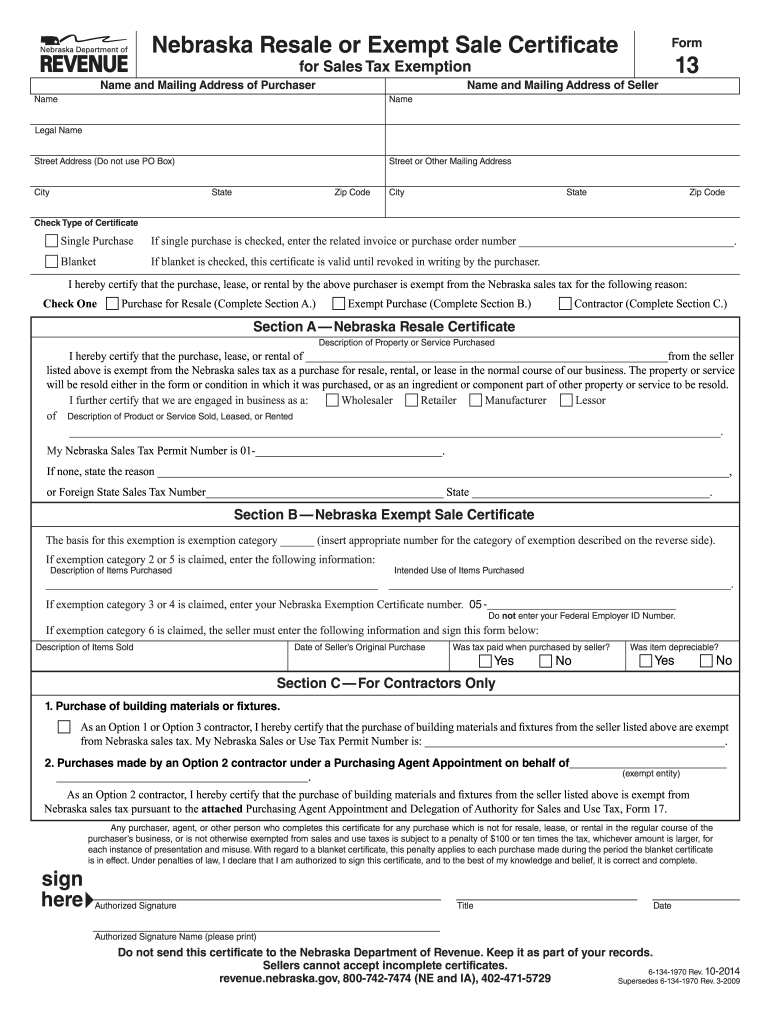
Begin by entering the name and mailing address of both the purchaser and seller in the designated fields. Ensure accuracy to avoid any issues.
Select the type of certificate you are issuing: either 'Single Purchase' or 'Blanket'. If you choose 'Blanket', remember that it remains valid until revoked in writing.
In Section A, if claiming a resale exemption, provide a description of the item or service purchased and your Nebraska Sales Tax Permit Number. If none, state the reason.
For Section B, indicate the exemption category and provide necessary details about intended use and description of items purchased.
If completing Section C for contractors, certify your tax-free purchases by providing your permit number and any relevant details regarding building materials.
Finally, ensure an authorized signature is included along with the date before submitting the form to the seller.
Start using our platform today for free to streamline your form completion process!
Printable form 13 nebraskaForm 13 nebraska instructionsHow to fill out form 13 nebraskaNebraska Form 13 AgricultureForm 17 NebraskaForm 13 nebraska pdfForm 13 nebraska onlineTax Exempt Form Nebraska
Security and compliance
At DocHub, your data security is our priority. We follow HIPAA, SOC2, GDPR, and other standards, so you can work on your documents with confidence.
As a result, there is no direct information available on the 13C of EDB or 1,2-DCA originally released in leaded motor fuel. Five samples of modern leadedRead more
Form 13, Section B, may be completed and issued by governmental units or organizations that are exempt from paying Nebraska sales and use taxes. See this listRead more
Cookie consent notice
This site uses cookies to enhance site navigation and personalize your experience.
By using this site you agree to our use of cookies as described in our Privacy Notice.
You can modify your selections by visiting our Cookie and Advertising Notice.