Type text, add images, blackout confidential details, add comments, highlights and more.
02. Sign it in a few clicks
Draw your signature, type it, upload its image, or use your mobile device as a signature pad.
03. Share your form with others
Send ltc 100 via email, link, or fax. You can also download it, export it or print it out.
How to use or fill out ltc 100 form with our platform
Ease of Setup
DocHub User Ratings on G2
Ease of Use
DocHub User Ratings on G2
Click ‘Get Form’ to open the ltc 100 form in the editor.
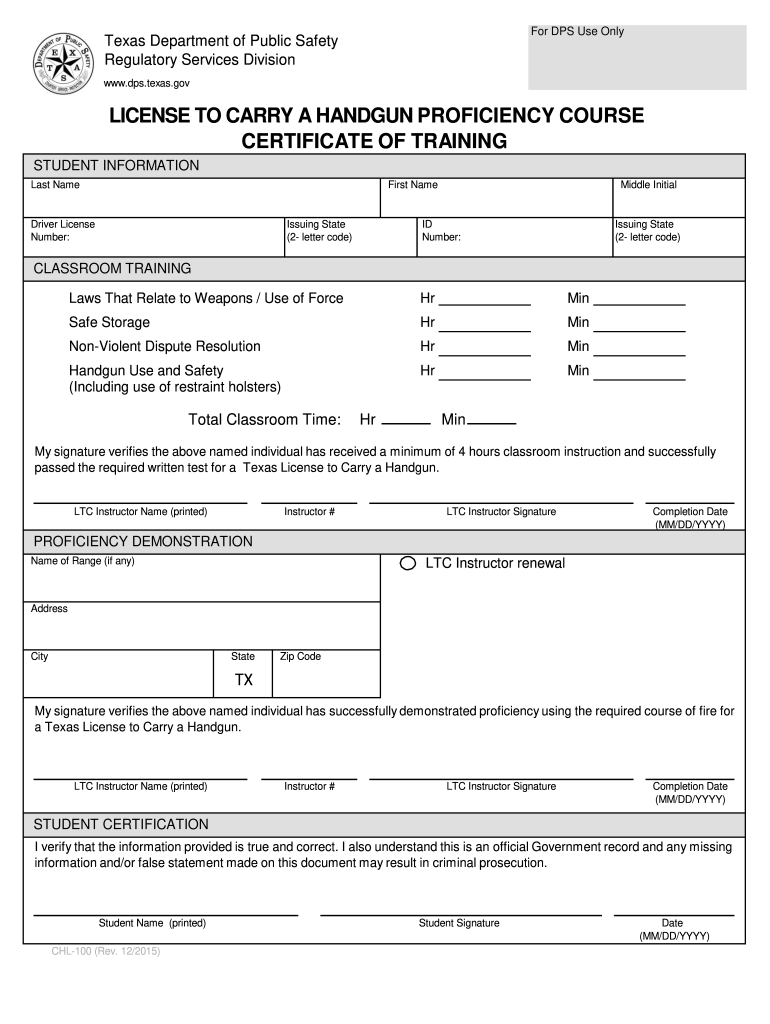
Begin by filling in your personal information in the 'STUDENT INFORMATION' section. Enter your last name, first name, middle initial, driver license number, and issuing state code.
Complete the 'CLASSROOM TRAINING' section by entering the hours and minutes for each training category: Laws That Relate to Weapons, Safe Storage, Non-Violent Dispute Resolution, and Handgun Use and Safety. Ensure that the total classroom time is accurately calculated.
In the 'PROFICIENCY DEMONSTRATION' section, provide details about the range used (if applicable), including its name and address. Fill in the LTC instructor's name, instructor number, signature, and completion date.
Finally, complete the 'STUDENT CERTIFICATION' section by printing your name, signing it, and entering today's date. This certifies that all provided information is true.
Start using our platform today to fill out your ltc 100 form online for free!
The circuit features feedback without an opto-isolator, programmable load regulation compensation, input under voltage lockout and short circuit cyclingRead more
THIRD PARTY BILLING AGREEMENT FORM. The Third Party Billing Agreement Form must be submitted to the Registration Office at the time of Registration.Read more
Cookie consent notice
This site uses cookies to enhance site navigation and personalize your experience.
By using this site you agree to our use of cookies as described in our Privacy Notice.
You can modify your selections by visiting our Cookie and Advertising Notice.