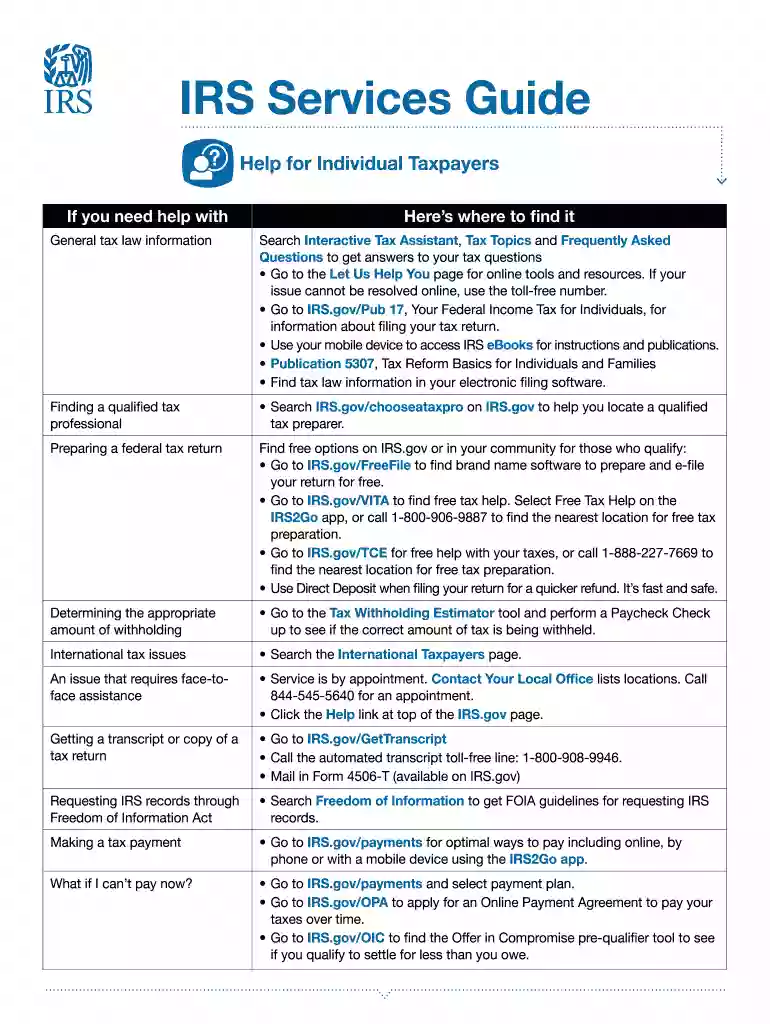
Irs guide form 2026

Get Form
irs guide form Preview on Page 1

Here's how it works

01. Edit your irs guide form online
Type text, add images, blackout confidential details, add comments, highlights and more.

02. Sign it in a few clicks
Draw your signature, type it, upload its image, or use your mobile device as a signature pad.

03. Share your form with others
Send 5136 via email, link, or fax. You can also download it, export it or print it out.

How to use or fill out IRS Guide Form with our platform

Form edit decoration
9.5
Ease of Setup
DocHub User Ratings on G2
9.0
Ease of Use
DocHub User Ratings on G2
  1. Click ‘Get Form’ to open it in the editor.
  2. Begin by reviewing the sections outlined in the form. Each section addresses different taxpayer needs, such as general tax law information and finding a qualified tax professional.
  3. Fill out your personal information in the designated fields. Ensure accuracy to avoid delays in processing.
  4. Utilize the interactive tools mentioned, like the Tax Withholding Estimator, by clicking on relevant links provided within the form for guidance.
  5. For any inquiries regarding payments or refunds, navigate to those specific sections and follow the prompts to access online resources or contact information.
  6. Once completed, review all entries for correctness before saving or exporting your filled form directly from our platform.

Start using our platform today for free to streamline your IRS guide form completion!

See more irs guide form versions

We've got more versions of the irs guide form form. Select the right irs guide form version from the list and start editing it straight away!
Versions Form popularity Fillable & printable
2020 4.8 Satisfied (113 Votes)
be ready to get more

Complete this form in 5 minutes or less

Get form

Got questions?

We have answers to the most popular questions from our customers. If you can't find an answer to your question, please contact us.
Contact us

Managing your documentation with DocHub this way is extremely easy after you have downloaded its extension for Google Chrome. Navigate to the Chrome Web Store and set up DocHub - Sign PDF from Gmail to obtain it. Give our tool access to your Google account, and then open an email containing 5136 template as an attachment and point to the file with your cursor - the DocHub extension button will automatically show up there. Click on it to open your file in our editor. Make any required edits, complete the blanks, and click Sign to create your legally-binding eSignature.

You can easily edit and complete your services guide on any iOS gadget. Open an internet browser of your choice, go to the DocHub site, authorize or create a new account, add your file for editing, and make your required alterations. Our service is mobile-friendly, so utilizing its functions on your smartphone will be a no-brainer, even on the first try.

Need to find a product or place a telephone order? Visit the Forms, instructions publications page to download products or call 800-829-3676 to place your order.
Initially included in the American Rescue Plan Act of 2021, the lower 1099-K threshold was meant to close tax gaps by flagging more digital income. It required platforms to report any user earning $600 or more, regardless of how many transactions they had.
Avoid These Common Tax Mistakes Not Claiming All of Your Credits and Deductions. Not Being Aware of Tax Considerations for the Military. Not Keeping Up with Your Paperwork. Not Double Checking Your Forms for Errors. Not Adhering to Filing Deadlines or Not Filing at All. Not Fixing Past Mistakes. Not Planning for Next Year.

Security and compliance

At DocHub, your data security is our priority. We follow HIPAA, SOC2, GDPR, and other standards, so you can work on your documents with confidence.

Learn more
ccpa2
pci-dss
gdpr-compliance
hipaa
soc-compliance
be ready to get more

Complete this form in 5 minutes or less

Get form

People also ask

While a $10,000 tax refund might sound like a dream, its achievable in certain situations. This typically happens when youve docHubly overpaid taxes throughout the year or qualify for substantial tax credits. The key is understanding which credits and deductions youre eligible for.
Form 1040-SR is available as an optional alternative to using Form 1040 for taxpayers who are age 65 or older. Form 1040-SR uses the same schedules and instructions as Form 1040 does.
The 10 Most Overlooked Tax Deductions State sales taxes. Reinvested dividends. Out-of-pocket charitable contributions. Student loan interest paid by you or someone else. Moving expenses. Child and Dependent Care Credit. Earned Income Tax Credit (EITC) State tax you paid last spring.
Read below for some of the most common tax mistakes and learn how to avoid making them when you file. Filing past the deadline. Forgetting to file quarterly estimated taxes. Leaving out (or messing up) essential information. Failing to double-check your math. Missing out on a potential tax break.
It required platforms to report any user earning $600 or more, regardless of how many transactions they had. The IRS delayed enforcement due to massive backlash: Taxpayer confusion over casual payments vs. taxable income.

5136 form