Internal revenue service application 2026

Get Form
internal revenue service application Preview on Page 1

Here's how it works

01. Edit your form online
Type text, add images, blackout confidential details, add comments, highlights and more.
02. Sign it in a few clicks
Draw your signature, type it, upload its image, or use your mobile device as a signature pad.
03. Share your form with others
Send it via email, link, or fax. You can also download it, export it or print it out.

How to use or fill out internal revenue service application with our platform

Form edit decoration
9.5
Ease of Setup
DocHub User Ratings on G2
9.0
Ease of Use
DocHub User Ratings on G2
  1. Click ‘Get Form’ to open the internal revenue service application in the editor.
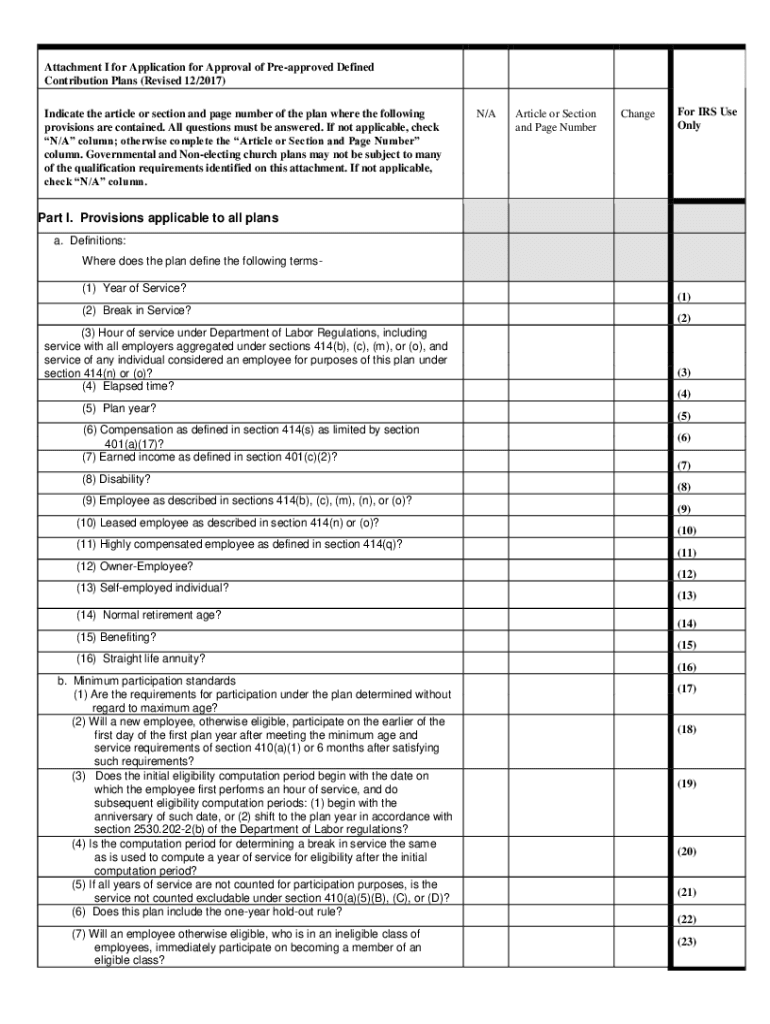
  2. Begin by filling out Part I, which includes definitions. Locate each term such as 'Year of Service' and provide the corresponding article or section and page number from your plan document.
  3. Proceed to minimum participation standards. Answer questions regarding eligibility requirements without regard to maximum age, ensuring you check 'N/A' for any non-applicable items.
  4. In the employer contributions section, indicate whether contributions are determined under a definite formula. Ensure all fields are completed accurately.
  5. Continue through sections on employee contributions, forfeiture provisions, and distribution provisions, providing detailed responses as required.
  6. Review your entries for accuracy before submitting. Utilize our platform's features to save your progress and make edits as needed.

Start using our platform today for free to streamline your IRS application process!

See more internal revenue service application versions

We've got more versions of the internal revenue service application form. Select the right internal revenue service application version from the list and start editing it straight away!
Versions Form popularity Fillable & printable
2017 4.8 Satisfied (174 Votes)
be ready to get more

Complete this form in 5 minutes or less

Get form

Got questions?

We have answers to the most popular questions from our customers. If you can't find an answer to your question, please contact us.
Contact us
The IRS is sending out stimulus checks to taxpayers who did not claim the Recovery Rebate Credit on their 2021 tax return.
For information on the status of your application, go to Wheres My Application on IRS.gov. If you submitted your application before the date indicated on that page and havent been contacted, you can call the toll-free Customer Account Services number at 877-829-5500 Monday through Friday, 8 a.m. - 5p.
Generally, if you were a U.S. citizen or U.S. resident alien in 2021, you were not a dependent of another taxpayer, and you either have a valid SSN or claim a dependent who has a valid SSN or ATIN, you are eligible to claim the 2021 Recovery Rebate Credit.
Securely access your IRS online account to view the total of your first, second and third Economic Impact Payment amounts under the Tax Records page.
To qualify, you must owe $60,000 or less, be current on tax filings, and prove financial hardship. Required forms may include IRS Form 9465 or Form 433-A. Applicants must also stay compliant with future tax obligations. IRS Fresh Start Initiative vs.

Security and compliance

At DocHub, your data security is our priority. We follow HIPAA, SOC2, GDPR, and other standards, so you can work on your documents with confidence.

Learn more
ccpa2
pci-dss
gdpr-compliance
hipaa
soc-compliance

People also ask

The 2021 Recovery Rebate Credit includes up to an additional $1,400 for each qualifying dependent you claim on your 2021 tax return. A qualifying dependent is a dependent who has a valid Social Security number or Adoption Taxpayer Identification Number issued by the IRS.
Individuals with a Social Security number (SSN) who cannot be claimed as a dependent and have an adjusted gross income of less than $75,000 or less than $150,000 if married and filing a joint return qualify for the full EIP amount.
After you apply for an IRS position, you will receive updates to the status of your application on your USAJOBS account. We will also provide those notifications via email. The hiring process can take 2-4 months on average.

Related links