




01. Edit your form online
Type text, add images, blackout confidential details, add comments, highlights and more.

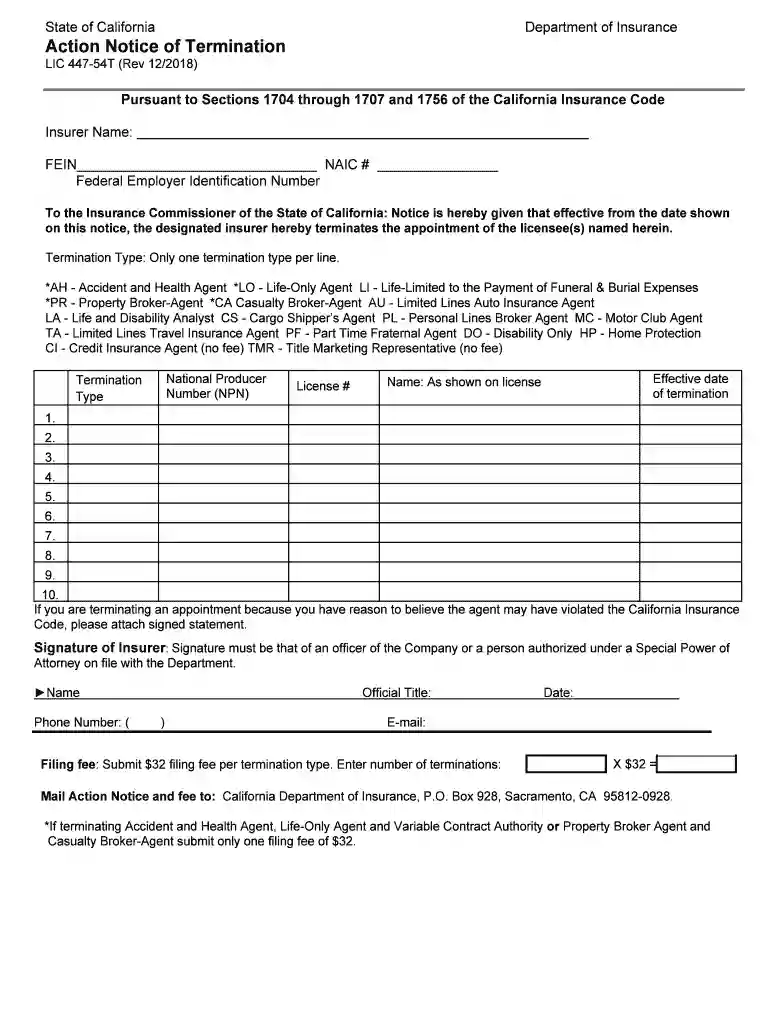
Type text, add images, blackout confidential details, add comments, highlights and more.

Draw your signature, type it, upload its image, or use your mobile device as a signature pad.

Send it via email, link, or fax. You can also download it, export it or print it out.

Start using our platform today to streamline your form completion process for free!
We've got more versions of the LIC 447-54T - California Department of Insurance - State of ... form. Select the right LIC 447-54T - California Department of Insurance - State of ... version from the list and start editing it straight away!
| Versions | Form popularity | Fillable & printable |
|---|---|---|
| 2018 | 4.8 Satisfied (41 Votes) |
Sure, it is possible with DocHub. This trustworthy and compliant online service has a phone-based signing option. When you log in to your DocHub account and import your LIC 447-54T - California Department of Insurance - State of ... to our editor, fill out all necessary areas and utilize the Sign tool on the top barf. Click on Create your signature and select Phone from the available options. Here, you scan a QR code with your smartphone and draw your signature on your phone screen, as you usually do when approving hard copies. If you access DocHub right from your mobile device, you can electronically sign your template by drawing your electronic signature, uploading its picture, or simply with a typed name.
You can easily fill out, modify, and even eSign your LIC 447-54T - California Department of Insurance - State of ... utilizing DocHub. Create a new account and start your free trial. After that, you can add the document with the form and simply make all the required edits. No need to print on paper or use a third-party application to sign it, as you can put your electronic signature on your document quicker via DocHub.
At DocHub, your data security is our priority. We follow HIPAA, SOC2, GDPR, and other standards, so you can work on your documents with confidence.
Report of the Insurance Department of the Comptroller-Generals Office for the Year Ending December 31, 1915 ; Publisher: Atlanta : Franklin Print.Read more
Department of Insurance. Action Notice of Termination. LIC 447-54T (Rev 12/2018). Pursuant to Sections 1704 through 1707 and 1756 of the California InsuranceRead more


